
使用 C# 开发智能手机软件:推箱子(二十二)
时间:2015-07-26 12:42:54
收藏:0
阅读:279
这是“使用 C# 开发智能手机软件:推箱子” 系列文章的第二十二篇。在这篇文章中,介绍 Window/MainForm.Replay.cs 源程序文件。这个源程序文件是 MainForm 类的一部分,该类继承自 System.Windows.Forms.Form 类,表示推箱子的主窗体。而本篇文章讲述的是推箱子“回放”过程,如下图所示:
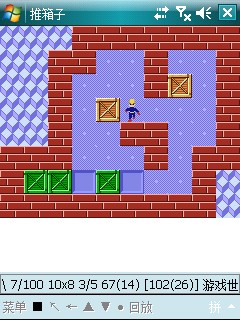
我们先看看 MainForm.Designer.cs 源程序文件(该文件是由 Visual Studio 2005 IDE 自动生成的)中和“回放”相关的部分:
namespace Skyiv.Ben.PushBox.Window
{
partial class MainForm
{
// 注意:省略了很多代码,仅保留和 miReplayOrLand 相关的部分。
private void InitializeComponent()
{
this.miReplayOrLand = new System.Windows.Forms.MenuItem();
this.mnuMain.MenuItems.Add(this.miReplayOrLand);
this.miReplayOrLand.Text = "回放";
this.miReplayOrLand.Click += new System.EventHandler(this.miReplayOrLand_Click);
}
private System.Windows.Forms.MenuItem miReplayOrLand;
}
}
{
partial class MainForm
{
// 注意:省略了很多代码,仅保留和 miReplayOrLand 相关的部分。
private void InitializeComponent()
{
this.miReplayOrLand = new System.Windows.Forms.MenuItem();
this.mnuMain.MenuItems.Add(this.miReplayOrLand);
this.miReplayOrLand.Text = "回放";
this.miReplayOrLand.Click += new System.EventHandler(this.miReplayOrLand_Click);
}
private System.Windows.Forms.MenuItem miReplayOrLand;
}
}
上述代码片断展示了在推箱子游戏的主窗体上点击“回放”时发生的事件:
this.miReplayOrLand.Click += new System.EventHandler(this.miReplayOrLand_Click);
也就是说如果以前使用“录像”功能保存过通关步骤的话,可以通过“回放”功能将该通关步骤重新播放出来。这是由下面的 MainForm.Replay.cs 源程序代码实现的:
1 using System;
2 using System.Drawing;
3 using System.Threading;
4 using Skyiv.Ben.PushBox.Common;
5
6 namespace Skyiv.Ben.PushBox.Window
7 {
8 partial class MainForm
9 {
10 Rectangle workerThreadInvalidRectangle;
11 bool workerThreadIsStop;
12
13 private void miReplayOrLand_Click(object sender, EventArgs e)
14 {
15 if (env.IsDesign)
16 {
17 env.Pen = Block.Land;
18 UpdateStatus();
19 }
20 else
21 {
22 env.IsReplay = true;
23 workerThreadIsStop = false;
24 UpdateStatus();
25 ThreadPool.QueueUserWorkItem(WorkerThreadReplay, env.GetSteps());
26 }
27 }
28
29 /// <summary>
30 /// 回放通关步骤,使用后台工作线程
31 /// </summary>
32 /// <param name="steps">通关步骤</param>
33 private void WorkerThreadReplay(object steps)
34 {
35 try
36 {
37 foreach (char c in (string)steps)
38 {
39 if (workerThreadIsStop) break;
40 if (env.ReplayDelay > 0) Thread.Sleep(env.ReplayDelay);
41 Step step = c;
42 if (!env.StepIt(step.Direct, step.IsStop, out workerThreadInvalidRectangle)) break;
43 Invoke(new EventHandler(WorkerThreadUpdateStatus));
44 }
45 }
46 finally
47 {
48 env.IsReplay = false;
49 Invoke(new EventHandler(WorkerThreadUpdateStatus));
50 }
51 }
52
53 /// <summary>
54 /// 更新主窗体状态
55 /// </summary>
56 /// <param name="sender">事件源</param>
57 /// <param name="e">不包含任何事件数据的事件参数</param>
58 void WorkerThreadUpdateStatus(object sender, EventArgs e)
59 {
60 Invalidate(workerThreadInvalidRectangle);
61 UpdateStatus();
62 }
63 }
64 }
65
66
2 using System.Drawing;
3 using System.Threading;
4 using Skyiv.Ben.PushBox.Common;
5
6 namespace Skyiv.Ben.PushBox.Window
7 {
8 partial class MainForm
9 {
10 Rectangle workerThreadInvalidRectangle;
11 bool workerThreadIsStop;
12
13 private void miReplayOrLand_Click(object sender, EventArgs e)
14 {
15 if (env.IsDesign)
16 {
17 env.Pen = Block.Land;
18 UpdateStatus();
19 }
20 else
21 {
22 env.IsReplay = true;
23 workerThreadIsStop = false;
24 UpdateStatus();
25 ThreadPool.QueueUserWorkItem(WorkerThreadReplay, env.GetSteps());
26 }
27 }
28
29 /// <summary>
30 /// 回放通关步骤,使用后台工作线程
31 /// </summary>
32 /// <param name="steps">通关步骤</param>
33 private void WorkerThreadReplay(object steps)
34 {
35 try
36 {
37 foreach (char c in (string)steps)
38 {
39 if (workerThreadIsStop) break;
40 if (env.ReplayDelay > 0) Thread.Sleep(env.ReplayDelay);
41 Step step = c;
42 if (!env.StepIt(step.Direct, step.IsStop, out workerThreadInvalidRectangle)) break;
43 Invoke(new EventHandler(WorkerThreadUpdateStatus));
44 }
45 }
46 finally
47 {
48 env.IsReplay = false;
49 Invoke(new EventHandler(WorkerThreadUpdateStatus));
50 }
51 }
52
53 /// <summary>
54 /// 更新主窗体状态
55 /// </summary>
56 /// <param name="sender">事件源</param>
57 /// <param name="e">不包含任何事件数据的事件参数</param>
58 void WorkerThreadUpdateStatus(object sender, EventArgs e)
59 {
60 Invalidate(workerThreadInvalidRectangle);
61 UpdateStatus();
62 }
63 }
64 }
65
66
几点说明:
- 因为“回放”是一个长时间的过程,为了防止用户界面失去响应,所以使用了多线程技术,在后台工作线程进行回放。也说是将回放通关步骤的 WorkerThreadReplay 方法加入到线程池中去:ThreadPool.QueueUserWorkItem(WorkerThreadReplay, env.GetSteps());
- workerThreadInvalidRectangle 字段(Rectangle 类型)表明“回放”时主窗体需要更新的矩形区域。该值是由 Env 类的 StepIt 方法设定。
- workerThreadIsStop 字段(bool 类型)指示是否停止回放,初始值为 false。当用户按“停止”按钮时,该字段被设置为 true,从而停止回放。
- miReplayOrLand_Click 方法响应用户的“回放”请求,启动后台“回放”线程。
- WorkerThreadReplay 方法在后台线程执行实际的“回放”动作,她实际上是对已经保存的通关步骤的每一步调用 Env 类的 StepIt 方法来进行“回放”,并通过 Invoke 调用 WorkerThreadUpdateStatus 方法更新主窗体状态。
- WorkerThreadUpdateStatus 方法负责更新主窗体状态。
- 如果在智能手机上进行“回放”,就是不使用后台线程,用户界面也不会失去响应,不知是什么原因。
版权声明:本文为博主http://www.zuiniusn.com原创文章,未经博主允许不得转载。
原文:http://blog.csdn.net/u013948190/article/details/47066553
评论(0)