
maven
时间:2014-01-19 15:51:07
收藏:0
阅读:359
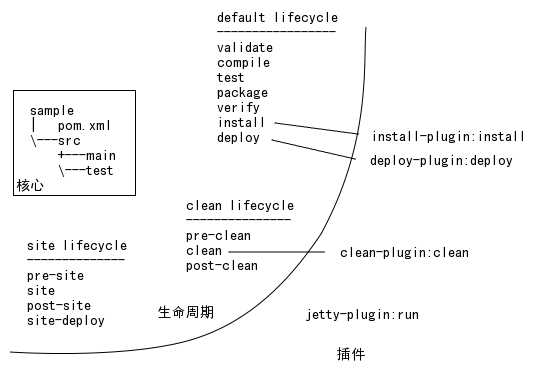
maven的定义:项目生命周期的管理,基于plugin的开源工具。
- maven的生命周期
- 各个周期的定义:如compile、test、deploy等
- 每个生命周期指定一个或多个plugin
- 各个周期的定义:如compile、test、deploy等
- POM
- 项目基本信息
- groupId、artifactid、version、packaging
- 项目基本信息
- dependencies、dependencyManagement
- dependencyManagement管理项目的依赖指定,特别是多个子项目的共同依赖的管理
- dependencies:具体依赖的管理
- parent
- 父pom的依赖说明
- modules
- 多模块工程中用于各个子模块的说明。
- properties
- name-value值对的特殊说明,常用于多处地方同时使用时,在一个地方指定,便于修改和查看。
- groupId、artifactid、version、packaging
- 构建settings设置
- build标签
- 构建时属性的指定
- 可以指定:
- goal:构建生命周期
- resources:路径指定或包含的文件指定,需要特殊说明时使用
- test-resources:测试类文件或路径指定,需要特殊说明时使用
- filters:过滤器,用于特殊的配置文件等的说明。
- plugins:插件配置。用于指定该build使用的plugin,否则使用默认。各个插件配置时除了指定groupid、artifactid、version外,还需要指定特殊的参数,可以见maven官网的插件列表,进行使用。packaging等的说明。
- 对execution的特殊说明:
-
123456789101112131415
<executions> <!-- 配置插件在哪个阶段使用 --><execution><id>echodir</id><goals><goal>run</goal></goals><phase>verify</phase><inherited>false</inherited><configuration><tasks><echo>Build Dir: ${project.build.directory}</echo></tasks></configuration></execution></executions>
- extension:扩展插件。
- reporting标签
- 生成报告配置项,用于site阶段生成各个报表的配置
-

<reporting>
    <plugins>
      <plugin>
        <outputDirectory>${basedir}/target/site</outputDirectory>
        <artifactId>maven-project-info-reports-plugin</artifactId>
        <reportSets>
          <reportSet></reportSet>
        </reportSets>
      </plugin>
    </plugins>
  </reporting>
多个report使用reportSets:
-
123456789101112131415161718192021
<reporting><plugins><plugin>...<reportSets><reportSet><id>sunlink</id><reports><report>javadoc</report></reports><inherited>true</inherited><configuration><links><link>http://java.sun.com/j2se/1.5.0/docs/api/</link></links></configuration></reportSet></reportSets></plugin></plugins></reporting>
-
- 生成报告配置项,用于site阶段生成各个报表的配置
- build标签
- project meta data
- name
- description
- url
- inceptionYear
- licenses
- organization
- developers
- contributions
- 环境设置
- issueManagement
- ciManagement
- mailingList
- scm
- prerequisites
- repositories
- pluginRepositories
- distributionManagement:发布设置
-
1234567
<distributionManagement><repository><id>proficio-repository</id><name>Proficio Repository</name><url>file://${basedir}/target/deploy</url></repository></distributionManagement>
-
- profiles:类似于settings.xml中的profiles,增加了几个元素,如下的样式:
1234567891011121314<profiles><profile><id>test</id><activation>...</activation><build>...</build><modules>...</modules><repositories>...</repositories><pluginRepositories>...</pluginRepositories><dependencies>...</dependencies><reporting>...</reporting><dependencyManagement>...</dependencyManagement><distributionManagement>...</distributionManagement></profile></profiles>
- 项目基本信息
- settings.xml
- 示例:
-
<settings xmlns="http://maven.apache.org/SETTINGS/1.0.0"
  xmlns:xsi="http://www.w3.org/2001/XMLSchema-instance"
  xsi:schemaLocation="http://maven.apache.org/SETTINGS/1.0.0
                      http://maven.apache.org/xsd/settings-1.0.0.xsd">
  <localRepository/> <!-- 指定本地仓库位置 -->
  <interactiveMode/> <!-- 指定 maven 的运行模式是否为交互模式 -->
  <usePluginRegistry/> <!-- 目前少用,指定插件配置文件 -->
  <offline/> <!-- 指定是否为离线模式,在不需要网络交互的时候使用 -->
  <pluginGroups/> <!-- 指定插件所在的路径,maven 将通过该路径查找插件 -->
  <servers/> <!-- 指定服务器的用户名、密码等,用于上传,下载文件等 -->
  <mirrors/> <!-- 指定 maven 主仓库的镜像 -->
  <proxies/> <!-- 网络代理配置,用于有代理的网络 -->
  <profiles/> <!-- pom.xml 中的 profile 能够用于公共配置的部分 -->
  <activeProfiles/>
</settings>

示例:12345678910111213141516171819202122232425262728293031323334353637383940414243444546474849505152<settings xmlns="http://maven.apache.org/SETTINGS/1.0.0"xsi:schemaLocation="http://maven.apache.org/SETTINGS/1.0.0 http://maven.apache.org/xsd/settings-1.0.0.xsd">...<servers><server> <!-- 设置发布 jar 包时的用户名及密码 --><id>deploymentRepo</id><username>deployment</username><password>deployment123</password></server></servers>...<mirrors><mirror> <!-- 设置 maven 的远程仓库为 nexus --><id>nexus</id><mirrorOf>*</mirrorOf><name>Local Repository</name><url>http://192.168.1.60:8081/nexus/content/groups/public</url></mirror></mirrors>...<profiles>...<profile> <!-- 设置 nexus 的路径等 --><id>nexus</id><repositories><repository><id>central</id><name>localprivatenexus</name><url>http://localhost:8081/nexus/content/groups/public</url><releases><enabled>true</enabled></releases><snapshots><enabled>true</enabled></snapshots></repository></repositories><pluginRepositories><pluginRepository><id>central</id><name>localprivatenexus</name><url>http://localhost:8081/nexus/content/groups/public</url><releases><enabled>true</enabled></releases><snapshots><enabled>true</enabled></snapshots></pluginRepository></pluginRepositories></profile>...</profiles>...<activeProfiles> <!-- 激活 nexus --><activeProfile>nexus</activeProfile></activeProfiles>...</settings>
-
- 示例:
原文:http://www.cnblogs.com/leeying/p/3525775.html
评论(0)