
RHCE7学习笔记5——管理用户和用户组
1、用户和用户组
/etc/passwd 文件记录了所有用户的相关信息
[root@clz ~]# cat /etc/passwd
root:x:0:0:root:/root:/bin/bash
bin:x:1:1:bin:/bin:/sbin/nologin
daemon:x:2:2:daemon:/sbin:/sbin/nologin
每一行代表一个用户信息,从左至右分别代表了:用户名,密码(存储在/etc/shadow,用x表示),UID,GID,用户全称,家目录,shell;
如果要在图形化界面下管理用户与组,需安装包:system-config-users-1.3.5-2.el7.noarch.rpm
如果一个用户的shell指定为/sbin/nologin,此用户成为匿名用户,则此用户无法登陆系统,任何用户也无法切换到它,一般用于系统的服务,基于安全考虑;
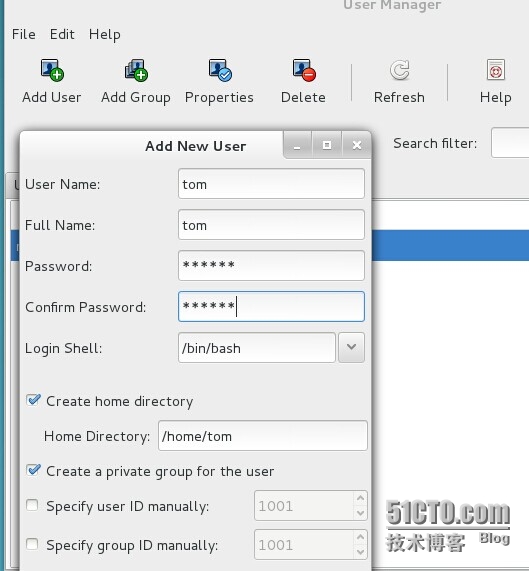
不为用户创建私人组的话,则默认属于user组;
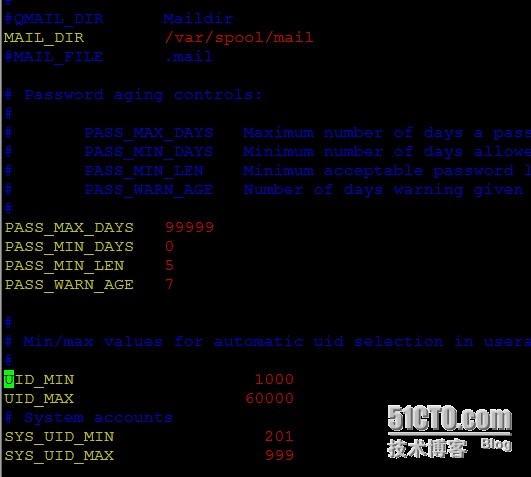
RHEL6的UID 从500开始,RHEL7则是从1000开始;
一个用户如果密码被锁定,则只有root用户可以切换过去;
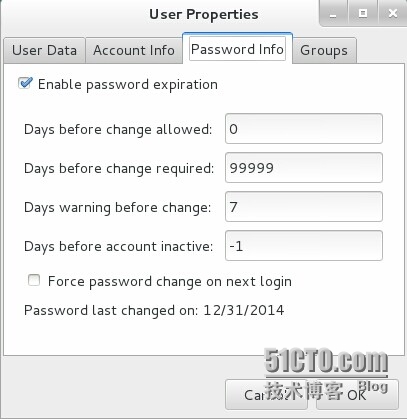
用户密码修改,可以使用passwd和chage来修改对应的账号属性:
[root@clz ~]# passwd --help
Usage: passwd [OPTION...] <accountName>
  -k, --keep-tokens       keep non-expired authentication tokens
  -d, --delete            delete the password for the named account (root only)
  -l, --lock              lock the password for the named account (root only)
  -u, --unlock            unlock the password for the named account (root only)
  -e, --expire            expire the password for the named account (root only)
  -f, --force             force operation
  -x, --maximum=DAYS      maximum password lifetime (root only)密码使用最大天数
  -n, --minimum=DAYS      minimum password lifetime (root only)密码使用最少天数
  -w, --warning=DAYS      number of days warning users receives before password expiration (root only)    密码更换前警告的天数
  -i, --inactive=DAYS     number of days after password expiration when an account becomes disabled (root only)账号被取消激活前的天数,如果该值设置未负值,则表示账号不锁定,但是登陆时一定要修改密码;
  -S, --status            report password status on the named account (root only)
  --stdin                 read new tokens from stdin (root only)
[root@clz ~]# chage --help
Usage: chage [options] LOGIN

Options:
  -d, --lastday LAST_DAY        set date of last password change to LAST_DAY 修改密码的时间戳
  -E, --expiredate EXPIRE_DATE  set account expiration date to EXPIRE_DATE密码过期日期
  -I, --inactive INACTIVE       set password inactive after expiration
                                to INACTIVE 账号被取消激活前的天数
  -m, --mindays MIN_DAYS        set minimum number of days before password
                                change to MIN_DAYS 密码最少使用天数
  -M, --maxdays MAX_DAYS        set maximim number of days before password
                                change to MAX_DAYS密码最大使用天数
  -R, --root CHROOT_DIR         directory to chroot into
  -W, --warndays WARN_DAYS      set expiration warning days to WARN_DAYS密码更换前警告的天数
添加用户:useradd/adduser
[root@clz ~]# useradd --helpOptions:
  -c, --comment COMMENT         GECOS field of the new account 全称
  -d, --home-dir HOME_DIR       home directory of the new account 家目录
  -e, --expiredate EXPIRE_DATE  expiration date of the new account
  -g, --gid GROUP               name or ID of the primary group of the new
                                account 主组
  -G, --groups GROUPS           list of supplementary groups of the new
                                account 子组
  -m, --create-home             create the user‘s home directory
  -M, --no-create-home          do not create the user‘s home directory 不创建用户家目录
  -p, --password PASSWORD        设置密码
  -s, --shell SHELL             login shell of the new account 设置SHELL
  -u, --uid UID                 user ID of the new account 指定UID
创建用户时一般不直接指定-p设置密码,而是在创建用户后,使用echo ‘password‘|passwd --stdin username 设置密码
修改用户属性时,也可以使用usermod,与useradd和chage的选项类似:
[root@clz ~]# usermod --help
  -c, --comment COMMENT         new value of the GECOS field 修改全称
  -d, --home HOME_DIR           new home directory for the user account修改家目录
  -e, --expiredate EXPIRE_DATE  set account expiration date to EXPIRE_DATE
  -f, --inactive INACTIVE       set password inactive after expiration
                                to INACTIVE
  -g, --gid GROUP               force use GROUP as new primary group
  -G, --groups GROUPS           new list of supplementary GROUPS
  -l, --login NEW_LOGIN         new value of the login name
  -L, --lock                    lock the user account
  -m, --move-home               move contents of the home directory to the
                                new location (use only with -d)
  -p, --password PASSWORD       use encrypted password for the new password
  -s, --shell SHELL             new login shell for the user account
  -u, --uid UID                 new UID for the user account
  -U, --unlock                  unlock the user account
手工创建用户的家目录,例如:
当前用户的家目录为:/home/tom
[tom@clz ~]$ pwd
/home/tom
修改用户家目录为:/home/tom1
[root@clz ~]# usermod -d /home/tom1 tom
此时切换到tom用户,因为新的家目录没有创建,会报错:
手工创建家目录:
[root@clz ~]# mkdir /home/tom1
将/etc/skell下面的隐藏文件拷贝到新的家目录:
[root@clz ~]# cp -a /etc/skel/.[^.]* /home/tom1
修改家目录文件的属主属组,之后再切换用户即可:
[root@clz home]# chown tom.tom -R tom1
查看用户属于哪些组,使用groups命令:
[root@clz home]# groups tom
tom : tom
为用户添加多个组:
[root@clz tom1]# usermod -a -G wheel tom
[root@clz tom1]# groups tom
tom : tom wheel
修改用户的主组 usermod -g:
修改删除用户的属组,可以使用gpasswd命令:
[root@clz tom1]# gpasswd --help
  -a, --add USER                add USER to GROUP
  -d, --delete USER             remove USER from GROUP 将用户删除某个组
  -r, --remove-password         remove the GROUP‘s password
  -R, --restrict                restrict access to GROUP to its members
  -M, --members USER,...        set the list of members of GROUP
用户的默认的登陆时间属性在/etc/login.defs
组的管理:userdel删除组,添加组 groupadd
本文出自 “平凡之路” 博客,请务必保留此出处http://linjohn.blog.51cto.com/1026193/1598208
原文:http://linjohn.blog.51cto.com/1026193/1598208