
将自己喜欢的网页保存为单个文件包括图片(mhtml文件)
时间:2021-09-20 15:24:58
收藏:0
阅读:40
from selenium import webdriver

driver = webdriver.Chrome(r‘C:\chromedriver_win32\chromedriver.exe‘)
driver.get(‘https://baike.baidu.com/item/宇宙/31801‘)

# 1. 执行 Chome 开发工具命令,得到mhtml内容
res = driver.execute_cdp_cmd(‘Page.captureSnapshot‘, {})

# 2. 写入文件
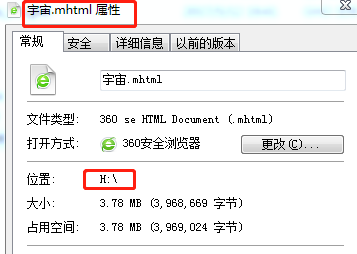
with open(‘H:\宇宙.mhtml‘, ‘w‘, newline=‘‘) as f:   # 根据5楼的评论,添加newline=‘‘
    f.write(res[‘data‘])
执行程序,打开谷歌,访问“宇宙”百度百科词条页面,保存文件。关闭浏览器
效果:

原文:https://www.cnblogs.com/machangwei-8/p/15312376.html
评论(0)