
Java常用类之Date类
一、JDK8之前的日期API
1.1 java.lang.System类
System类提供的public static long currentTimeMillis()用来返回当前时间与1970年1月1日0时0分0秒之间以毫秒为单位的时间差。
此方法适于计算时间差
//1.System类中的currentTimeMillis()
@Test
public void test1(){
    long time = System.currentTimeMillis();
    System.out.println(time);
}
1.2 java.util.Date类
表示特定的瞬间,精确到毫秒。
util与sql下的Date类为父子关系:
java.util.Date类
|---java.sql.Date类
-
两个构造器的使用
构造器一:Date():创建一个对应当前时间的Date对象
构造器二:Date(long date):创建指定毫秒数的Date对象 -
两个方法的使用
方法 作用 toString() 显示当前的年、月、日、时、分、秒 getTime() 获取当前Date对象对应的毫秒数。(时间戳) @Test public void test2(){ //构造器一:Date():创建一个对应当前时间的Date对象 Date date1 = new Date(); System.out.println(date1.toString());//Sat Feb 16 16:35:31 GMT+08:00 2019 System.out.println(date1.getTime());//1550306204104 //构造器二:创建指定毫秒数的Date对象 Date date2 = new Date(155030620410L); System.out.println(date2.toString());//Sat Feb 16 16:35:31 GMT+08:00 2019 } -
java.sql.Date对应着数据库中的日期类型的变量
① 如何实例化
只有一个构造器:Date(long date):创建指定毫秒数的Date对象
② 如何将java.sql.Date对象转换为java.util.Date对象(直接赋值-->多态)
② 如何将java.util.Date对象转换为java.sql.Date对象
@Test
public void test3(){
    //①创建java.sql.Date对象
    java.sql.Date date3 = new java.sql.Date(35235325345L);
    System.out.println(date3);//1971-02-13


    //③如何将java.util.Date对象转换为java.sql.Date对象
    //情况一:
    //②将java.sql.Date对象转换为java.util.Date对象(直接赋值-->多态)
	Date date4 = new java.sql.Date(2343243242323L);
    //强转
	java.sql.Date date5 = (java.sql.Date) date4;

    //情况二:
    Date date6 = new Date();
    java.sql.Date date7 = new java.sql.Date(date6.getTime());
}
1.3 java.text.SimpleDateFormat类
Date类的API不易于国际化,大部分被废弃了,java.text.SimpleDateFormat类是一个不与语言环境有关的方式来格式化和解析日期的具体类。
-
两个操作
① 格式化:日期-->字符串
② 解析:字符串-->日期
-
SimpleDateFormat的实例化
@Test
public void testSimpleDateFormat() throws ParseException {
    //实例化SimpleDateFormat:使用默认的构造器
    SimpleDateFormat sdf = new SimpleDateFormat();

    //格式化:日期 --->字符串
    Date date = new Date();
    System.out.println(date);//Mon Feb 18 11:43:01 GMT+08:00 2019

    String format = sdf.format(date);
    System.out.println(format);//19-2-18 上午11:43

    //解析:格式化的逆过程,字符串 ---> 日期
    String str = "19-2-18 上午11:43";
    Date date1 = sdf.parse(str);
    System.out.println(date1);////Mon Feb 18 11:43:01 GMT+08:00 2019
}
一些格式化的构造器:
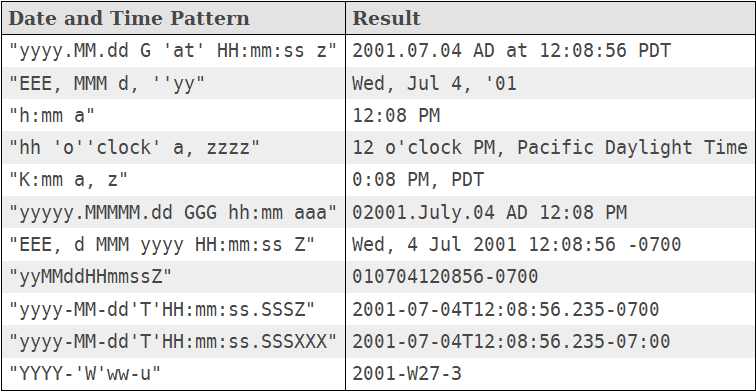
开发中常用这种:
@Test
public void testSimpleDateFormat() throws ParseException {
    //开发中常用此种构造器
    SimpleDateFormat sdf1 = new SimpleDateFormat("yyyy-MM-dd hh:mm:ss");

    //格式化
    Date date = new Date();
    String format1 = sdf1.format(date);
    System.out.println(format1);//2019-02-18 11:48:27

    //解析:要求字符串必须是符合SimpleDateFormat识别的格式(通过构造器参数体现),
    //否则,抛异常
    Date date2 = sdf1.parse("2019-02-18 11:48:27");
    System.out.println(date2);//Mon Feb 18 11:48:27 GMT+08:00 2019
}
练习题:"三天打渔两天晒网" 输入一个日期 计算从1990-01-01开始 打渔?晒网?
import java.text.ParseException;
import java.text.SimpleDateFormat;
import java.util.Date;
import java.util.Scanner;

public class DateTest {
	public static void main(String[] args) throws ParseException {
		Scanner scanner = new Scanner(System.in);
		SimpleDateFormat sdf = new SimpleDateFormat("yyyy-MM-dd");
		System.out.println("请输入一个日期:");
		Date date2 = sdf.parse(scanner.nextLine());
		Date date1 = sdf.parse("1990-01-01");

		long sumDay = (date2.getTime() - date1.getTime()) / (1000 * 60 * 60 * 24) + 1;
		System.out.println(sumDay);
		if (sumDay % 5 == 4 | sumDay % 5 == 0) {
			System.out.println("正在晒网!");
		} else if (sumDay % 5 == 1 | sumDay % 5 == 2 | sumDay % 5 == 3) {
			System.out.println("正在打鱼!");
		}
		scanner.close();
	}
}
1.4 Calendar日历类(抽象类)
@Test
public void testCalendar(){
    //1.实例化
    //方式一:创建其子类(GregorianCalendar)的对象
    //方式二:调用其静态方法getInstance()
    Calendar calendar = Calendar.getInstance();
	System.out.println(calendar.getClass());//class java.util.GregorianCalendar

    //2.常用方法
    //get()
    int days = calendar.get(Calendar.DAY_OF_MONTH);
    System.out.println(days);
    System.out.println(calendar.get(Calendar.DAY_OF_YEAR));

    //set()
    //calendar可变性
    calendar.set(Calendar.DAY_OF_MONTH,22);
    days = calendar.get(Calendar.DAY_OF_MONTH);
    System.out.println(days);

    //add()
    calendar.add(Calendar.DAY_OF_MONTH,-3);
    days = calendar.get(Calendar.DAY_OF_MONTH);
    System.out.println(days);

    //getTime():日历类---> Date
    Date date = calendar.getTime();
    System.out.println(date);

    //setTime():Date ---> 日历类
    Date date1 = new Date();
    calendar.setTime(date1);
    days = calendar.get(Calendar.DAY_OF_MONTH);
    System.out.println(days);
}
二、JDK8中新的日期API
2.1 新日期时间API出现的背景
如果我们可以跟别人说:“我们在1502643933071见面,别晚了!”那么就再简单不过了。但是我们希望时间与昼夜和四季有关,于是事情就变复杂了。JDK 1.0中包含了一个java.util.Date类,但是它的大多数方法已经在JDK 1.1引入Calendar类之后被弃用了。而Calendar并不比Date好多少。它们面临的问题是:
-
可变性:像日期和时间这样的类应该是不可变的。
-
偏移性:Date中的年份是从1900开始的,而月份都从0开始。
-
格式化:格式化只对Date有用,Calendar则不行。
-
此外,它们也不是线程安全的;不能处理闰秒等。
总结:对日期和时间的操作一直是Java程序员最痛苦的地方之一。
2.2 JDK8中新日期时间API
-
第三次引入的API是成功的,并且Java 8中引入的java.time API 已经纠正了过去的缺陷,将来很长一段时间内它都会为我们服务。
-
Java 8 吸收了 Joda-Time 的精华,以一个新的开始为 Java 创建优秀的 API。新的java.time 中包含了所有关于本地日期(LocalDate)、本地时间(LocalTime)、本地日期时间(LocalDateTime)、时区(ZonedDateTime)和持续时间(Duration)的类。历史悠久的 Date 类新增了 toInstant() 方法,用于把 Date 转换成新的表示形式。这些新增的本地化时间日期 API 大大简化了日期时间和本地化的管理。
java.time – 包含值对象的基础包?
java.time.chrono – 提供对不同的日历系统的访问
java.time.format – 格式化和解析时间和日期?
java.time.temporal – 包括底层框架和扩展特性
java.time.zone – 包含时区支持的类
说明:大多数开发者只会用到基础包和format包,也可能会用到temporal包。因此,尽管有68个新的公开类型,大多数开发者,大概将只会用到其中的三分之一。
2.3 LocalDate、LocalTime、LocalDateTime
-
LocalDate、LocalTime、LocalDateTime 类是其中较重要的几个类,它们的实例是不可变的对象,分别表示使用 ISO-8601日历系统的日期、时间、日期和时间,类似于Calendar类。它们提供了简单的本地日期或时间,并不包含当前的时间信息,也不包含与时区相关的信息。
-
LocalDate代表IOS格式(yyyy-MM-dd)的日期,可以存储 生日、纪念日等日期。
-
LocalTime表示一个时间,而不是日期。
-
LocalDateTime是用来表示日期和时间的,这是一个最常用的类之一。
注:ISO-8601日历系统是国际标准化组织制定的现代公民的日期和时间的表示法,也就是公历。
-
| 方法 | 描述 |
|---|---|
| now() / * now(ZoneId zone) | 静态方法,根据当前时间创建对象/指定时区的对象 |
| of() | 静态方法,根据指定日期/时间创建对象 |
| getDayOfMonth()/getDayOfYear() | 获得月份天数(1-31) /获得年份天数(1-366) |
| getDayOfWeek() | 获得星期几(返回一个 DayOfWeek 枚举值) |
| getMonth() | 获得月份, 返回一个 Month 枚举值 |
| getMonthValue() / getYear() | 获得月份(1-12) /获得年份 |
| getHour()/getMinute()/getSecond() | 获得当前对象对应的小时、分钟、秒 |
| withDayOfMonth()/withDayOfYear()/withMonth()/withYear() | 将月份天数、年份天数、月份、年份修改为指定的值并返回新的对象 |
| plusDays(), plusWeeks(), plusMonths(), plusYears(),plusHours() | 向当前对象添加几天、几周、几个月、几年、几小时 |
| minusMonths()/minusWeeks()/minusDays()/minusYears()/minusHours() | 从当前对象减去几月、几周、几天、几年、几小时 |
@Test
public void test1(){
    //now():获取当前的日期、时间、日期+时间(实例化)
    LocalDate localDate = LocalDate.now();
    LocalTime localTime = LocalTime.now();
    LocalDateTime localDateTime = LocalDateTime.now();

    System.out.println(localDate);//2021-08-17
    System.out.println(localTime);//19:34:31.650
    System.out.println(localDateTime);//2021-08-17T19:34:31.650

    //of():设置指定的年、月、日、时、分、秒。没有偏移量
    LocalDateTime localDateTime1 = LocalDateTime.of(2022, 10, 6, 13, 23, 43);
    System.out.println(localDateTime1);//2022-10-06T13:23:43

    //getXxx():获取相关的属性
    System.out.println(localDateTime.getDayOfMonth());
    System.out.println(localDateTime.getDayOfWeek());
    System.out.println(localDateTime.getMonth());
    System.out.println(localDateTime.getMonthValue());
    System.out.println(localDateTime.getMinute());

    //体现不可变性
    //withXxx():设置相关的属性
    LocalDate localDate1 = localDate.withDayOfMonth(22);
    System.out.println(localDate);//2021-08-17
    System.out.println(localDate1);//2021-08-22

    LocalDateTime localDateTime2 = localDateTime.withHour(4);
    System.out.println(localDateTime);//2021-08-17T19:44:00.114
    System.out.println(localDateTime2);//2021-08-17T04:44:00.114

    //不可变性
    LocalDateTime localDateTime3 = localDateTime.plusMonths(3);
    System.out.println(localDateTime);//2021-08-17T19:44:00.114
    System.out.println(localDateTime3);//2021-11-17T19:44:00.114

    LocalDateTime localDateTime4 = localDateTime.minusDays(6);
    System.out.println(localDateTime);//2021-08-17T19:44:00.114
    System.out.println(localDateTime4);//2021-08-11T19:44:00.114
}
2.4 Instant
-
Instant:时间线上的一个瞬时点。 这可能被用来记录应用程序中的事件时间戳。 类似于 java.util.Date类
-
在处理时间和日期的时候,我们通常会想到年,月,日,时,分,秒。然而,这只是时间的一个模型,是面向人类的。第二种通用模型是面向机器的,或者说是连续的。在此模型中,时间线中的一个点表示为一个很大的数,这有利于计算机处理。在UNIX中,这个数从1970年开始,以秒为的单位;同样的,在Java中,也是从1970年开始,但以毫秒为单位。
-
java.time包通过值类型Instant提供机器视图,不提供处理人类意义上的时间单位。Instant表示时间线上的一点,而不需要任何上下文信息,例如,时区。概念上讲,它只是简单的表示自1970年1月1日0时0分0秒(UTC)开始的秒数。因为java.time包是基于纳秒计算的,所以Instant的精度可以达到纳秒级。
-
(1 ns = 10-9 s) 1秒 = 1000毫秒 =106微秒=109纳秒
| 方法 | 描述 |
|---|---|
| now() | 静态方法,返回默认UTC时区的Instant类的对象 |
| ofEpochMilli(long epochMilli) | 静态方法,返回在1970-01-01 00:00:00基础上加上指定毫秒数之后的Instant类的对象 |
| atOffset(ZoneOffset offset) | 结合即时的偏移来创建一个 OffsetDateTime |
| toEpochMilli() | 返回1970-01-01 00:00:00到当前时间的毫秒数,即为时间戳 |
@Test
public void test2(){
    //now():获取本初子午线对应的标准时间(比中国东八区早8小时)
    Instant instant = Instant.now();
    System.out.println(instant);//2019-02-18T07:29:41.719Z

    //添加时间的偏移量
    OffsetDateTime offsetDateTime = instant.atOffset(ZoneOffset.ofHours(8));
    System.out.println(offsetDateTime);//2019-02-18T15:32:50.611+08:00

    //toEpochMilli():获取自1970年1月1日0时0分0秒(UTC)开始的毫秒数 --> Date类的getTime()
    long milli = instant.toEpochMilli();
    System.out.println(milli);//1550475314878

    //ofEpochMilli():通过给定的毫秒数,获取Instant实例 -->Date(long millis)
    Instant instant1 = Instant.ofEpochMilli(1550475314878L);
    System.out.println(instant1);//2019-02-18T07:35:14.878Z
}
2.5 格式化与解析日期或时间
java.time.format.DateTimeFormatter 类,类似于SimpleDateFormat。该类提供了三种格式化方法:
-
预定义的标准格式。如:ISO_LOCAL_DATE_TIME;ISO_LOCAL_DATE;ISO_LOCAL_TIME
-
本地化相关的格式。如:ofLocalizedDateTime(FormatStyle.LONG)
-
自定义的格式。如:ofPattern(“yyyy-MM-dd hh:mm:ss”)
@Test
public void test3(){
    //方式一:预定义的标准格式。如:ISO_LOCAL_DATE_TIME;ISO_LOCAL_DATE;ISO_LOCAL_TIME
    DateTimeFormatter formatter = DateTimeFormatter.ISO_LOCAL_DATE_TIME;
    //格式化:日期-->字符串
    LocalDateTime localDateTime = LocalDateTime.now();
    String str1 = formatter.format(localDateTime);
    System.out.println(localDateTime);//2019-02-18T15:42:18.797
    System.out.println(str1);//2019-02-18T15:42:18.797

    //解析:字符串 -->日期
    TemporalAccessor parse = formatter.parse("2019-02-18T15:42:18.797");
    System.out.println(parse);

	//--------------------------------------------------------------------
    //方式二:本地化相关的格式。如:ofLocalizedDateTime()
    //FormatStyle.LONG / FormatStyle.MEDIUM / FormatStyle.SHORT :适用于LocalDateTime
    DateTimeFormatter formatter1 = DateTimeFormatter.ofLocalizedDateTime(FormatStyle.LONG);
    //格式化
    String str2 = formatter1.format(localDateTime);
    System.out.println(str2);//2019年2月18日 下午03时47分16秒

    //本地化相关的格式。如:ofLocalizedDate()
    //FormatStyle.FULL / FormatStyle.LONG / FormatStyle.MEDIUM / FormatStyle.SHORT : 适用于LocalDate
    DateTimeFormatter formatter2 = DateTimeFormatter.ofLocalizedDate(FormatStyle.MEDIUM);
    //格式化
    String str3 = formatter2.format(LocalDate.now());
    System.out.println(str3);//2019-2-18

	//--------------------------------------------------------------------
	//重点:
    //方式三:自定义的格式。如:ofPattern(“yyyy-MM-dd hh:mm:ss”)
    DateTimeFormatter formatter3 = DateTimeFormatter.ofPattern("yyyy-MM-dd hh:mm:ss");
    //格式化
    String str4 = formatter3.format(LocalDateTime.now());
    System.out.println(str4);//2019-02-18 03:52:09

    //解析
    TemporalAccessor accessor = formatter3.parse("2019-02-18 03:52:09");
    System.out.println(accessor);

}
原文:https://www.cnblogs.com/zgy1996z/p/15154652.html