
Linux - 自动同步时间chrony
时间:2021-08-16 22:36:21
收藏:0
阅读:17
前言
Centos8开始取消了ntp同步时间,改为chrony同步
chrony工具安装
yum -y install chrony
修改配置文件
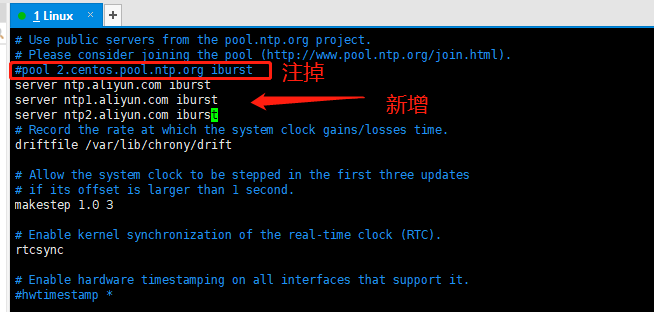
将配置文件中的同步服务器修改为国内的时间服务器(推荐阿里及腾讯),将原配置文件中的server注释掉,第三行,换成国内的服务器
vim /etc/chrony.conf
server ntp.aliyun.com iburst
server ntp1.aliyun.com iburst
server ntp2.aliyun.com iburst
重启服务并配置为开机启动
step-1:systemctl enable --now chronyd
step-2:重启Linux服务器
查看时间是否同步
date
原文:https://www.cnblogs.com/gltou/p/15149221.html
评论(0)