
Android Studio(2)布局
时间:2021-08-16 10:30:58
收藏:0
阅读:16
------------恢复内容开始------------
1.线性布局:水平布局、垂直布局
LinearLayout:
android:orientation="vertical" 水平或垂直
android:layout_width="match_parent" 水平方向铺满,适配容器
android:layout_height="wrap_content" 内容铺满组件
android:layout_weight="1" 权重 使用时width需等于“0dp”
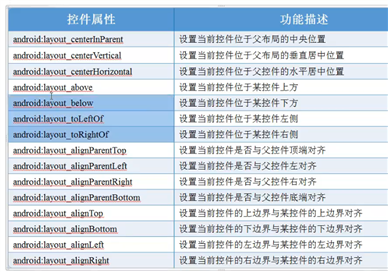
2.相对布局
RelativeLayout
android:layout_centerInParent="true" 水平垂直居中
android:layout_centerHorizontal="true" 水平居中
android:layout_centerVertical="true" 垂直居中
3.表格布局
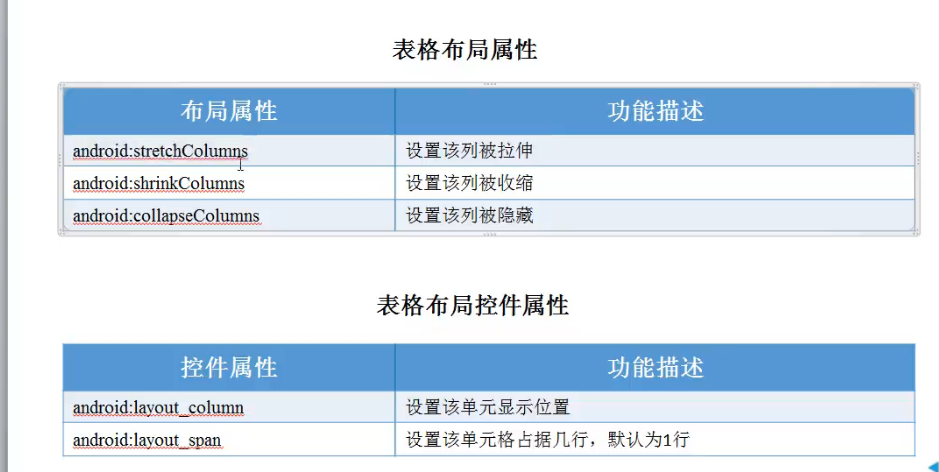
TableLayout:
4.帧布局
FrameLayout:
------------恢复内容结束------------
原文:https://www.cnblogs.com/xiaohuangTX/p/15145453.html
评论(0)