
Running powershell scripts during nuget package installation and removal
示范:
 1 param($installPath, $toolsPath, $package)
 2
 3 function Uninstall-ProjectPackages($project) {
 4     #remove no use dlls
 5     $project.Object.References | Where-Object {  $_.Name -eq ‘A.ServiceInterface‘ } | ForEach-Object { $_.Remove() }
 6     # save project
 7     $project.Save()
 8 }
 9
10
11 $projects = Get-Project -All
12 $projects| ForEach-Object { Uninstall-ProjectPackages $_ }
Running powershell scripts during nuget package installation and removal
来源:https://everydaylifein.net/netframework/running-powershell-scripts-during-nuget-package-installation-and-removal.html#:~:text=Your%20NuGet%20package%20can%20contain%20PowerShell%20scripts%20which%2C,supported%20in%20Visual%20Studio%202017%20%28%20read%20more%29
Your NuGet package can contain PowerShell scripts which, based on a convention, will be called during the package installation/removal process.
- Init.ps1 runs the first time a package is installed in a solution
- Install.ps1 runs when a package is installed in a project <- no longer supported in Visual Studio 2017 (read more)
- Uninstall.ps1 runs every time a package is uninstalled <- no longer supported in Visual Studio 2017 (read more)
- you can read more about it here
Your scripts should begin with the following line
param($installPath, $toolsPath, $package, $project)
Where
- $installPath path to where the project is installed
- $toolsPath path to the extracted tools directory
- $package information about the currently installing package
- $project reference to the EnvDTE project the package is being installed into
In order to be executed, the scripts need to be included in the tools directory of the nuget package. You can achieve this by editing your *.nuspec file and adding a file reference.
<?xml version="1.0"?>
<package >
  <metadata>...</metadata>
  <files>
	<file src="scripts\NugetScripts\Install.ps1" target="tools\Install.ps1" />
  </files>
</package>
You will quickly find debugging to be fairly painful if you need to operate with the $project reference. In this case, you are highly encouraged to test all your $project actions in the Visual Studio Package Manager Console by writing
$project = Get-Project
Now you can interactively test your operations in the console, and you don’t have to constantly pack and install/uninstall your package to check if the scripts work as intended.
NuGet 3 – What and Why?
来源:https://devblogs.microsoft.com/nuget/NuGet-3-What-and-Why/

Jeffrey
Since Visual Studio 2015 was released in July, developers have started using a new version of NuGet, NuGet 3 We decided to introduce a number of significant changes based on feedback from the community. With any major version change, some things break… and usually for a good reason. We have bugs and issues that we are addressing and want to share what the plan was for versions 3.x and what the plan is for the future.
The NuGet 2.x code base proved to be tightly coupling user interface and protocol. NuGet 3 included a major rewrite of the code base to allow for supporting the new V3 nuget server Protocol.
User Interface Changes
The most noticeable change to the NuGet client is the updated user interface. This is also the feature that has brought the most feedback. What was changed? The only thing that changed was everything… this is a complete rewrite of the Visual Studio interface for NuGet, bringing new features and dropping other features.
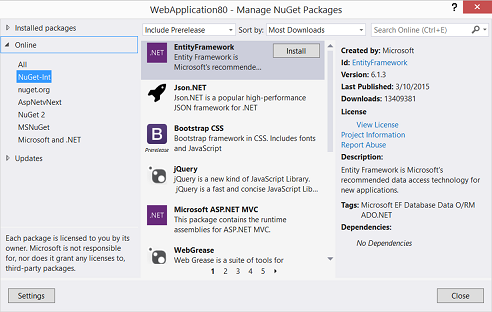 Before: NuGet User Interface in Visual Studio 2013 |
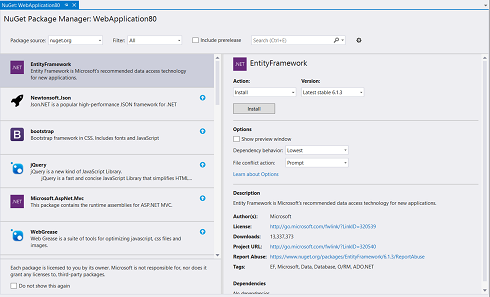 After: NuGet User Interface in Visual Studio 2015 |
Let’s review some of the items that were changed and what user feedback drove the change:
The Good
- The NuGet window was changed to a docked window to allow continued work on other tasks in Visual Studio while packages are being installed
- Package version selector was introduced to allow more control over which packages to install and manage, allowing explicit control of package versions in projects. This also helps to prevent inadvertent breaks with new major package versions.
- Visibility controls were introduced for the preview window because developers didn’t want to be distracted by this information and wanted to continue working without interruption.
- The file conflict action combobox was added to allow control over how project content should be handled when a content package is installed or updated. Content packages provide a dual purpose of scaffolding initial content or bringing libraries that were not intended to be changed. With this configuration option, you can control what action NuGet should take when installing or updating packages that have existing files in your project that it would like to overwrite.
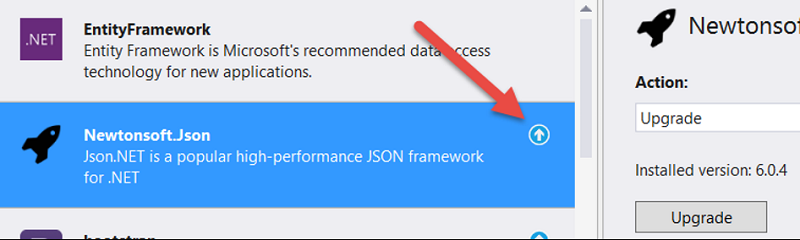
- The Update Available indicator is introduced to allow you to work in any filtered view, and still know what packages your project has installed and what may need to be updated.
The Bad
- The ‘All Sources’ package source was very hard to use, and the search results were not clear that were presented in the package list. We are making changes to how this functions and is presented, hoping to reintroduce in a future release.
- Package sources and states were converted to a pair of comboboxes to make it more of a filter action that leads to the search on the right side of the screen, similar to how many websites provide search capabilities. This is confusing as the filter controls operate independently of each other.

The Ugly
- The introduction of an ‘Action’ combobox and button brings a context to the right panel that is not intuitive or discoverable. We hear that when the action combobox is configured with a default value, developers can have difficulty locating alternate actions to take with the package. In the prior user interface, all actions were made available as individual buttons that were easy to locate.
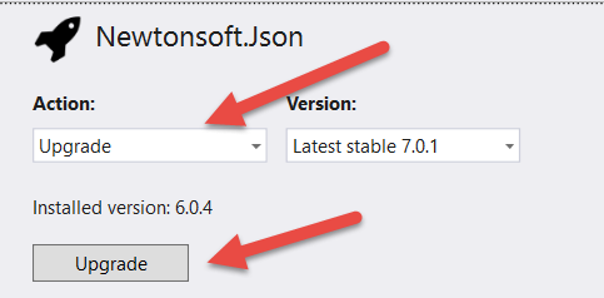
All in all, a number of really important updates for the user interface that added functionality. However, we know that this hindered workflow for some developers. We’re revisiting those decisions and in our next blog post, we’ll discuss what updates are being made.
Update All
The most significant removal from the NuGet user-interface was that ‘Update All” was removed. After hearing from developers who were concerned about breaking changes introduced by a significant number of packages that were updated in their project, this button was not included in the revision. When there are a number of major package changes, developers found the resultant projects difficult to work with due to the number of breaking changes introduced by updated packages.
However, we also hear feedback from developers with more than 100 projects in a solution and are not able to update all of their packages quickly. The ‘Update All’ button is a significant help to these developers, and they experience a significant delay in their workflow when they need to update each package individually. For advanced users who prefer the Powershell console, the Update-Package command still provides ‘Update All’ functionality. We understand that having this in the user-interface is important to many developers and we’re going to bring back the Update All button in our next user-interface update, scheduled for later this Fall.
NuGet v3 Protocol
The NuGet.org service was based on an open WCF data service that allowed for virtually unlimited open-ended queries against a SQL database. The database server was at capacity and we were unable to scale it further without changing the implementation of the service. The new protocol was designed to be more responsive and be able to operate across content-delivery networks without communicating to a central database server. Package detail pages could be stored in a static JSON format on the web server and replicate across the NuGet CDN along with the packages. This would allow for developers to get updates to their packages from local edge nodes without querying the central NuGet.org service which is designed to reduce latency.
In practice over the last 4 months, we have seen a reduction in NuGet.org server resources and a dramatic increase in the utilization of the CDN. From our telemetry, all regions that are using the new NuGet v3 protocol are experiencing a performance improvement. Since the beginning of the year, we see major improvements in server response, even though download traffic has doubled over the last 10 months.
Solution Level Packages
Solution packages were deprecated with this version of NuGet. Why? What do they bring to the feature set? These packages typically did not deliver references for a project, but rather tools that could be shared among several projects. Currently in Visual Studio 2015, these packages can be installed into a project that will be shared in the solution. We now understand that this took some developers by surprise and it prevents solutions from being worked on with both Visual Studio 2013 and 2015. We have a tracking issue opened that addresses this issue, and we are going to schedule it for a future release.
Introducing Project.JSON
For supporting .NET Core that comes with the Universal Windows Platform SDK and ASP.NET 5, we wanted to take several steps to address common questions and concerns that developers had with building applications that referenced NuGet packages. We have introduced the project.json configuration file initially in ASP.NET 5 and Universal Windows Platform projects. This was a chance to start these new project types with a package reference model that could address several significant concerns that developers shared with us:
- Packages.config file would no longer described the developer’s intent of the packages they wanted to install once dependent packages are added.
- Installing packages would modify the csproj/vbproj file and prevent it from being easily moved on disk and having a consistent experience in Visual Studio.
- Support the ability to deliver .NET Core as packages
- Developers who mixed updating packages from a command-line and from the Visual Studio interface would realize different changes to their project. This made it difficult to configure and maintain continuous integration environments.
Introducing a new package reference model allowed us to address these issues by bringing a new format that more closely aligned with helping a developer with a project, and not modifying the project for them. This model could be introduced for the new Universal Windows Platform projects, and not affect other project types who could continue operating with the existing NuGet packages.config model. Existing projects and project types that operate with packages.config and not project.json are not be subject to the following changes.
Transitive Dependency Support
To better show a developer’s intent, we created the project.json dependencies feature where developers can directly reference only those packages that they need in their project. Any dependencies are automatically discovered and restored without needing to explicitly document those references in project.json

Project.json for a UWP project and a simulated packages.config showing some of the packages that would be referenced in the same project
The result is that you need to manage less package references and skip dealing with potential circular reference problems.
Global Packages Folder
With Project.JSON managed projects, there is now a packages folder that is shared for all projects that you work with. Packages are downloaded and stored in the %userprofile%\.nuget\packagesfolder. This means that if you are working on multiple UWP projects on your workstation, you only have one copy of the EntityFramework package and its dependencies on your machine. All .NET projects will acquire package references from this global shared folder. This also means that when you need to configure a new project, your project will not take time starting so that it can download a fresh copy of EntityFramework.nupkg Instead, it will simply and quickly reference the files you have already downloaded. ASP.NET 5 uses the %userprofile%\.dnx\packages folder and as that framework nears completion it will use the %userprofile%\.nuget\packages folder as well.
Powershell Install and Uninstall Scripts
Powershell script support was modified to no longer execute install and uninstall scripts, but init scripts are still executed. Some of the reasoning for this is the inability to determine which package scripts need to be run when not all packages are directly referenced by a project. Without an explicit install or uninstall for a dependency package, it is impossible to determine when these scripts should be run. We do not believe there is a reliable and repeatable way to execute these scripts in this package reference model. Additionally, as we want to ensure that NuGet provides a repeatable experience on the command-line this forces packages to run without script capabilities. We plan to introduce features to address many of the common tasks that scripts provided.
Additionally, running NuGet outside of Visual Studio at the command-line or on other operating systems cannot execute these Powershell scripts as they relied on Visual Studio automation. Powershell is in NuGet to provide a shim to allow for missing features to run inside of Visual Studio. Moving forward, we plan to introduce these features to provide this functionality. Finally, many of these scripts relied on Visual Studio APIs that could break across versions of Visual Studio.
Configuration File Transforms
Configuration file transforms are not typically re-runnable against a project. In the indirect package reference model, NuGet does not know if a configuration transform has been applied to a project reliably. To prevent these transforms from being executed multiple times against the same project, this feature was dropped.
Content Packages
With indirect package references, it is also not clear how to handle the content that may be delivered. When a package is updated, does the content of the indirect references need to be re-copied into the project? What happens to the files and content that a developer was maintaining in their project? Without a reliable answer to these questions, we cut this feature in the short term, and are working to define a proper feature to deliver this functionality. Follow our discussion on GitHub to learn more about the new feature.
Looking Forward
These changes that were introduced means that package authors and package consumers have some new decisions to make and new features to explore. We plan to provide more details on these topics in the weeks ahead. We will discuss the upcoming changes to the user interface, post walk-through tutorials demonstrating how to build new packages that target the Universal Windows Platform and how to update existing packages to make them available to the Universal Windows Platform.
Summary
We hope this gives you some insight into some of the decisions that were made to advance the NuGet product. All of the changes were made with the hopes that they would reduce complexity and prevent any compatibility issues with new frameworks and features required by project systems that NuGet would support. In our next post, we’ll discuss further the NuGet user interface, review some of your feedback, and explore the decisions around the updates that are coming.
原文:https://www.cnblogs.com/micro-chen/p/15137620.html