
Linux下RAID磁盘阵列的原理与搭建
RAID概念
- 磁盘阵列(Redundant Arrays of Independent Disks,RAID),有“独立磁盘构成的具有冗余能力的阵列”之意。 磁盘阵列是由很多价格较便宜的磁盘,以硬件(RAID卡)或软件(MDADM)形式组合成一个容量巨大的磁盘组,利用多个磁盘组合在一起,提升整个磁盘系统效能。利用这项技术,将数据切割成许多区段,分别存放在各个硬盘上。 磁盘阵列还能利用同位检查(Parity Check)的观念,在数组中任意一个硬盘故障时,仍可读出数据,在数据重构时,将数据经计算后重新置入新硬盘中
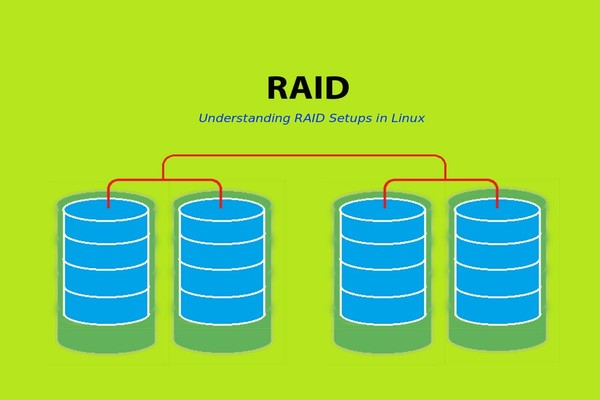
为什么要用RAID
- RAID(Redundant Arrays of Independent Disks,磁盘阵列):把相同的数据存储在多个硬盘的不同的地方的方法
- 通过RAID可以提高磁盘I/O能力(磁盘并行读写)以及提高耐用性(磁盘冗余)。
- RAID级别:多种磁盘组织在一起的工作方式有所不同
软件 RAID 和硬件 RAID
- 软件 RAID 的性能较低,因为其使用主机的资源。 需要加载 RAID 软件以从软件 RAID 卷中读取数据。在加载 RAID 软件前,操作系统需要引导起来才能加载 RAID 软件。在软件 RAID 中无需物理硬件。零成本投资。
- 硬件 RAID 的性能较高。他们采用 PCI Express 卡物理地提供有专用的 RAID 控制器。它不会使用主机资源。他们有 NVRAM 用于缓存的读取和写入。缓存用于 RAID 重建时,即使出现电源故障,它会使用后备的电池电源保持缓存。对于大规模使用是非常昂贵的投资。
实现方式:
- 外接式磁盘阵列:通过扩展卡提供适配能力
- 内接式磁盘阵列:主板集成RAID控制器
- Software RAID:在软件层面实现RAID
RAID级别:
- RAID 0:Data Stripping数据分条技术
- RAID 1:磁盘镜像
- RAID 2:带海明码校验
- RAID 3:带奇偶校验码的并行传送
- RAID 4:带奇偶校验码的独立磁盘结构
- RAID 5:分布式奇偶校验的独立磁盘结构
- RAID 10:高可靠性与高效磁盘结构
- RAID 01:RAID0和RAID1技术结合起来
RAID 的两个关键目标是提高数据可靠性和 I/O 性能。
RAID 中主要有三个关键概念和技术:镜像( Mirroring )、数据条带( Data Stripping )和数据校验( Data parity )。
- 1.镜像:
- 镜像是一种冗余技术,为磁盘提供保护功能,防止磁盘发生故障而造成数据丢失。
- 2.数据条带:
- 数据条带技术将数据以块的方式分布存储在多个磁盘中,从而可以对数据进行并发处理。这样写入和读取数据就可以在多个磁盘上同时进行,并发产生非常高的聚合 I/O ,有效提高了整体 I/O 性能,而且具有良好的线性扩展性。
- 3.数据校验
- 数据校验是一种冗余技术,它用校验数据来提供数据的安全,可以检测数据错误,并在能力允许的前提下进行数据重构。
RAID 主要优势有如下几点:
- (1) 大容量
- 这是 RAID 的一个显然优势,它扩大了磁盘的容量,由多个磁盘组成的 RAID 系统具有海量的存储空间。现在单个磁盘的容量就可以到 1TB 以上,这样 RAID 的存储容量就可以达到 PB 级,大多数的存储需求都可以满足。一般来说, RAID 可用容量要小于所有成员磁盘的总容量。不同等级的 RAID 算法需要一定的冗余开销,具体容量开销与采用算法相关。如果已知 RAID 算法和容量,可以计算出 RAID 的可用容量。通常, RAID 容量利用率在 50% ~ 90% 之间。
- (2) 高性能
- RAID 的高性能受益于数据条带化技术。单个磁盘的 I/O 性能受到接口、带宽等计算机技术的限制,性能往往很有 限,容易成为系统性能的瓶颈。通过数据条带化, RAID 将数据 I/O 分散到各个成员磁盘上,从而获得比单个磁盘成倍增长的聚合 I/O 性能。
- (3) 可靠性
- 可用性和可靠性是 RAID 的另一个重要特征。从理论上讲,由多个磁盘组成的 RAID 系统在可靠性方面应该比单个磁盘要差。这里有个隐含假定:单个磁盘故障将导致整个 RAID 不可用。 RAID 采用镜像和数据校验等数据冗余技术,打破了这个假定。 镜像是最为原始的冗余技术,把某组磁盘驱动器上的数据完全复制到另一组磁盘驱动器上,保证总有数据副本可用。 比起镜像 50% 的冗余开销 ,数据校验要小很多,它利用校验冗余信息对数据进行校验和纠错。 RAID 冗余技术大幅提升数据可用性和可靠性,保证了若干磁盘出错时,不 会导致数据的丢失,不影响系统的连续运行。
- (4) 可管理性
- 实际上, RAID 是一种虚拟化技术,它对多个物理磁盘驱动器虚拟成一个大容量的逻辑驱动器。对于外部主机系统来说, RAID 是一个单一的、快速可靠的大容量磁盘驱动器。这样,用户就可以在这个虚拟驱动器上来组织和存储应用系统数据。 从用户应用角度看,可使存储系统简单易用,管理也很便利。 由于 RAID 内部完成了大量的存储管理工作,管理员只需要管理单个虚拟驱动器,可以节省大量的管理工作。 RAID 可以动态增减磁盘驱动器,可自动进行数据校验和数据重建,这些都可以 大大简化管理工作。
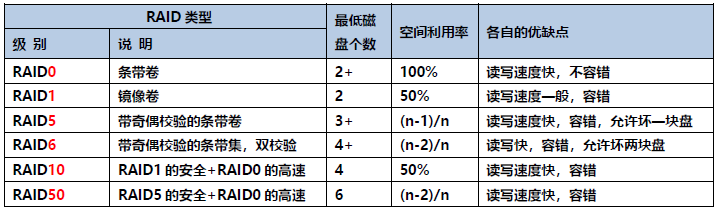
RAID几种常见的类型RAID几种常见的类型
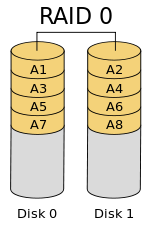
RAID-0 (条带化)
- 条带 (strping),也是我们最早出现的RAID模式
- 需磁盘数量:2块以上(大小最好相同),是组建磁盘阵列中最简单的一种形式,只需要2块以上的硬盘即可.
- 特点:成本低,可以提高整个磁盘的性能和吞吐量。RAID 0没有提供冗余或错误修复能力,速度快.
- 任何一个磁盘的损坏将损坏全部数据;磁盘利用率为100%
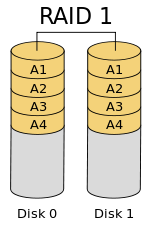
RAID-1 (镜像化)
- mirroring(镜像卷),需要磁盘两块以上
- 原理:是把一个磁盘的数据镜像到另一个磁盘上,也就是说数据在写入一块磁盘的同时,会在另一块闲置的磁盘上生成镜像文件,(同步)
- RAID 1 mirroring(镜像卷),至少需要两块硬盘,raid大小等于两个raid分区中最小的容量(最好将分区大小分为一样),数据有冗余,在存储时同时写入两块硬盘,实现了数据备份;
- 磁盘利用率为50%,即2块100G的磁盘构成RAID1只能提供100G的可用空间。
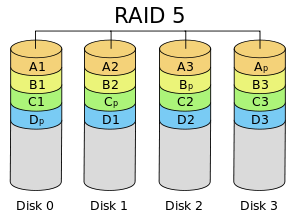
RAID-5 (分布式奇偶校验)
- 需要三块或以上硬盘,可以提供热备盘实现故障的恢复;只损坏一块,没有问题。但如果同时损坏两块磁盘,则数据将都会损坏。
- 空间利用率: (n-1)/n
RAID-6( 双分布式奇偶校验磁盘)
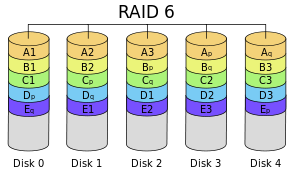
- RAID 6 和 RAID 5 相似但它有两个分布式奇偶校验。大多用在大数量的阵列中。我们最少需要4个驱动器,即使有2个驱动器发生故障,我们依然可以更换新的驱动器后重建数据。
RAID-10 (镜像+条带)
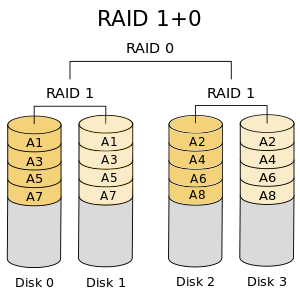
RAID 10是将镜像和条带进行两级组合的RAID级别,第一级是RAID1镜像对,第二级为RAID 0。
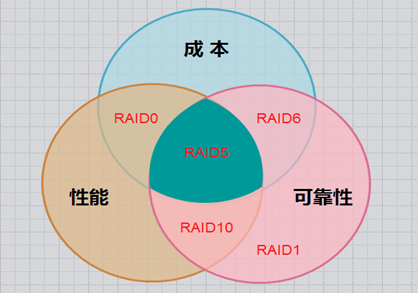
几个方案对比下来, RAID5是最适合的,如下图:
第一步 部署环境准备
[root@wencheng ~]# cat /etc/redhat-release
CentOS Linux release 7.5.1804 (Core)

[root@wencheng ~]# rpm -qa | grep mdadm
mdadm-4.1-6.el7.x86_64

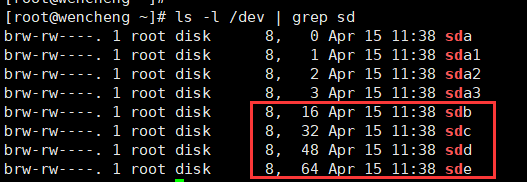
[root@wencheng ~]# ls -l /dev | grep sd
brw-rw----. 1 root disk      8,   0 Apr 15 11:38 sda
brw-rw----. 1 root disk      8,   1 Apr 15 11:38 sda1
brw-rw----. 1 root disk      8,   2 Apr 15 11:38 sda2
brw-rw----. 1 root disk      8,   3 Apr 15 11:38 sda3
VMware Workstation添加硬盘
- 在"我的计算机"中选择该主机--右键--设置--添加--硬盘--下一步--下一步--下一步--完成 添加硬盘步骤。

- 命令:echo "- - -" > /sys/class/scsi_host/host0/scan
- 1.新增添磁盘,还不能直接显示出来,要想出现要对磁盘进行扫描(实际生产环境中不需要,都是热插拔技术):
- 2.假如 fdisk -l 还是未发现新硬盘,则将上面命令中的host0,替换为host1,host2,....看看;
- 3.我们再查看系统日志/var/log/messages,发现对SCSI设备进行了一次重新扫描,用fdisk -l也看到了新增加的磁盘了。
第二步 创建RAID分区
[root@wencheng ~]# fdisk /dev/sdb     //创建/dev/sdb分区
Welcome to fdisk (util-linux 2.23.2).

Changes will remain in memory only, until you decide to write them.
Be careful before using the write command.

Device does not contain a recognized partition table
Building a new DOS disklabel with disk identifier 0x50157e3b.

Command (m for help): m
Command action
   a   toggle a bootable flag           //设置可引导标记
   b   edit bsd disklabel             //编辑 bsd 磁盘标签
   c   toggle the dos compatibility flag    //设置 DOS 操作系统兼容标记
   d   delete a partition             //删除一个分区
   g   create a new empty GPT partition table //创建一个新的空GPT分区表
   G   create an IRIX (SGI) partition table  //创建一个IRIX (SGI)分区表
   l   list known partition types        //显示已知的文件系统类型。82 为 Linux swap 分区,83 为 Linux 分区
   m   print this menu              //显示帮助菜单
   n   add a new partition            //新建分区
   o   create a new empty DOS partition table //建立空白 DOS 分区表
   p   print the partition table         //显示分区列表
   q   quit without saving changes       //不保存退出
   s   create a new empty Sun disklabel    //新建空白 SUN 磁盘标签
   t   change a partition‘s system id     //改变一个分区的系统 ID
   u   change display/entry units       //改变显示记录单位
   v   verify the partition table       //验证分区表
   w   write table to disk and exit      //保存退出
   x   extra functionality (experts only)   //附加功能(仅专家)

Command (m for help): n    //新建分区
Partition type:
   p   primary (0 primary, 0 extended, 4 free)
   e   extended
Select (default p): p    //这里选主分区
Partition number (1-4, default 1): 1
First sector (2048-20971519, default 2048):     //回车(默认大小)
Using default value 2048
Last sector, +sectors or +size{K,M,G} (2048-20971519, default 20971519):   //回车(默认整块硬盘大小);可指定但小于硬盘容量
Using default value 20971519
Partition 1 of type Linux and of size 10 GiB is set

Command (m for help): p    //显示分区列表

Disk /dev/sdb: 10.7 GB, 10737418240 bytes, 20971520 sectors
Units = sectors of 1 * 512 = 512 bytes
Sector size (logical/physical): 512 bytes / 512 bytes
I/O size (minimum/optimal): 512 bytes / 512 bytes
Disk label type: dos
Disk identifier: 0x50157e3b

   Device Boot      Start         End      Blocks   Id  System
/dev/sdb1            2048    20971519    10484736   83  Linux      //分区的状态

Command (m for help): L    //列出所有可用的类型

 0  Empty           24  NEC DOS         81  Minix / old Lin bf  Solaris
 1  FAT12           27  Hidden NTFS Win 82  Linux swap / So c1  DRDOS/sec (FAT-
 2  XENIX root      39  Plan 9          83  Linux           c4  DRDOS/sec (FAT-
 3  XENIX usr       3c  PartitionMagic  84  OS/2 hidden C:  c6  DRDOS/sec (FAT-
 4  FAT16 <32M      40  Venix 80286     85  Linux extended  c7  Syrinx
 5  Extended        41  PPC PReP Boot   86  NTFS volume set da  Non-FS data
 6  FAT16           42  SFS             87  NTFS volume set db  CP/M / CTOS / .
 7  HPFS/NTFS/exFAT 4d  QNX4.x          88  Linux plaintext de  Dell Utility
 8  AIX             4e  QNX4.x 2nd part 8e  Linux LVM       df  BootIt
 9  AIX bootable    4f  QNX4.x 3rd part 93  Amoeba          e1  DOS access
 a  OS/2 Boot Manag 50  OnTrack DM      94  Amoeba BBT      e3  DOS R/O
 b  W95 FAT32       51  OnTrack DM6 Aux 9f  BSD/OS          e4  SpeedStor
 c  W95 FAT32 (LBA) 52  CP/M            a0  IBM Thinkpad hi eb  BeOS fs
 e  W95 FAT16 (LBA) 53  OnTrack DM6 Aux a5  FreeBSD         ee  GPT
 f  W95 Ext‘d (LBA) 54  OnTrackDM6      a6  OpenBSD         ef  EFI (FAT-12/16/
10  OPUS            55  EZ-Drive        a7  NeXTSTEP        f0  Linux/PA-RISC b
11  Hidden FAT12    56  Golden Bow      a8  Darwin UFS      f1  SpeedStor
12  Compaq diagnost 5c  Priam Edisk     a9  NetBSD          f4  SpeedStor
14  Hidden FAT16 <3 61  SpeedStor       ab  Darwin boot     f2  DOS secondary
16  Hidden FAT16    63  GNU HURD or Sys af  HFS / HFS+      fb  VMware VMFS
17  Hidden HPFS/NTF 64  Novell Netware  b7  BSDI fs         fc  VMware VMKCORE
18  AST SmartSleep  65  Novell Netware  b8  BSDI swap       fd  Linux raid auto
1b  Hidden W95 FAT3 70  DiskSecure Mult bb  Boot Wizard hid fe  LANstep
1c  Hidden W95 FAT3 75  PC/IX           be  Solaris boot    ff  BBT
1e  Hidden W95 FAT1 80  Old Minix

Command (m for help): t    //改变一个分区的系统 ID
Selected partition 1
Hex code (type L to list all codes): fd  //Linux raid auto
Changed type of partition ‘Linux‘ to ‘Linux raid autodetect‘

Command (m for help): p    //显示分区列表

Disk /dev/sdb: 10.7 GB, 10737418240 bytes, 20971520 sectors
Units = sectors of 1 * 512 = 512 bytes
Sector size (logical/physical): 512 bytes / 512 bytes
I/O size (minimum/optimal): 512 bytes / 512 bytes
Disk label type: dos
Disk identifier: 0x50157e3b

   Device Boot      Start         End      Blocks   Id  System
/dev/sdb1            2048    20971519    10484736   fd  Linux raid autodetect    //分区状态

Command (m for help): w    //保存退出
The partition table has been altered!

Calling ioctl() to re-read partition table.
Syncing disks.
[root@wencheng ~]#
[root@wencheng ~]# fdisk -l | grep raid
/dev/sdb1            2048    20971519    10484736   fd  Linux raid autodetect
/dev/sdc1            2048    20971519    10484736   fd  Linux raid autodetect
/dev/sdd1            2048    20971519    10484736   fd  Linux raid autodetect
/dev/sde1            2048    20971519    10484736   fd  Linux raid autodetect
注: 请使用上述步骤同样在 sd[c-m] 驱动器上创建分区,不再累赘。
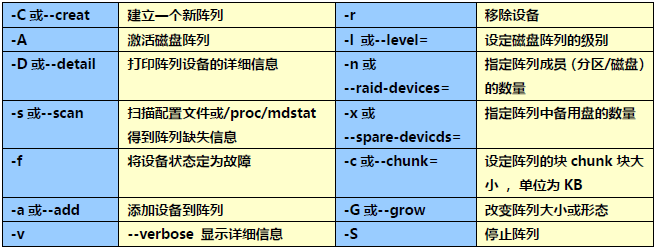
- mdadm命令常见参数解释:
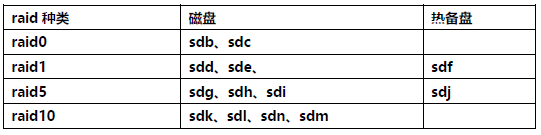
第三步 现在使用以下命令创建 md 设备(即 /dev/md0),并选择 RAID级别。
RAID-0

- 1.创建分区后,验证/dev/sd[b-c]这两个驱动器是否正确定义 RAID,使用下面的命令。
[root@wencheng ~]# mdadm -E /dev/sd[b-c]     //或mdadm --examine /dev/sd[b-c]
/dev/sdb:
   MBR Magic : aa55
Partition[0] :     20969472 sectors at         2048 (type fd)
/dev/sdc:
   MBR Magic : aa55
Partition[0] :     20969472 sectors at         2048 (type fd)

[root@wencheng ~]# mdadm -E /dev/sd[b-c]1    //mdadm --examine /dev/sd[b-c]1
mdadm: No md superblock detected on /dev/sdb1.
mdadm: No md superblock detected on /dev/sdc1.
- 2.创建RAID0,与其他RAID级别差异步骤。
[root@wencheng ~]# mdadm -C -v /dev/md0 -l raid0 -n 2 /dev/sd[b-c]1    //这里是raid0为例
mdadm: Fail to create md0 when using /sys/module/md_mod/parameters/new_array, fallback to creation via node
mdadm: Defaulting to version 1.2 metadata
mdadm: array /dev/md0 started.
[root@wencheng ~]#
- 3.查看 RAID 级别,设备和阵列的使用状态。
[root@wencheng ~]# cat /proc/mdstat
Personalities : [raid0]
md0 : active raid0 sdc1[1] sdb1[0]
      20951040 blocks super 1.2 512k chunks

unused devices: <none>
[root@wencheng ~]#
[root@wencheng ~]# mdadm -Ds    //或mdadm --detail /dev/md0 或 mdadm -E /dev/sd[b-c]1
ARRAY /dev/md0 metadata=1.2 name=wencheng:0 UUID=17542cfe:0b0649c8:43eecd07:cc58228b
[root@wencheng ~]#
[root@wencheng ~]# mdadm -D /dev/md0
/dev/md0:
           Version : 1.2
     Creation Time : Thu Apr 15 14:37:47 2021
        Raid Level : raid0
        Array Size : 20951040 (19.98 GiB 21.45 GB)
      Raid Devices : 2
     Total Devices : 2
       Persistence : Superblock is persistent

       Update Time : Thu Apr 15 14:37:47 2021
             State : clean
    Active Devices : 2
   Working Devices : 2
    Failed Devices : 0
     Spare Devices : 0

        Chunk Size : 512K    //chunk是raid中最小的存储单位

Consistency Policy : none

              Name : wencheng:0  (local to host wencheng)
              UUID : 17542cfe:0b0649c8:43eecd07:cc58228b
            Events : 0

    Number   Major   Minor   RaidDevice State
       0       8       17        0      active sync   /dev/sdb1
       1       8       33        1      active sync   /dev/sdc1
- 4.保存RAID配置到一个"mdadm"文件中,以供将来使用。
[root@wencheng ~]# mdadm -E -s -v > /etc/mdadm.conf
[root@wencheng ~]# cat /etc/mdadm.conf
ARRAY /dev/md/0  level=raid0 metadata=1.2 num-devices=2 UUID=17542cfe:0b0649c8:43eecd07:cc58228b name=wencheng:0
   devices=/dev/sdc1,/dev/sdb1
或
[root@wencheng ~]# mdadm -Ds
ARRAY /dev/md0 metadata=1.2 name=wencheng:0 UUID=17542cfe:0b0649c8:43eecd07:cc58228b
[root@wencheng ~]#
[root@wencheng ~]# mdadm -Ds > /etc/mdadm.conf
- 5. 将 RAID 设备 /dev/md0 创建为 xfs 文件系统,并挂载到 /mnt/raid0 下。
[root@wencheng ~]# mkfs.xfs /dev/md0
meta-data=/dev/md0               isize=512    agcount=16, agsize=327296 blks
         =                       sectsz=512   attr=2, projid32bit=1
         =                       crc=1        finobt=0, sparse=0
data     =                       bsize=4096   blocks=5236736, imaxpct=25
         =                       sunit=128    swidth=256 blks
naming   =version 2              bsize=4096   ascii-ci=0 ftype=1
log      =internal log           bsize=4096   blocks=2560, version=2
         =                       sectsz=512   sunit=8 blks, lazy-count=1
realtime =none                   extsz=4096   blocks=0, rtextents=0

[root@wencheng ~]# mkdir /mnt/raid0    //创建挂载点
[root@wencheng ~]#
[root@wencheng ~]# mount /dev/md0 /mnt/raid0/
[root@wencheng ~]# df -Th /mnt/raid0/
Filesystem     Type  Size  Used Avail Use% Mounted on
/dev/md0       xfs    20G   33M   20G   1% /mnt/raid0

验证/mnt/raid0/是否能正常使用
[root@wencheng ~]# ls -l /mnt/raid0/
total 0
[root@wencheng ~]# echo 123 > /mnt/raid0/a
[root@wencheng ~]# echo 456 > /mnt/raid0/b
[root@wencheng ~]#
[root@wencheng ~]# ls -l /mnt/raid0/
total 8
-rw-r--r--. 1 root root 4 Apr 15 15:39 a
-rw-r--r--. 1 root root 4 Apr 15 15:40 b
[root@wencheng ~]#
[root@wencheng ~]# rm /mnt/raid0/b -f
[root@wencheng ~]#
[root@wencheng ~]# ls -l /mnt/raid0/
total 4
-rw-r--r--. 1 root root 4 Apr 15 15:39 a

添加开机自动挂载
[root@wencheng ~]# blkid /dev/md0
/dev/md0: UUID="2d2c0f39-3605-4634-bfb1-c8b151936057" TYPE="xfs"

[root@wencheng ~]# echo "UUID=2d2c0f39-3605-4634-bfb1-c8b151936057 /mnt/raid0 xfs defaults 0 0" >> /etc/fstab

[root@wencheng ~]# cat /etc/fstab | grep /mnt/raid0
UUID=2d2c0f39-3605-4634-bfb1-c8b151936057 /mnt/raid0 xfs defaults 0 0

[root@wencheng ~]# mount -av    //检查 fstab 的条目是否有误
/                        : ignored
/boot                    : already mounted
swap                     : ignored
/mnt/raid0               : already mounted
注:以上步骤创建各RAID级别类似,不再赘述。
RAID1

- 1.创建RAID1
[root@wencheng ~]# mdadm -C -v /dev/md1 -l raid1 -n 2 -x 1 /dev/sd[d-f]1
mdadm: Note: this array has metadata at the start and
    may not be suitable as a boot device.  If you plan to
    store ‘/boot‘ on this device please ensure that
    your boot-loader understands md/v1.x metadata, or use
    --metadata=0.90
Continue creating array? (y/n) y
mdadm: Fail to create md1 when using /sys/module/md_mod/parameters/new_array, fallback to creation via node
mdadm: Defaulting to version 1.2 metadata
mdadm: array /dev/md1 started.
- 2.查看 RAID 级别,设备和阵列的使用状态。
[root@wencheng ~]# mdadm -D /dev/md1
/dev/md1:
           Version : 1.2
     Creation Time : Fri Apr 16 17:33:12 2021
        Raid Level : raid1
        Array Size : 10475520 (9.99 GiB 10.73 GB)
     Used Dev Size : 10475520 (9.99 GiB 10.73 GB)
      Raid Devices : 2
     Total Devices : 3
       Persistence : Superblock is persistent

       Update Time : Fri Apr 16 17:34:04 2021
             State : clean
    Active Devices : 2
   Working Devices : 3
    Failed Devices : 0
     Spare Devices : 1

Consistency Policy : resync

              Name : wencheng:1  (local to host wencheng)
              UUID : a88125e0:2c4b9029:cfaa3acf:67941e04
            Events : 17

    Number   Major   Minor   RaidDevice State
       0       8       49        0      active sync   /dev/sdd1
       1       8       65        1      active sync   /dev/sde1

       2       8       81        -      spare   /dev/sdf1
- 3.保存 RAID1 的配置到文件“mdadm.conf”中。
[root@wencheng ~]# mdadm -Dsv /dev/md1 > /etc/mdadm.conf
[root@wencheng ~]# cat /etc/mdadm.conf
ARRAY /dev/md1 level=raid1 num-devices=2 metadata=1.2 spares=1 name=wencheng:1 UUID=a88125e0:2c4b9029:cfaa3acf:67941e04
   devices=/dev/sdd1,/dev/sde1,/dev/sdf1
- 4.在RAID1设备上创建文件系统,并挂载到 /mnt/raid1 下。
[root@wencheng ~]# mkfs.xfs /dev/md1
meta-data=/dev/md1               isize=512    agcount=4, agsize=654720 blks
         =                       sectsz=512   attr=2, projid32bit=1
         =                       crc=1        finobt=0, sparse=0
data     =                       bsize=4096   blocks=2618880, imaxpct=25
         =                       sunit=0      swidth=0 blks
naming   =version 2              bsize=4096   ascii-ci=0 ftype=1
log      =internal log           bsize=4096   blocks=2560, version=2
         =                       sectsz=512   sunit=0 blks, lazy-count=1
realtime =none                   extsz=4096   blocks=0, rtextents=0
[root@wencheng ~]#
[root@wencheng ~]# mkdir /mnt/raid1
[root@wencheng ~]# mount /dev/md1 /mnt/raid1
[root@wencheng ~]# df -Th /mnt/raid1
Filesystem     Type  Size  Used Avail Use% Mounted on
/dev/md1       xfs    10G   33M   10G   1% /mnt/raid1
- 5.模拟RAID1中数据盘/dev/sde出现故障,观察/dev/sdf备用盘能否自动顶替故障盘。
[root@wencheng ~]# mdadm /dev/md1 -f /dev/sde1    //模拟测试文件损坏
mdadm: set /dev/sde1 faulty in /dev/md1
[root@wencheng ~]#
[root@wencheng ~]# mdadm -D /dev/md1
/dev/md1:
           Version : 1.2
     Creation Time : Fri Apr 16 17:33:12 2021
        Raid Level : raid1
        Array Size : 10475520 (9.99 GiB 10.73 GB)
     Used Dev Size : 10475520 (9.99 GiB 10.73 GB)
      Raid Devices : 2
     Total Devices : 3
       Persistence : Superblock is persistent

       Update Time : Mon Apr 19 09:26:02 2021
             State : clean, degraded, recovering
    Active Devices : 1
   Working Devices : 2
    Failed Devices : 1
     Spare Devices : 1

Consistency Policy : resync

    Rebuild Status : 7% complete

              Name : wencheng:1  (local to host wencheng)
              UUID : a88125e0:2c4b9029:cfaa3acf:67941e04
            Events : 23

    Number   Major   Minor   RaidDevice State
       0       8       49        0      active sync   /dev/sdd1
       2       8       81        1      spare rebuilding   /dev/sdf1    //热备盘已经在同步数据

       1       8       65        -      faulty   /dev/sde1
------------------------------------------------------------------------
    Number   Major   Minor   RaidDevice State
       0       8       49        0      active sync   /dev/sdd1
       2       8       81        1      active sync   /dev/sdf1    //数据同步完成

       1       8       65        -      faulty   /dev/sde1
- 6.更新配置文件。
[root@wencheng ~]# mdadm -Dsv > /etc/mdadm.conf
[root@wencheng ~]#
[root@wencheng ~]# cat /etc/mdadm.conf
ARRAY /dev/md1 level=raid1 num-devices=2 metadata=1.2 name=wencheng:1 UUID=a88125e0:2c4b9029:cfaa3acf:67941e04
   devices=/dev/sdd1,/dev/sde1,/dev/sdf1
- 7.查看数据是否丢失。
[root@wencheng ~]# ls -l /mnt/raid1/
total 4
-rw-r--r--. 1 root root 846 Apr 19 09:24 passwd
- 8.移除损坏的设备。
[root@wencheng ~]# mdadm -r /dev/md1 /dev/sde1
mdadm: hot removed /dev/sde1 from /dev/md1
[root@wencheng ~]# mdadm -D /dev/md1
/dev/md1:
           Version : 1.2
     Creation Time : Fri Apr 16 17:33:12 2021
        Raid Level : raid1
        Array Size : 10475520 (9.99 GiB 10.73 GB)
     Used Dev Size : 10475520 (9.99 GiB 10.73 GB)
      Raid Devices : 2
     Total Devices : 2
       Persistence : Superblock is persistent

       Update Time : Mon Apr 19 09:34:50 2021
             State : clean
    Active Devices : 2
   Working Devices : 2
    Failed Devices : 0
     Spare Devices : 0

Consistency Policy : resync

              Name : wencheng:1  (local to host wencheng)
              UUID : a88125e0:2c4b9029:cfaa3acf:67941e04
            Events : 44

    Number   Major   Minor   RaidDevice State
       0       8       49        0      active sync   /dev/sdd1
       2       8       81        1      active sync   /dev/sdf1
- 9.更换一块新硬盘。
[root@wencheng ~]# mdadm -a /dev/md1 /dev/sde
mdadm: added /dev/sde
[root@wencheng ~]#
[root@wencheng ~]# mdadm -D /dev/md1
/dev/md1:
           Version : 1.2
     Creation Time : Fri Apr 16 17:33:12 2021
        Raid Level : raid1
        Array Size : 10475520 (9.99 GiB 10.73 GB)
     Used Dev Size : 10475520 (9.99 GiB 10.73 GB)
      Raid Devices : 2
     Total Devices : 3
       Persistence : Superblock is persistent

       Update Time : Mon Apr 19 09:37:30 2021
             State : clean
    Active Devices : 2
   Working Devices : 3
    Failed Devices : 0
     Spare Devices : 1

Consistency Policy : resync

              Name : wencheng:1  (local to host wencheng)
              UUID : a88125e0:2c4b9029:cfaa3acf:67941e04
            Events : 45

    Number   Major   Minor   RaidDevice State
       0       8       49        0      active sync   /dev/sdd1
       2       8       81        1      active sync   /dev/sdf1

       3       8       64        -      spare   /dev/sde
RAID5
(1)创建RAID5, 添加1个热备盘,指定chunk大小为32K(默认512K)
-x或--spare-devicds= 指定阵列中备用盘的数量
-c或--chunk= 设定阵列的块chunk块大小 ,单位为KB
(2)停止阵列,重新激活阵列
(3)使用热备盘,扩展阵列容量,从3个磁盘扩展到4个

- 1.创建RAID5
[root@wencheng ~]# mdadm -C -v /dev/md5 -l 5 -n 3 -x 1 /dev/sd{g,h,i,j}1
mdadm: layout defaults to left-symmetric
mdadm: layout defaults to left-symmetric
mdadm: chunk size defaults to 512K
mdadm: size set to 10475520K
mdadm: Fail to create md5 when using /sys/module/md_mod/parameters/new_array, fallback to creation via node
mdadm: Defaulting to version 1.2 metadata
mdadm: array /dev/md5 started.
- 2.查看 RAID 级别,设备和阵列的使用状态。
[root@wencheng ~]# mdadm -D /dev/md5
/dev/md5:
           Version : 1.2
     Creation Time : Mon Apr 19 10:03:42 2021
        Raid Level : raid5
        Array Size : 20951040 (19.98 GiB 21.45 GB)
     Used Dev Size : 10475520 (9.99 GiB 10.73 GB)
      Raid Devices : 3
     Total Devices : 4
       Persistence : Superblock is persistent

       Update Time : Mon Apr 19 10:04:34 2021
             State : clean
    Active Devices : 3
   Working Devices : 4
    Failed Devices : 0
     Spare Devices : 1

            Layout : left-symmetric
 Chunk Size : 512K

Consistency Policy : resync    //数据同步完成

              Name : wencheng:5  (local to host wencheng)
              UUID : 816190d1:6b78e305:49220ba0:6178499b
            Events : 18

    Number   Major   Minor   RaidDevice State
       0       8       97        0      active sync   /dev/sdg1
       1       8      113        1      active sync   /dev/sdh1
       4       8      129        2      active sync   /dev/sdi1

       3       8      145        -      spare   /dev/sdj1    //热备盘
- 3.保存 RAID5 的配置到文件“mdadm.conf”中。
[root@wencheng ~]# mdadm -Dsv > /etc/mdadm.conf
[root@wencheng ~]# cat /etc/mdadm.conf
ARRAY /dev/md5 level=raid5 num-devices=3 metadata=1.2 spares=1 name=wencheng:5 UUID=816190d1:6b78e305:49220ba0:6178499b
   devices=/dev/sdg1,/dev/sdh1,/dev/sdi1,/dev/sdj1
- 4.停止/激活md5阵列。
[root@wencheng ~]# mdadm -S /dev/md5
mdadm: stopped /dev/md

[root@wencheng ~]# mdadm -AS /dev/md5
mdadm: Fail to create md5 when using /sys/module/md_mod/parameters/new_array, fallback to creation via node
mdadm: /dev/md5 has been started with 3 drives and 1 spare.
- 5.扩展md5阵列,将热备盘增加到md5中,使用md5中可以使用的磁盘数量为4块,并验证。
[root@wencheng ~]# mdadm -G /dev/md5 -n 4    //-G或--grow	改变阵列大小或形态
[root@wencheng ~]#
[root@wencheng ~]# mdadm -D /dev/md5
/dev/md5:
           Version : 1.2
     Creation Time : Mon Apr 19 10:03:42 2021
        Raid Level : raid5
        Array Size : 31426560 (29.97 GiB 32.18 GB)    //对比初始空间已增大
     Used Dev Size : 10475520 (9.99 GiB 10.73 GB)
      Raid Devices : 4
     Total Devices : 4
       Persistence : Superblock is persistent

       Update Time : Mon Apr 19 10:27:43 2021
             State : clean
    Active Devices : 4
   Working Devices : 4
    Failed Devices : 0
     Spare Devices : 0

            Layout : left-symmetric
        Chunk Size : 512K

Consistency Policy : resync

              Name : wencheng:5  (local to host wencheng)
              UUID : 816190d1:6b78e305:49220ba0:6178499b
            Events : 47

    Number   Major   Minor   RaidDevice State
       0       8       97        0      active sync   /dev/sdg1
       1       8      113        1      active sync   /dev/sdh1
       4       8      129        2      active sync   /dev/sdi1
       3       8      145        3      active sync   /dev/sdj1
[root@wencheng ~]#
[root@wencheng ~]# mdadm -Dsv > /etc/mdadm.conf
[root@wencheng ~]# cat /etc/mdadm.conf
ARRAY /dev/md5 level=raid5 num-devices=4 metadata=1.2 name=wencheng:5 UUID=816190d1:6b78e305:49220ba0:6178499b
   devices=/dev/sdg1,/dev/sdh1,/dev/sdi1,/dev/sdj1
RAID10
- 1.创建RAID10
[root@wencheng ~]# mdadm -C -v /dev/md10 -l 10 -n 4 /dev/sd[k,l,n,m]1
mdadm: layout defaults to n2
mdadm: layout defaults to n2
mdadm: chunk size defaults to 512K
mdadm: size set to 10475520K
mdadm: Fail to create md10 when using /sys/module/md_mod/parameters/new_array, fallback to creation via node
mdadm: Defaulting to version 1.2 metadata
mdadm: array /dev/md10 started.
- 2.查看 RAID 级别,设备和阵列的使用状态。
[root@wencheng ~]# mdadm -D /dev/md10
/dev/md10:
           Version : 1.2
     Creation Time : Mon Apr 19 10:54:33 2021
        Raid Level : raid10
        Array Size : 20951040 (19.98 GiB 21.45 GB)
     Used Dev Size : 10475520 (9.99 GiB 10.73 GB)
      Raid Devices : 4
     Total Devices : 4
       Persistence : Superblock is persistent

       Update Time : Mon Apr 19 10:56:18 2021
             State : clean
    Active Devices : 4
   Working Devices : 4
    Failed Devices : 0
     Spare Devices : 0

            Layout : near=2
        Chunk Size : 512K

Consistency Policy : resync

              Name : wencheng:10  (local to host wencheng)
              UUID : 98ee3164:bc417c61:3e8b29d6:24470192
            Events : 17

    Number   Major   Minor   RaidDevice State
       0       8      161        0      active sync set-A   /dev/sdk1
       1       8      177        1      active sync set-B   /dev/sdl1
       2       8      193        2      active sync set-A   /dev/sdm1
       3       8      209        3      active sync set-B   /dev/sdn1
- 3.保存 RAID10 的配置到文件“mdadm.conf”中。
[root@wencheng ~]# mdadm -Dsv /dev/md10 > /etc/mdadm.conf
[root@wencheng ~]#
[root@wencheng ~]# cat /etc/mdadm.conf
ARRAY /dev/md10 level=raid10 num-devices=4 metadata=1.2 name=wencheng:10 UUID=98ee3164:bc417c61:3e8b29d6:24470192
   devices=/dev/sdk1,/dev/sdl1,/dev/sdm1,/dev/sdn1
删除RAID所有信息及注意事项
- 1.如果你已经挂载raid,就先卸载。
[root@wencheng ~]# df -Th | grep raid1
/dev/md1       xfs        10G   33M   10G   1% /mnt/raid1
[root@wencheng ~]#
[root@wencheng ~]# umount /dev/md1 /mnt/raid1
umount: /mnt/raid1: not mounted
[root@wencheng ~]#
[root@wencheng ~]# df -Th
Filesystem     Type      Size  Used Avail Use% Mounted on
/dev/sda2      xfs        30G  1.3G   29G   5% /
devtmpfs       devtmpfs  981M     0  981M   0% /dev
tmpfs          tmpfs     992M     0  992M   0% /dev/shm
tmpfs          tmpfs     992M  9.6M  982M   1% /run
tmpfs          tmpfs     992M     0  992M   0% /sys/fs/cgroup
/dev/sda1      xfs       297M  107M  191M  36% /boot
tmpfs          tmpfs     199M     0  199M   0% /run/user/0
- 2.停止RAID设备,并删除配置文件。
[root@wencheng ~]# mdadm -D /dev/md1
/dev/md1:
           Version : 1.2
     Creation Time : Fri Apr 16 17:33:12 2021
        Raid Level : raid1
        Array Size : 10475520 (9.99 GiB 10.73 GB)
     Used Dev Size : 10475520 (9.99 GiB 10.73 GB)
      Raid Devices : 2
     Total Devices : 3
       Persistence : Superblock is persistent

       Update Time : Mon Apr 19 11:03:51 2021
             State : clean
    Active Devices : 2
   Working Devices : 3
    Failed Devices : 0
     Spare Devices : 1

Consistency Policy : resync

              Name : wencheng:1  (local to host wencheng)
              UUID : a88125e0:2c4b9029:cfaa3acf:67941e04
            Events : 45

    Number   Major   Minor   RaidDevice State
       0       8       49        0      active sync   /dev/sdd1
       2       8       81        1      active sync   /dev/sdf1

       3       8       64        -      spare   /dev/sde
[root@wencheng ~]#
[root@wencheng ~]# mdadm -S /dev/md1
mdadm: stopped /dev/md1
[root@wencheng ~]#
[root@wencheng ~]# mdadm -D /dev/md1
mdadm: cannot open /dev/md1: No such file or directory
[root@wencheng ~]#
[root@wencheng ~]# rm  /etc/mdadm.conf -f
- 3.清除物理磁盘中的raid标识。
[root@wencheng ~]# mdadm --zero-superblock /dev/sdd1
[root@wencheng ~]# mdadm --zero-superblock /dev/sdf1
参数:--zero-superblock :  erase the MD superblock from a device.   #擦除设备中的MD超级块
原文:https://www.cnblogs.com/zhangwencheng/p/14659141.html