
Linux 查看磁盘空间
时间:2021-05-24 15:43:46
收藏:0
阅读:17
df
df 以磁盘分区为单位查看文件系统,可以获取硬盘被占用了多少空间,目前还剩下多少空间等信息。
例如,我们使用df -h命令来查看磁盘信息, -h 选项为根据大小适当显示:
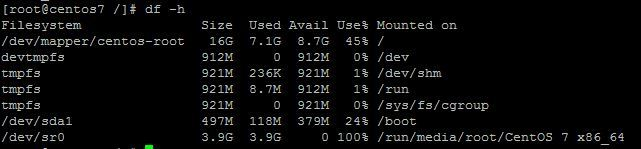
显示内容参数说明:
- Filesystem:文件系统
- Size: 分区大小
- Used: 已使用容量
- Avail: 还可以使用的容量
- Use%: 已用百分比
- Mounted on: 挂载点
相关命令:
- df -hl:查看磁盘剩余空间
- df -h:查看每个根路径的分区大小
- du -sh [目录名]:返回该目录的大小
- du -sm [文件夹]:返回该文件夹总M数
- du -h [目录名]:查看指定文件夹下的所有文件大小(包含子文件夹)
du
du 的英文原义为 disk usage,含义为显示磁盘空间的使用情况,用于查看当前目录的总大小。
例如查看当前目录的大小:
# du -sh
605M    .
显示指定文件所占空间:
# du -h log2012.log
300     log2012.log
方便阅读的格式显示test目录所占空间情况:
# du -h test
608K    test/test6
308K    test/test4
4.0K    test/scf/lib
4.0K    test/scf/service/deploy/product
4.0K    test/scf/service/deploy/info
12K     test/scf/service/deploy
16K     test/scf/service
4.0K    test/scf/doc
4.0K    test/scf/bin
32K     test/scf
8.0K    test/test3
1.3M    test
du 命令用于查看当前目录的总大小:
- -s:对每个Names参数只给出占用的数据块总数。
- -a:递归地显示指定目录中各文件及子目录中各文件占用的数据块数。若既不指定-s,也不指定-a,则只显示Names中的每一个目录及其中的各子目录所占的磁盘块数。
- -b:以字节为单位列出磁盘空间使用情况(系统默认以k字节为单位)。
- -k:以1024字节为单位列出磁盘空间使用情况。
- -c:最后再加上一个总计(系统默认设置)。
- -l:计算所有的文件大小,对硬链接文件,则计算多次。
- -x:跳过在不同文件系统上的目录不予统计。
- -h:以K,M,G为单位,提高信息的可读性。
案例
- 目录
[root@hadoop1 home]# du -h img2text/  (查看当前目录的总大小)
8.4G    img2text/logs
11G    img2text/
- 文件
[root@hadoop1 img2text]# du -h  nohup.log (查看当前文件的总大小)
2.1G    nohup.log
原文:https://www.cnblogs.com/luweiweicode/p/14803714.html
评论(0)