
关于iOS开发多线程,你应该知道的
多线程:顾名思义就是多条线程同时存在,在实际开发中是非常重要的。
要了解多线程,我们首先要了解的是进程。
什么是进程
简单说进程就是我们运行中的程序,运行中的程序对应相应的进程,每个程序都有一个进程来对应,那么程序(进程)是怎么执行的呢。那就要谈到线程了。
什么是线程,与进程有什么关系呢
进程是执行程序是靠线程来执行的,进程与线程的关系就类似工长的车间与流水线,
每个进程的都要靠一个或多个流水线来完成。那么为什么要使用多线程呢
多线程优点缺点
优点
-
适当的提高程序的执行效率(多个线程同时执行)
- 适当的提高了资源利用率(cpu,内存)
多线程缺点
-
占用一定的内存空间
-
线程越多cpu的调度开销越大
- 程序的复杂度会上升(会涉及到多线程的通信,多线程共用一个资源)
既然有多线程这个东西,我们就像这东西究竟在实际应用中是什么样的呢!
ios中实际应用
主线程
我们了解应用首先要知道线程有哪些种类
主线程
-
程序一启动就会创建的线程(主线程,UI线程)
-
主要是更新UI
- 处理UI事件
主线程注意事项
- 费时操作要放在子线程中否则会阻塞线程
子线程
处理耗时操作
插-多线程原理
多线程时间上是cpu在多条线程上快速切换执行,造成了给我们感觉上是同时执行
通过上面的介绍我们知道了子线程的重要性,但是我们怎么创建子线程呢?有多少中方法呢?
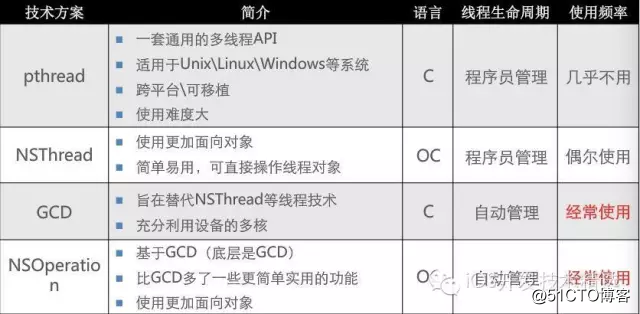
上图介绍了现今各种多线程技术,通过上面这些类我们就能够创建线程
Pthread
现在使用较少,可以看出它使用的是c语言,一般我们使用的方法是[Pthread currentThread];
创建方法
- (IBAction)testButton:(UIButton *)sender {//初始化一个线程
 pthread_t thread;//下方法是在线程中执行相应的函数
    //第一个参数传递的时地址,传递地址才能在函数中更改这个对象
    //第三个是指向函数的指针
    pthread_create(&thread, NULL, run, NULL);
}//创建一个函数void * run(void *param)
{  //耗时操作
    for (int i = 1; i++; i>1) {    NSLog(@"i= %@",[NSThread currentThread]);
    }    return NULL;
}
那么我们就可以将函数操作放在函数中,那么这个函数就会在子线程中执行了
NSthread
一共有三种创建线程的方式
- (void)touchesBegan:(NSSet<UITouch *> *)touches withEvent:(UIEvent *)event
{
    [self createThread1];
}
- (void)createThread3
{
    [self performSelectorInBackground:@selector(run:) withObject:@"rose"];
}
- (void)createThread2
{    //创建线程并开启
    [NSThread detachNewThreadSelector:@selector(run:) toTarget:self withObject:@"jack"];
}
- (void)createThread1
{    //通过Nsthread创建一个对象
    CJNSthread *thread = [[CJNSthread alloc]initWithTarget:self selector:@selector(run:) object:@"jack"];    //开启线程,(就会执行线程中的方法)
    [thread start];    //常用方法
    thread.name = @"haha";
}
- (void)run:(NSString *)parm
{    for (NSInteger i = 0; i < 100; i++) {        NSLog(@"%@",[NSThread currentThread ]);
    }
}
以上三种方式都可以创建线程
三种方式对比
第二三中方式创建线程比较简单,直接创建,自动执行,但是相对第一种就不能拿到线程不能对线程进行更详细的操作。
三种线程销毁时间,我们使用第一种方式创建线程并且自定义一个类继承自NSThread,重写delloc方法,可以看到在方法调用完毕自动被类销毁,所以创建是我们要手动的,销毁是自动的。
线程状态
线程从开始到结束都有什么状态呢
CJNSthread *thread = [[CJNSthread alloc]initWithTarget:self selector:@selector(run:) object:@"jack"];上面代码创建线程-新建线程
[thread start];上面代码开启线程- 就绪状态
cpu调度-运行状态
如果阻塞线程-阻塞状态
线程执行完毕-进入死亡状态
阻塞线程代码
- (void)sleepUnitlDate:(NSDate *)date;
- (void)sleepTimeInterval:(NSTimeinterval)ti;
使用多线程的隐患
多条线程同时访问相同资源进行操作,很容易造成数据错乱。
解决方案:互斥锁-访问数据的线程增加一把锁,线程结束之后再解锁,其他线程才能访问这个资源
@interface ViewController ()//创建三个售票员@property (nonatomic , strong)NSThread thread01;@property (nonatomic , strong)NSThread thread02;@property (nonatomic , strong)NSThread thread03;@property (nonatomic , assign)NSInteger ticketCount;//创建所对象,必须是相同的锁对象才能够锁住@property (nonatomic , strong)NSObject obj;@end@implementation ViewController- (void)viewDidLoad {
[super viewDidLoad]; self.thread01 = [[NSThread alloc]initWithTarget:self selector:@selector(saleTicket) object:nil]; self.thread01.name = @"售票员01"; self.thread02 = [[NSThread alloc]initWithTarget:self selector:@selector(saleTicket) object:nil]; self.thread02.name = @"售票员02"; self.thread03 = [[NSThread alloc]initWithTarget:self selector:@selector(saleTicket) object:nil]; self.thread03.name = @"售票员03"; self.ticketCount = 100; self.obj = [[NSObject alloc]init];
}
- (void)touchesBegan:(NSSet<UITouch > )touches withEvent:(UIEvent *)event
{
[self.thread01 start];
[self.thread02 start];
[self.thread03 start];
} -
(void)saleTicket
{ while (1) { //增加线程锁,在取出资源之前
@synchronized(self.obj){ NSInteger count = self.ticketCount; if (count > 0) { //为了看得更加明显,我们将线程睡眠
[NSThread sleepForTimeInterval:0.1]; self.ticketCount = count - 1; NSLog(@"%@票已经卖完,还剩%zd张",[NSThread currentThread].name,self.ticketCount);
}else
{ NSLog(@"票已经卖完了"); break;
}
}}
}
互斥锁(线程同步技术)
缺点:互斥所是很耗费cpu资源的
使用:多个线程涉及数据的访问
线程同步:多条线程在同一条线程上执行。
相关:atomic 和nonatomic 原子性和非原子性
使用atomic:定义属性的时候,属性的set方法就会加锁,会非常耗尽性能(因为属性使用频繁)
建议:所以使用的时候我们一般都直接定义nonatomic,个别需要的时候我们再使用atomic

线程通信
我们在开启子线程执行耗时操作,那么如何我们需要执行操作后立即就更新到界面上,我们就有了回到主线程更新界面的需求,所以我们要学会线程通信。

在子线程中操作[self performSelectorInBackground: withObject:l];
回到住线程中操作[self performSelectorOnMainThread:]//waitUnitilDone是否等待线程执行完毕后继续执行[self.imageView performSelector: onThread:[NSThread mainThread] withObject:image waitUntilDone:NO];
原文:https://blog.51cto.com/15080019/2586290