
Android连载34-更新数据库以及使用SDK自带adb工具
时间:2020-09-21 08:28:54
收藏:0
阅读:59
一、使用adb shell功能
- Book表是无法通过File Explorer来看的,所以我们可以使用android SDK自带的一个工具来进行查看,这个工具就是adb
- 首先我们要把该工具所在的地址配置环境变量中去才可以在dos窗口中直接调用。
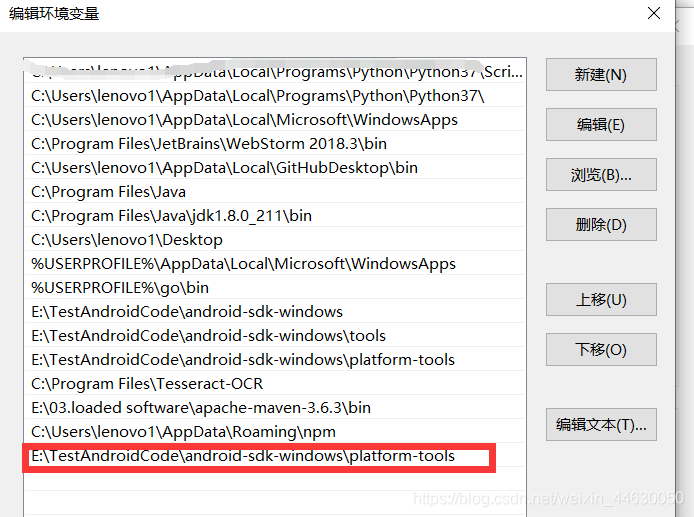
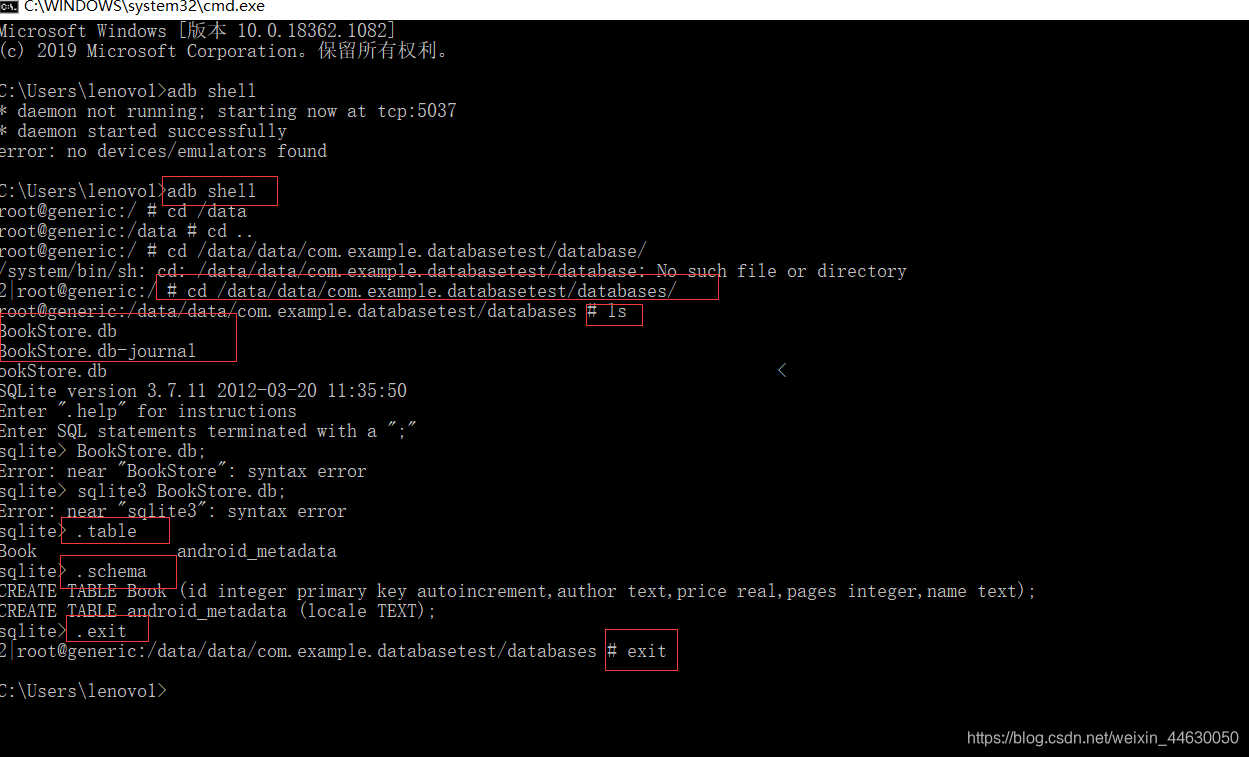
- 输入adb shell,进入设备控制台
- 输入cd /data/data/com.example.databasetest/databases/,进入到android目录下
- ls查看文件夹中有什么
- 里面含有两个文件,一个就是我们创建的BookStore.db和一个journal结尾的文件,这个文件就是为了让数据库能够支持事务而产生的临时日志文件,通常这种文件的大小都是0
- 使用sqlite3 数据库名 来打开数据库,然后输入.table来查看数据库中有哪些表,可以看到有两张表,其中android_metadata表是每个数据库中都会自动生成的,而另一张Book表就是我们在android app中生成的。
- 输入.exit或者.quit退出数据库的编辑,再输入exite就是退出设备控制台。
二、升级数据库
- 我们不能只能创建这一个表就结束了,我们还创建更多的表,所以还是要在MyDatabaseHelper.java中修改函数来实现升级数据库的功能
package com.example.databasetest;

import android.content.Context;
import android.database.sqlite.SQLiteDatabase;
import android.database.sqlite.SQLiteDatabase.CursorFactory;
import android.database.sqlite.SQLiteOpenHelper;
import android.widget.Toast;

public class MyDatabaseHelper extends SQLiteOpenHelper{
	public static final String CREATE_BOOK = "create table Book (" + "id integer primary key autoincrement," + "author text," + "price real,"+ "pages integer," + "name text)";

	public static final String CREATE_CATEGORY = "create table Category(" + "id integer primary key autoincrement" + "category_name text" + "category_code integer";

	private Context mContext;

	public MyDatabaseHelper(Context context,String name,CursorFactory factory,int version) {
		super(context,name,factory,version);
		mContext = context;
	}

	@Override
	public void onCreate(SQLiteDatabase db) {
		db.execSQL(CREATE_BOOK);
		db.execSQL(CREATE_CATEGORY);
		Toast.makeText(mContext ,"Create succeeded",Toast.LENGTH_LONG).show();
	}

	@Override
	public void onUpgrade(SQLiteDatabase db,int oldVersion ,int newVersion) {
		db.execSQL("drop table if exists Book");
		db.execSQL("drop table if exists Category");
		onCreate(db);
	}
}
- 相比上一个版本就是增加升级数据库的SQL语句以及执行“升级数据库”的SQL语句。以及修改了升级函数。
- 这个升级函数可以讲一下,如果发现已经存在Book和Category表,就会先扔这两个表,然后再执行onCreate方法。然而如何让这个函数执行呢?我们就需要修改主活动程序MainActivity.java
dbHelper = new MyDatabaseHelper(this,"BookStore.db",null,2);
- 这里只需要修改一行语句就可以,就是第四个参数改为2,代表着数据升版了,那么有人问,如果是第一次创建呢?这无所谓啊,第一次创建,drop语句不生效而已,仍然会继续执行onCreate()函数。
- 我们查看一下adb shell创建成功了没有

三、添加数据
- 其实android是支持SQL语句,但是为了能够加强交互性,android程序开发即使不用SQL语句也可以对数据库进行“增删改查”一系列操作的。
getReadableDatabase()和·getWritableDatabase()`方法是可以创建和升级数据库的,这两个方法还会返回一个SQLiteDatabase对象。- 具体如何进行我们下次连载再进行编写。
四、源码:
- DatabaseTest
- 地址:https://github.com/ruigege66/Android/tree/master/DatabaseTest
- CSDN:https://blog.csdn.net/weixin_44630050
- 博客园:https://www.cnblogs.com/ruigege0000/
- 欢迎关注微信公众号:傅里叶变换,个人账号,仅用于技术交流
原文:https://www.cnblogs.com/ruigege0000/p/13703152.html
评论(0)