
Golang使用selenium操作Chrome
1.需求
? 解决自动化登录的问题,顺便可以解决爬虫问题。
2.基本概念
? selenium: Selenium 是一个用于 Web 应用程序测试的工具,Selenium 测试直接自动运行在浏览器中,就像真正的用户在手工操作一样。
? webdriver: chromeDriver是谷歌为网站开发人员提供的自动化测试工具。
? selenium和webdriver其实原来是两个不同的开源项目,后来selenium2就把selenium1(RC)和webdriver合并到一起,还是用selenium的名字,但是实现方式和协议基本沿用的是webdriver的。可以看做一样。
? 简单来说,需要通过chromedriver调用chrome,进行模拟浏览器操作。
3.安装
-
下载chromedriver。chrome和chromedriver 要版本对应,chromedriver版本下载,放到相应目录。
-
下载golang代码包。selenium的golang代码包
go get -t -d github.com/tebeka/selenium - 注意点: 本人Win10,调用chrome报错。主要涉及3个点: 1.将chrome添加至环境变量path中,可以通过cmd直接运行chrome.exe确定是否运行成功;2.修改程序的权限,让执行账户获取所有权,避免权限提升 3.如果提示没有找到google-chrome时,拷贝一份chrome.exe重命名为google.chrome.exe。
4.源码分析
4.1 selenium执行流程分析
? 经过我的理解和思考,我认为selenium 主要运行模式如下(个人理解,仅供参考)。
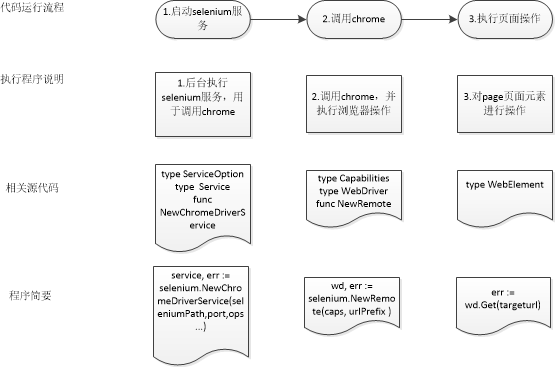
? 程序需要调用selenium库执行相应的函数, 后台调用chrome浏览器,然后将操作元素的请求给下方的浏览器驱动。浏览器驱动再转发这个请求给浏览器。最后将结果返回。
4.2 源码文件分析selenium-golangdoc
? 因为selenium源码包不是很大,同时因为是chrome进行实战,所以我将源码进行删减然后进行添加注释。godoc包应该没有写完整,比如webdriver,webelement只讲了接口,并没有将实现细节,我们可以根据selenium操作进行脑补。可以参考python中selenium中的实现,比如自动化测试。
? 先继续画个图进行包的讲解的吧。
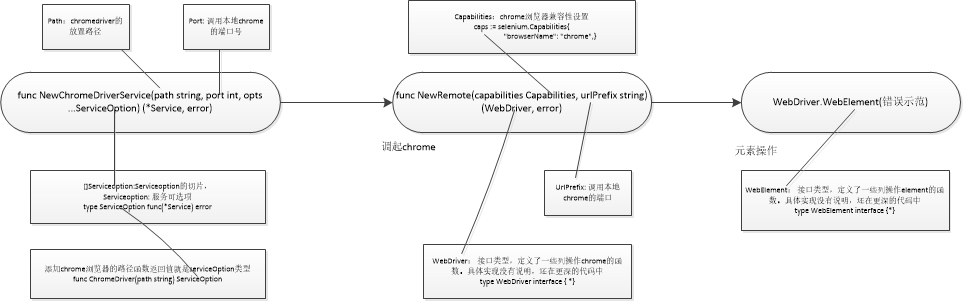
? 源码简略分析:
// 第一类 杂项

//删除会话
func DeleteSession(urlPrefix, id string) error

//开启关闭debug调试
func SetDebug(debug bool)

//设置代理
func (c Capabilities) AddProxy(p Proxy)
//设置日志级别
func (c Capabilities) SetLogLevel(typ log.Type, level log.Level)

// 第二类 seleium后台服务

//服务实例的可选项
type ServiceOption func(*Service) error

//添加chrome路径信息,返回的是serviceOption类型
func ChromeDriver(path string) ServiceOption

//服务的结构体,包含隐藏类型
type Service struct {
    // contains filtered or unexported fields
}

//启动chrome浏览器的服务器,返回service类型指针
func NewChromeDriverService(path string, port int, opts ...ServiceOption) (*Service, error)

//关闭服务,记得defer关闭
func (s *Service) Stop() error

// 第三类 chrome操作相关

//设置浏览器兼容性,map类型,比如chrome浏览器兼容性。
//caps := selenium.Capabilities{"browserName": "chrome"}
type Capabilities map[string]interface{}

//通过调用函数添加chrome兼容性
func (c Capabilities) AddChrome(f chrome.Capabilities)

//启动webdriver实例
func NewRemote(capabilities Capabilities, urlPrefix string) (WebDriver, error)

//通过WebDriver接口可以看出具体页面的实现的方法,是接口,接口里面是实现的方法。
type WebDriver interface {
    //返回服务器环境的版本信息
    // Status returns various pieces of information about the server environment.
    Status() (*Status, error)

    //创建新的session
    // NewSession starts a new session and returns the session ID.
    NewSession() (string, error)

    //创建新的session(已废弃)
    // SessionId returns the current session ID
    // Deprecated: This identifier is not Go-style correct. Use SessionID
    // instead.
    SessionId() string

    //获取新的ssionid
    // SessionID returns the current session ID.
    SessionID() string

    //切换session
    // SwitchSession switches to the given session ID.
    SwitchSession(sessionID string) error

    //返回兼容性
    // Capabilities returns the current session‘s capabilities.
    Capabilities() (Capabilities, error)

    //设置异步脚本执行时间
    // SetAsyncScriptTimeout sets the amount of time that asynchronous scripts
    // are permitted to run before they are aborted. The timeout will be rounded
    // to nearest millisecond.
    SetAsyncScriptTimeout(timeout time.Duration) error

    //设置等待搜索元素的时间,目的: 如果页面结果返回较慢,就需要等待页面内容完整返回,然后再进行页面元素操作。
    // SetImplicitWaitTimeout sets the amount of time the driver should wait when
    // searching for elements. The timeout will be rounded to nearest millisecond.
    SetImplicitWaitTimeout(timeout time.Duration) error

    //设置等待页面的时间
    // SetPageLoadTimeout sets the amount of time the driver should wait when
    // loading a page. The timeout will be rounded to nearest millisecond.
    SetPageLoadTimeout(timeout time.Duration) error

    //设置会话退出
    // Quit ends the current session. The browser instance will be closed.
    Quit() error

    //获取现在窗口句柄,一串序号,打开一个窗口一个句柄
    // CurrentWindowHandle returns the ID of current window handle.
    CurrentWindowHandle() (string, error)

    //获取现在所有打开窗口句柄,获取所有窗口句柄
    // WindowHandles returns the IDs of current open windows.
    WindowHandles() ([]string, error)

    //返回当前页面连接的URL
    // CurrentURL returns the browser‘s current URL.
    CurrentURL() (string, error)

    //获取当前页面的标题
    // Title returns the current page‘s title.
    Title() (string, error)

    //返回当前页面的所有内容
    // PageSource returns the current page‘s source.
    PageSource() (string, error)

    //关闭现在的窗口
    // Close closes the current window.
    Close() error

    //切换frame,frame里面内嵌一个完整html,如果操作里面的内容需要进入iframe中。switchframe(nil),返回到顶层
    // SwitchFrame switches to the given frame. The frame parameter can be the
    // frame‘s ID as a string, its WebElement instance as returned by
    // GetElement, or nil to switch to the current top-level browsing context.
    SwitchFrame(frame interface{}) error

    切换windows到指定窗口
    // SwitchWindow switches the context to the specified window.
    SwitchWindow(name string) error

    //关闭窗口
    // CloseWindow closes the specified window.
    CloseWindow(name string) error

    //设置最大化窗口
    // MaximizeWindow maximizes a window. If the name is empty, the current
    // window will be maximized.
    MaximizeWindow(name string) error

    //设置窗口尺寸
    // ResizeWindow changes the dimensions of a window. If the name is empty, the
    // current window will be maximized.
    ResizeWindow(name string, width, height int) error

    //通过url导航至相应界面。主要选项,就是打开url地址。
    // Get navigates the browser to the provided URL.
    Get(url string) error

    //向前翻
    // Forward moves forward in history.
    Forward() error

    //向后翻
    // Back moves backward in history.
    Back() error

    //刷新
    // Refresh refreshes the page.
    Refresh() error

    //查找定位一个html元素。
    // FindElement finds exactly one element in the current page‘s DOM.
    FindElement(by, value string) (WebElement, error)

    //查找定位多个的html元素
    // FindElement finds potentially many elements in the current page‘s DOM.
    FindElements(by, value string) ([]WebElement, error)

    //获取当前焦点元素
    // ActiveElement returns the currently active element on the page.
    ActiveElement() (WebElement, error)

    //解码元素响应
    // DecodeElement decodes a single element response.
    DecodeElement([]byte) (WebElement, error)

    //解码多个元素响应
    // DecodeElements decodes a multi-element response.
    DecodeElements([]byte) ([]WebElement, error)

    //获取所有cookie
    // GetCookies returns all of the cookies in the browser‘s jar.
    GetCookies() ([]Cookie, error)

    //获取指定cookie
    // GetCookie returns the named cookie in the jar, if present. This method is
    // only implemented for Firefox.
    GetCookie(name string) (Cookie, error)

    //添加cookie到jar
    // AddCookie adds a cookie to the browser‘s jar.
    AddCookie(cookie *Cookie) error

    //删除所有cookie
    // DeleteAllCookies deletes all of the cookies in the browser‘s jar.
    DeleteAllCookies() error

    //删除指定cookie
    // DeleteCookie deletes a cookie to the browser‘s jar.
    DeleteCookie(name string) error

    //敲击鼠标按钮
    // Click clicks a mouse button. The button should be one of RightButton,
    // MiddleButton or LeftButton.
    Click(button int) error

    //双击鼠标按钮
    // DoubleClick clicks the left mouse button twice.
    DoubleClick() error

    //按下鼠标
    // ButtonDown causes the left mouse button to be held down.
    ButtonDown() error

    //抬起鼠标
    // ButtonUp causes the left mouse button to be released.
    ButtonUp() error

    //发送更改到活动元素(已丢弃)
    // SendModifier sends the modifier key to the active element. The modifier
    // can be one of ShiftKey, ControlKey, AltKey, MetaKey.
    //
    // Deprecated: Use KeyDown or KeyUp instead.
    SendModifier(modifier string, isDown bool) error

    //将按键顺序序列发送到活动元素
    // KeyDown sends a sequence of keystrokes to the active element. This method
    // is similar to SendKeys but without the implicit termination. Modifiers are
    // not released at the end of each call.
    KeyDown(keys string) error

    //释放发送的元素
    // KeyUp indicates that a previous keystroke sent by KeyDown should be
    // release
    KeyUp(keys string) error

    //拍摄快照
    // Screenshot takes a screenshot of the browser window.
    Screenshot() ([]byte, error)

    //日志抓取
    // Log fetches the logs. Log types must be previously configured in the
    // capabilities.
    //
    // NOTE: will return an error (not implemented) on IE11 or Edge drivers.
    Log(typ log.Type) ([]log.Message, error)

    //解除警报
    // DismissAlert dismisses current alert.
    DismissAlert() error

    //接受警报
    // AcceptAlert accepts the current alert.
    AcceptAlert() error

    //返回现在警报内容
    // AlertText returns the current alert text.
    AlertText() (string, error)

    //发送警报内容
    // SetAlertText sets the current alert text.
    SetAlertText(text string) error

    //执行脚本
    // ExecuteScript executes a script.
    ExecuteScript(script string, args []interface{}) (interface{}, error)

    //异步执行脚本
    // ExecuteScriptAsync asynchronously executes a script.
    ExecuteScriptAsync(script string, args []interface{}) (interface{}, error)

    //执行源脚本
    // ExecuteScriptRaw executes a script but does not perform JSON decoding.
    ExecuteScriptRaw(script string, args []interface{}) ([]byte, error)

    //异步执行源脚本
    // ExecuteScriptAsyncRaw asynchronously executes a script but does not
    // perform JSON decoding.
    ExecuteScriptAsyncRaw(script string, args []interface{}) ([]byte, error)

    //等待条件为真
    // WaitWithTimeoutAndInterval waits for the condition to evaluate to true.
    WaitWithTimeoutAndInterval(condition Condition, timeout, interval time.Duration) error

    //等待时间
    // WaitWithTimeout works like WaitWithTimeoutAndInterval, but with default polling interval.
    WaitWithTimeout(condition Condition, timeout time.Duration) error

    //等待
    //Wait works like WaitWithTimeoutAndInterval, but using the default timeout and polling interval.
    Wait(condition Condition) error
}

//对相关元素进行后续执行,接口类型,里面是实现方法
type WebElement interface {
    // click选中的元素
    // Click clicks on the element.
    Click() error

    //发送数据到选中元素
    // SendKeys types into the element.
    SendKeys(keys string) error

    //提交按钮
    // Submit submits the button.
    Submit() error

    //清空按钮
    // Clear clears the element.
    Clear() error

    //移动元素到相应的坐标
    // MoveTo moves the mouse to relative coordinates from center of element, If
    // the element is not visible, it will be scrolled into view.
    MoveTo(xOffset, yOffset int) error

    // 查找子元素
    // FindElement finds a child element.
    FindElement(by, value string) (WebElement, error)

    //查找多个子元素
    // FindElement finds multiple children elements.
    FindElements(by, value string) ([]WebElement, error)

    //返回标签名称
    // TagName returns the element‘s name.
    TagName() (string, error)

    //返回元素内容
    // Text returns the text of the element.
    Text() (string, error)

    //元素被选中返回真
    // IsSelected returns true if element is selected.
    IsSelected() (bool, error)

    //如果元素启用返回真
    // IsEnabled returns true if the element is enabled.
    IsEnabled() (bool, error)

    //如果元素显示返回真
    // IsDisplayed returns true if the element is displayed.
    IsDisplayed() (bool, error)
    //获取元素的名称
    // GetAttribute returns the named attribute of the element.
    GetAttribute(name string) (string, error)

    //范围元素的位置
    // Location returns the element‘s location.
    Location() (*Point, error)

    //滚动后返回元素的位置
    // LocationInView returns the element‘s location once it has been scrolled
    // into view.
    LocationInView() (*Point, error)

    //返回元素的大小
    // Size returns the element‘s size.
    Size() (*Size, error)

    //返回css优先级
    // CSSProperty returns the value of the specified CSS property of the
    // element.
    CSSProperty(name string) (string, error)

    //返回属性滚动的快照
    // Screenshot takes a screenshot of the attribute scroll‘ing if necessary.
    Screenshot(scroll bool) ([]byte, error)
}
4.3 说明
-
? 可能需要了解Html,Css,JavaScript的基本概念。菜鸟教程
-
? 可能需要了解Dom结构。html Dom
-
? 可能需要了解XPATH,CSSSelector 。Xpath和CSS选择器的使用详解
-
? 可以参考python中selenium操作实现,毕竟python案例多。selenim操作日常记录
- 参考学习白月黑羽的自动化教程,b站视频同步,强推。自动化测试
5.基础操作
? 操作之前,先分享一个快速获取CSS Selector和xpath的方法。
? 大家用chrome浏览器访问网页,按F12后,点击调试页左上角Elements箭头,然后鼠标移动到目的位置,即可显示页面对应的HTML 元素。
? 右键选中的元素,选择copy,此时可以根据直接选择ID,CLASS,CSS Selector或Xpath的地址.
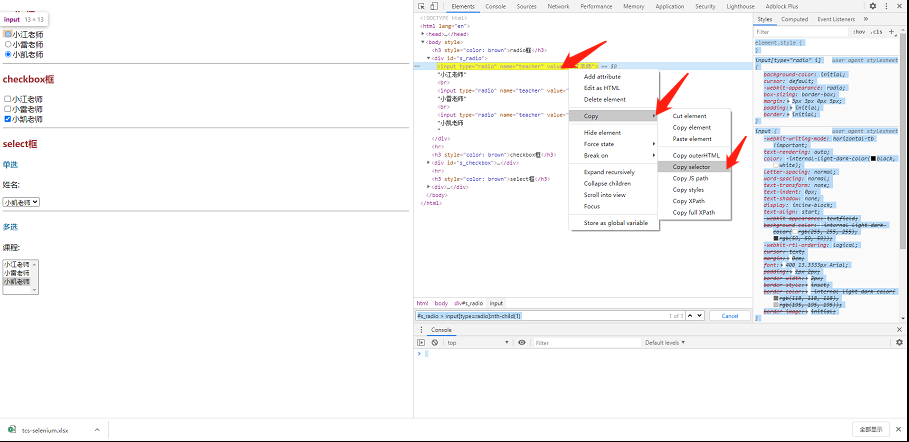
参考别人的案例,写了几个小案例,仅供参考。亮代码吧。
-
打开百度,自动搜索。
package main import ( "fmt" "github.com/tebeka/selenium" "time" ) const ( //设置常量 分别设置chromedriver.exe的地址和本地调用端口 seleniumPath = `H:\webdriver\chromedriver.exe` port = 9515 ) func main() { //1.开启selenium服务 //设置selium服务的选项,设置为空。根据需要设置。 ops := []selenium.ServiceOption{} service, err := selenium.NewChromeDriverService(seleniumPath, port, ops...) if err != nil { fmt.Printf("Error starting the ChromeDriver server: %v", err) } //延迟关闭服务 defer service.Stop() //2.调用浏览器 //设置浏览器兼容性,我们设置浏览器名称为chrome caps := selenium.Capabilities{ "browserName": "chrome", } //调用浏览器urlPrefix: 测试参考:DefaultURLPrefix = "http://127.0.0.1:4444/wd/hub" wd, err := selenium.NewRemote(caps, "http://127.0.0.1:9515/wd/hub") if err != nil { panic(err) } //延迟退出chrome defer wd.Quit() //3.对页面元素进行操作 //获取百度页面 if err := wd.Get("https://www.baidu.com/"); err != nil { panic(err) } //找到百度输入框id we, err := wd.FindElement(selenium.ByID, "kw") if err != nil { panic(err) } //向输入框发送“” err = we.SendKeys("天下第一") if err != nil { panic(err) } //找到百度提交按钮id we, err = wd.FindElement(selenium.ByID, "su") if err != nil { panic(err) } //点击提交 err = we.Click() if err != nil { panic(err) } //睡眠20秒后退出 time.Sleep(20 * time.Second) } -
内嵌iframe切换。
package main import ( "fmt" "github.com/tebeka/selenium" "time" ) const ( //设置常量 分别设置chromedriver.exe的地址和本地调用端口 seleniumPath = `H:\webdriver\chromedriver.exe` port = 9515 ) func main() { //1.开启selenium服务 //设置selium服务的选项,设置为空。根据需要设置。 ops := []selenium.ServiceOption{} service, err := selenium.NewChromeDriverService(seleniumPath, port, ops...) if err != nil { fmt.Printf("Error starting the ChromeDriver server: %v", err) } //延迟关闭服务 defer service.Stop() //2.调用浏览器 //设置浏览器兼容性,我们设置浏览器名称为chrome caps := selenium.Capabilities{ "browserName": "chrome", } //调用浏览器urlPrefix: 测试参考:DefaultURLPrefix = "http://127.0.0.1:4444/wd/hub" wd, err := selenium.NewRemote(caps, "http://127.0.0.1:9515/wd/hub") if err != nil { panic(err) } //延迟退出chrome defer wd.Quit() //3.对页面元素进行操作 //获取测试网页 if err := wd.Get("http://cdn1.python3.vip/files/selenium/sample2.html"); err != nil { panic(err) } //4.切换到相应的frame上去 //wd.SwitchFrame(可以id或者frame获取的webelement),我们使用二种方式分别实现。 //4.1 通过frame的id查找 此时id=frame1 /* err = wd.SwitchFrame("frame1") if err != nil { panic(err) } // 此时定位到iframe的html中,再像使用bycssselector即可 // 因为animal包含多个对象,我们使用findelements wes, err := wd.FindElements(selenium.ByCSSSelector, ".animal") if err != nil { panic(err) } //循环获取每个元素的信息 for _,we := range wes { text, err := we.Text() if err != nil { panic(err) } fmt.Println(text) } */ //4.2 frame获取的webelement,通过切换webelement实现。 // 找到ifname的webelement对象 element, err := wd.FindElement(selenium.ByCSSSelector, "#frame1") // 不同的获取element方式 //element, err := wd.FindElement(selenium.ByCSSSelector, `iframe[name="innerFrame"]`) if err != nil { panic(err) } //切换到iframe中 err = wd.SwitchFrame(element) if err != nil { panic(err) } // 此时定位到iframe的html中,再像使用bycssselector即可 // 因为animal包含多个对象,我们使用findelements wes, err := wd.FindElements(selenium.ByCSSSelector, ".animal") if err != nil { panic(err) } //循环获取每个元素的信息 for _, we := range wes { text, err := we.Text() if err != nil { panic(err) } fmt.Println(text) } //5.切换回顶层frame,因为切换中frame中是不能操作外层值元素的,所以我们要切换出来 //frame=nil是切换回顶层frame err = wd.SwitchFrame(nil) if err != nil { panic(err) } //根据class name选择元素 we, err := wd.FindElement(selenium.ByCSSSelector, ".baiyueheiyu") if err != nil { panic(err) } //查看顶层元素的内容 fmt.Println(we.Text()) //睡眠20秒后退出 time.Sleep(20 * time.Second) } -
多windows切换。
package main import ( "fmt" "github.com/tebeka/selenium" "strings" "time" ) const ( //设置常量 分别设置chromedriver.exe的地址和本地调用端口 seleniumPath = `H:\webdriver\chromedriver.exe` port = 9515 ) func main() { //1.开启selenium服务 //设置selenium服务的选项,设置为空。根据需要设置。 ops := []selenium.ServiceOption{} service, err := selenium.NewChromeDriverService(seleniumPath, port, ops...) if err != nil { fmt.Printf("Error starting the ChromeDriver server: %v", err) } //延迟关闭服务 defer service.Stop() //2.调用浏览器实例 //设置浏览器兼容性,我们设置浏览器名称为chrome caps := selenium.Capabilities{ "browserName": "chrome", } //调用浏览器urlPrefix: 测试参考:DefaultURLPrefix = "http://127.0.0.1:4444/wd/hub" wd, err := selenium.NewRemote(caps, "http://127.0.0.1:9515/wd/hub") if err != nil { panic(err) } //延迟退出chrome defer wd.Quit() //3.打开多页面chrome实例 //目前就想到两种方式可以打开, //第一种就是页面中有url连接,通过click()方式打开 //第二种方式就是通过脚本方式打开。wd.ExecuteScript if err := wd.Get("http://cdn1.python3.vip/files/selenium/sample3.html"); err != nil { panic(err) } //第一种方式,找到页面中的url地址,进行页面跳转 we, err := wd.FindElement(selenium.ByTagName, "a") if err != nil { panic(err) } we.Click() //第二种方式,通过运行通用的js脚本打开新窗口,因为我们暂时不需要操作获取的结果,所有不获取返回值。 wd.ExecuteScript(`window.open("https://www.qq.com", "_blank");`, nil) wd.ExecuteScript(`window.open("https://www.runoob.com/jsref/obj-window.html", "_blank");`, nil) //这一行是发送警报信息,写这一行的目的,主要是看当前主窗口是哪一个 wd.ExecuteScript(`window.alert(location.href);`, nil) //查看当前窗口的handle值 handle, err := wd.CurrentWindowHandle() if err != nil { panic(err) } fmt.Println(handle) fmt.Println("--------------------------") //查看所有网页的handle值 handles, err := wd.WindowHandles() if err != nil { panic(err) } for _, handle := range handles { fmt.Println(handle) } fmt.Println("--------------------------") //4.跳转到指定的网页 //我们虽然打开了多个页面,但是我们当前的handle值,还是第一个页面的,我们要想办法搞定它。 //记得保存当前主页面的handle值 //mainhandle := handle //通过判断条件进行相应的网页 //获取所有handle值 handles, err = wd.WindowHandles() if err != nil { panic(err) } //遍历所有handle值,通过url找到目标页面,判断相等时,break出来,就是停到相应的页面了。 for _, handle := range handles { wd.SwitchWindow(handle) url, _ := wd.CurrentURL() if strings.Contains(url, "qq.com") { break } } //查看此页面的handle handle, err = wd.CurrentWindowHandle() if err != nil { panic(err) } fmt.Println(handle) //这一行是发送警报信息,写这一行的目的,主要是看当前主窗口是哪一个 wd.ExecuteScript(`window.alert(location.href);`, nil) //切换回第一个页面 //wd.SwitchWindow(mainhandle) //睡眠20秒后退出 time.Sleep(20 * time.Second) } -
单选,多选框操作。
package main

import (
    "fmt"
    "github.com/tebeka/selenium"
    "time"
)

const (
    //设置常量 分别设置chromedriver.exe的地址和本地调用端口
    seleniumPath = `H:\webdriver\chromedriver.exe`
    port         = 9515
)

func main() {
    //1.开启selenium服务
    //设置selenium服务的选项,设置为空。根据需要设置。
    ops := []selenium.ServiceOption{}
    service, err := selenium.NewChromeDriverService(seleniumPath, port, ops...)
    if err != nil {
        fmt.Printf("Error starting the ChromeDriver server: %v", err)
    }
    //延迟关闭服务
    defer service.Stop()

    //2.调用浏览器实例
    //设置浏览器兼容性,我们设置浏览器名称为chrome
    caps := selenium.Capabilities{
        "browserName": "chrome",
    }
    //调用浏览器urlPrefix: 测试参考:DefaultURLPrefix = "http://127.0.0.1:4444/wd/hub"
    wd, err := selenium.NewRemote(caps, "http://127.0.0.1:9515/wd/hub")
    if err != nil {
        panic(err)
    }
    //延迟退出chrome
    defer wd.Quit()

    // 3单选radio,多选checkbox,select框操作(功能待完善,https://github.com/tebeka/selenium/issues/141)
    if err := wd.Get("http://cdn1.python3.vip/files/selenium/test2.html"); err != nil {
        panic(err)
    }
    //3.1操作单选radio
    we, err := wd.FindElement(selenium.ByCSSSelector, `#s_radio > input[type=radio]:nth-child(3)`)
    if err != nil {
        panic(err)
    }
    we.Click()

    //3.2操作多选checkbox
    //删除默认checkbox
    we, err = wd.FindElement(selenium.ByCSSSelector, `#s_checkbox > input[type=checkbox]:nth-child(5)`)
    if err != nil {
        panic(err)
    }
    we.Click()
    //选择选项
    we, err = wd.FindElement(selenium.ByCSSSelector, `#s_checkbox > input[type=checkbox]:nth-child(1)`)
    if err != nil {
        panic(err)
    }
    we.Click()
    we, err = wd.FindElement(selenium.ByCSSSelector, `#s_checkbox > input[type=checkbox]:nth-child(3)`)
    if err != nil {
        panic(err)
    }
    we.Click()

    //3.3 select多选
    //删除默认选项

    //选择默认项
    we, err = wd.FindElement(selenium.ByCSSSelector, `#ss_multi > option:nth-child(3)`)
    if err != nil {
        panic(err)
    }
    we.Click()

    we, err = wd.FindElement(selenium.ByCSSSelector, `#ss_multi > option:nth-child(2)`)
    if err != nil {
        panic(err)
    }
    we.Click()

    //睡眠20秒后退出
    time.Sleep(20 * time.Second)
}
结束语
? 个人理解,仅供参考。如有错误,欢迎指正。
? 一直在路上,默默前行。
?
参考
原文:https://blog.51cto.com/9406836/2499426