
keyboard-interactive authentication with the ssh2 server failed 的SecureCRT报错解决
时间:2020-05-28 11:15:22
收藏:0
阅读:440
两种解决方法:
一、选定SSH2,选择Authentication,勾选Password,然后将该选项上移,挪到第一位即可
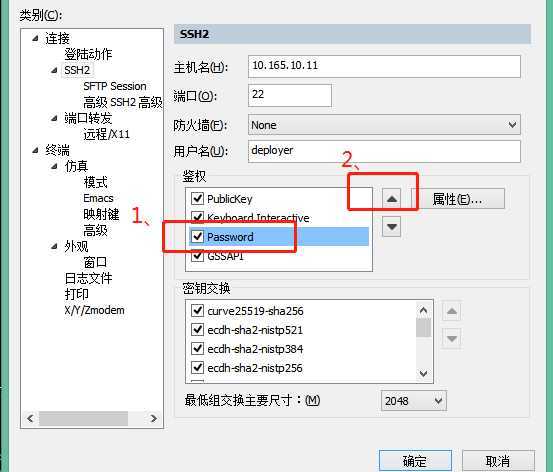
或者:
二、服务器端修改配置
默认情况/etc/ssh/sshd_config文件为注释掉的,
#PasswordAuthentication no
改为
PasswordAuthentication yes
#以下视情况修改
#PermitRootLogin = no
改为
PermitRootLogin = yes #允许root用户直接登陆 #不建议root用户直接登录,可能会涉及安全问题
原文:https://www.cnblogs.com/flyxuxi/p/12979086.html
评论(0)