
微信小程序开发(六)-常?组件
时间:2020-05-02 12:29:51
收藏:0
阅读:42
一. 常用组件
view,text,rich--text,button,image,navigator,icon,swiper,radio,checkbox text,button,image,navigator,icon,swiper,radio,checkbox。。
1.view
代替 原来的 div标签
2. text
1. ?本标签
2. 只能嵌套text
3. ?按?字可以复制(只有该标签有这个功能)
4. 可以对空格 回? 进?编码

  <text selectable="{{false}}" decode="{{false}}">
   普 通
  </text>
3.image
1. 图?标签,image组件默认宽度320px、?度240px
2. ?持懒加载
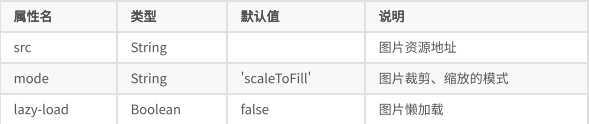
mode 有效值:
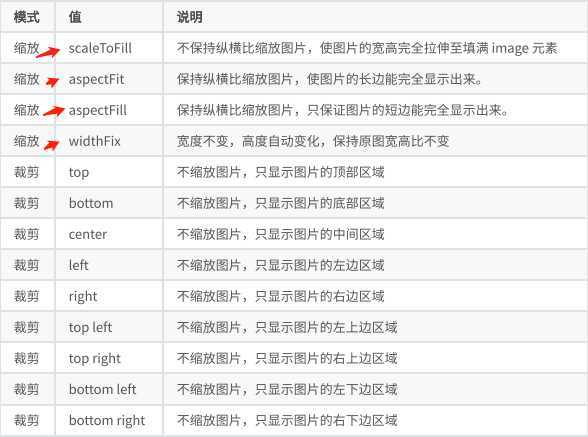
mode 有 13 种模式,其中 4 种是缩放模式,9种是裁剪模式。
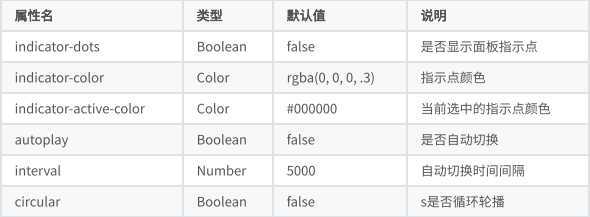
4.swiper(微信内置轮播图组件)
注意:默认宽度 100% ?度 150px
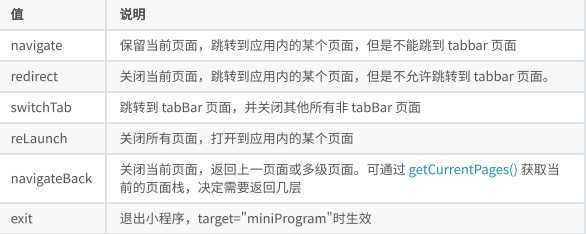
5.navigator(导航组件 类似超链接标签)
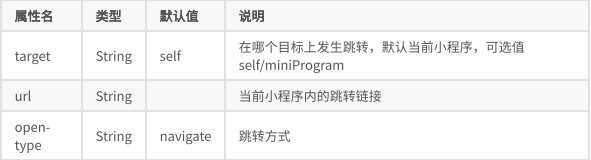
1.open-type 有效值:
6. rich-text(富文本标签)
可以将字符串解析成 对应标签,类似 vue中 v--html功能
// 1   index.wxml 加载 节点数组 <rich-text nodes="{{nodes}}" bindtap="tap"></rich-text>
// 2 加载 字符串 <rich-text nodes=‘<img
src="https://developers.weixin.qq.com/miniprogram/assets/images/head_global_z_@all.p
ng" >‘></rich-text>

// index.js

Page({
  data: {
    nodes: [{
      name: ‘div‘,
      attrs: {
        class: ‘div_class‘,
        style: ‘line-height: 60px; color: red;‘
     },
      children: [{
        type: ‘text‘,
        text: ‘Hello World!‘
     }]
   }]
 },
  tap() {
    console.log(‘tap‘)
 }
})
7. button
<button
  type="default"
  size="{{defaultSize}}"
  loading="{{loading}}"
  plain="{{plain}}"
>
 default
</button>
属性:
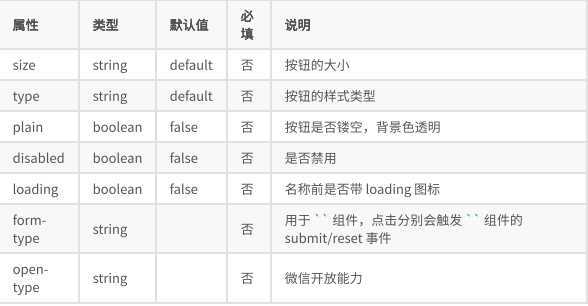
size 的合法值

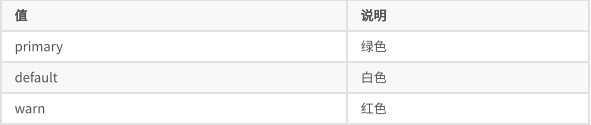
type 的合法值
form-type 的合法值

open-type 的合法值
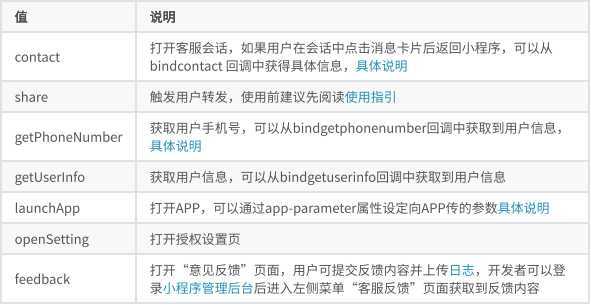
open-type 的 contact的实现流程
1. 将?程序 的 appid由测试号改为 ??的 appid
2. 登录微信?程序官?,添加客服-微信
8.icon, radio,checkbox
radio需要搭配 radio-group ?起使?
checkbox需要搭配checkbox-group ?起使?
原文:https://www.cnblogs.com/feifan1/p/12817053.html
评论(0)