
为win10添加右键“以管理员身份运行MSI”选项
时间:2020-05-01 19:50:01
收藏:0
阅读:162
win+r运行regedit以打开注册表编辑器
定位到HKEY_CLASSES_ROOT\Msi.Package\shell
右键shell,新建 项 项名称为runas
双击runas右边的默认,填写以管理员身份运行MSI
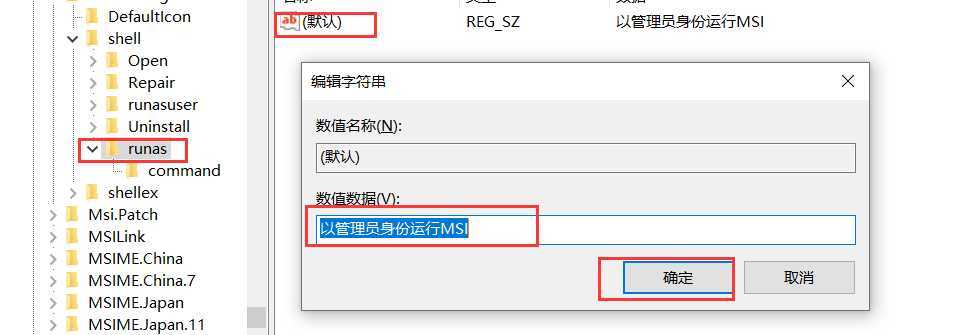
右键runas,新建 项 项名称为command
双击command右边的默认,填写msiexec /i"%1"
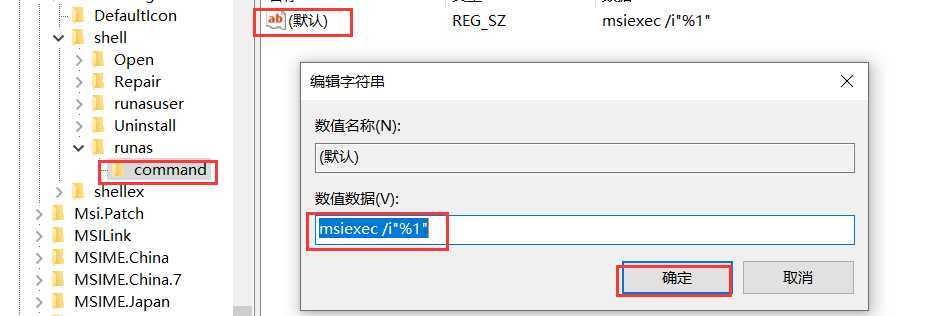
这时候右键要运行的msi文件,可以看到以管理员身份运行MSI选项,点击后正常运行则OK
参考:
原文:https://www.cnblogs.com/ccmig/p/12814222.html
评论(0)