
jupyter notebook 切换默认环境
时间:2020-04-11 18:34:31
收藏:0
阅读:289
jupyter notebook 切换默认环境
前景提要
在Anaconda种创建了一个名为tensorflow的环境,并安装了tensorflow,经测试可以正常运行tensorflow,现在想在jupyter notebook里,运行tensorflow代码,怎么切换默认环境?(jupyter notebook 默认环境应该是anaconda的基环境(base))。
教程
进入tensorflow环境
conda activate tensorflow
安装ipython内核
conda install ipykernel
继续在当前环境中(即tensorflow)输入
python -m ipykernel install --user --name tensorflow --display-name "Python [conda env:tensorflow]"
验证与测试
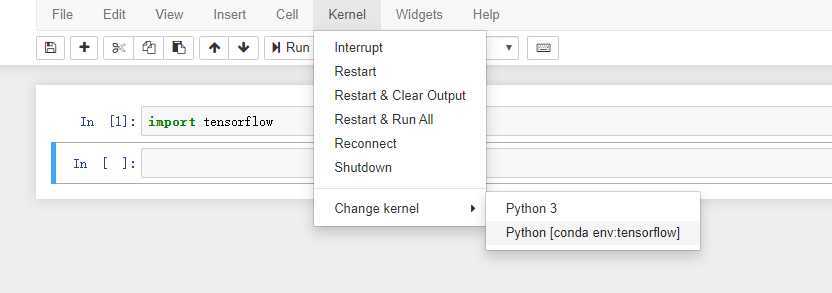
打开jypyter notebook,右侧选择New按钮时,若出现 Python [conda env:tensorflow] ,则表示环境已经引入到jupyter notebook里。为了进一步测试,可以新建文件
import tensorflow
运行cell 不报错即为正常。
原文:https://www.cnblogs.com/ctgu/p/12679845.html
评论(0)