
PowerDesigner设计表时显示注释列Comment(转载)
时间:2020-02-17 19:58:52
收藏:0
阅读:554
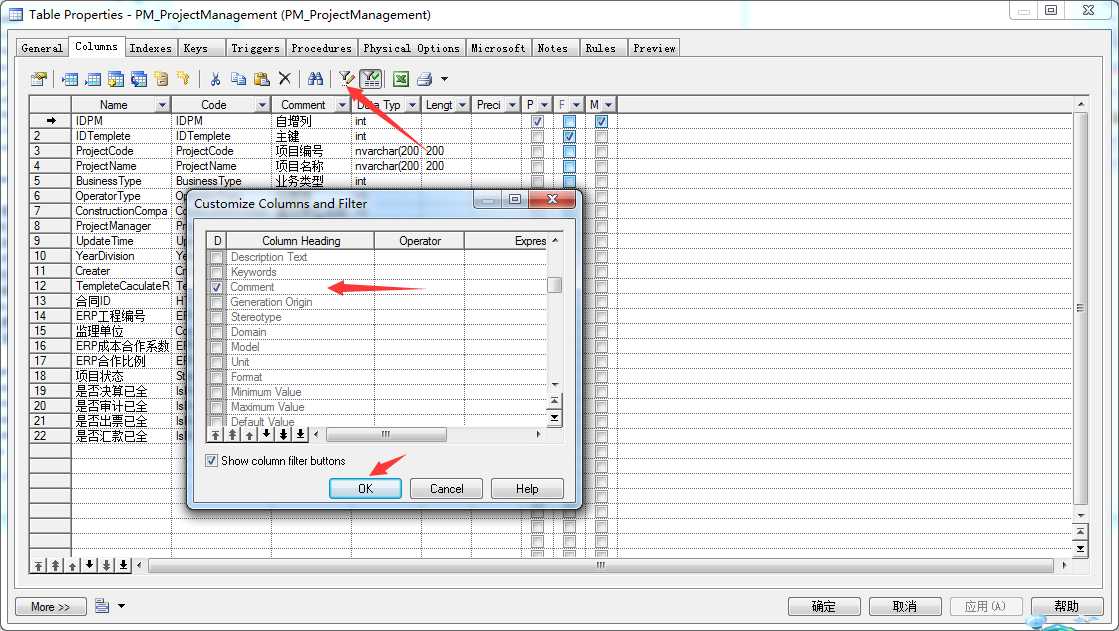
选中准备编辑的表,【右键】->【Properties】->【Columns】->【Customize Columns and Filter】->【Comment】->【OK】
或使用快捷键
【右键】->【Properties】->【Columns】->【Ctrl+U】->【Comment】->【OK】
————————————————
原文链接:https://blog.csdn.net/xiaouncle/article/details/53463581
原文:https://www.cnblogs.com/hao-1234-1234/p/12322909.html
评论(0)