
Hive学习笔记二
时间:2020-01-25 19:24:32
收藏:0
阅读:92
Hive常见属性配置
1、Hive数据仓库位置配置
1)Default数据仓库的最原始位置是在hdfs上的:/user/hive/warehouse路径下
2)在仓库目录下,没有对默认的数据库default创建文件夹。如果某张表属于default数据库,直接在数据仓库目录下创建一个文件夹。
3)修改default数据仓库原始位置(将hive-default.xml.template如下配置信息拷贝到hive-site.xml文件中)
<property>
<name>hive.metastore.warehouse.dir</name>
<value>/user/hive/warehouse</value>
<description>location of default database for the warehouse</description>
</property>
4) 配置同组用户有执行权限
bin/hdfs dfs -chmod g+w /user/hive/warehouse2、查询时,数据库名信息显示配置
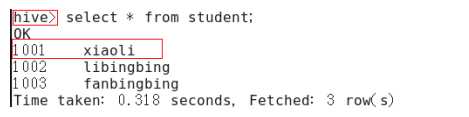
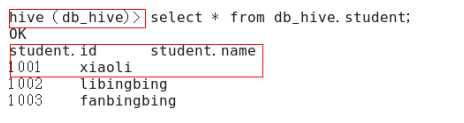
1)在hive-site.xml文件中添加如下配置信息,就可以实现显示当前数据库,以及查询表的头信息配置。
<property>
    <name>hive.cli.print.header</name>
    <value>true</value>
</property>

<property>
    <name>hive.cli.print.current.db</name>
    <value>true</value>
</property>
2)重新启动hive,对比配置前后差异
配置前:
配置后:
将本地库文件导入Hive案例
需求:将本地/opt/module/datas/student.txt这个目录下的数据导入到hive的student(id int, name string)表中。- 1、数据准备:在/opt/module/datas/student.txt这个目录下准备数据
//1)在/opt/module/目录下创建datas
[itstar@bigdata111module]$ mkdir datas

//2)在/opt/module/datas/目录下创建student.txt文件并添加数据
[itstar@bigdata111datas]$ touch student.txt
[itstar@bigdata111datas]$ vi student.txt
1001    zhangshan
1002    lishi
1003    zhaoliu
//注意以tab键间隔。- 2、Hive实际操作
//1)启动hive
[itstar@bigdata111hive]$ bin/hive

//2)显示数据库
hive>show databases;

//3)使用default数据库
hive>use default;

//4)显示default数据库中的表
hive>show tables;

//5)删除已创建的student表
hive> drop table student;

//6)创建student表, 并声明文件分隔符’\t’
hive> create table student(id int, name string) ROW FORMAT DELIMITED FIELDS TERMINATED BY '\t';

//7)加载/opt/module/datas/student.txt 文件到student数据库表中。
hive> load data local inpath '/opt/module/hive/mydata/student.txt' into table student;

//8)Hive查询结果
hive> select * from student;
Hive常用交互命令
- “-e”不进入hive的交互窗口执行sql语句
[itstar@bigdata111hive]$ bin/hive -e "select id from student;"- “-f”执行脚本中sql语句
//1)在/opt/module/datas目录下创建hivef.sql文件
[itstar@bigdata111datas]$ touch hivef.sql
----------------------
//文件中写入正确的sql语句
select *from student;

//2)执行文件中的sql语句
[itstar@bigdata111hive]$ bin/hive -f /opt/module/datas/hivef.sql

//3)执行文件中的sql语句并将结果写入文件中
[itstar@bigdata111hive]$ bin/hive -f /opt/module/datas/hivef.sql  > /opt/module/datas/hive_result.txt
Hive其他命令操作
- 退出hive窗口:
hive(default)>exit;
hive(default)>quit;

//在新版的oracle中没区别了,在以前的版本是有的:
//exit:先隐性提交数据,再退出;
//quit:不提交数据,退出;- 在hive cli命令窗口中如何查看hdfs文件系统
hive(default)>dfs -ls /;- 在hive cli命令窗口中如何查看hdfs本地系统
hive(default)>! ls /opt/module/datas;- 查看在hive中输入的所有历史命令
//1)进入到当前用户的根目录/root或/home/itstar
//2)查看. hivehistory文件
[itstar@bigdata111~]$ cat .hivehistory
参数配置方式
- 查看当前所有的配置信息
hive>set;参数的配置三种方式
1)配置文件方式
默认配置文件:hive-default.xml
用户自定义配置文件:hive-site.xml
注意:用户自定义配置会覆盖默认配置。另外,Hive也会读入Hadoop的配置,因为Hive是作为Hadoop的客户端启动的,Hive的配置会覆盖Hadoop的配置。配置文件的设定对本机启动的所有Hive进程都有效。2)命令行参数方式
启动Hive时,可以在命令行添加-hiveconf param=value来设定参数。
例如:[itstar@bigdata112 hive]$ bin/hive -hiveconf mapred.reduce.tasks=10; //注意:仅对本次hive启动有效 //查看参数设置: hive (default)> set mapred.reduce.tasks;3)参数声明方式
可以在HQL中使用SET关键字设定参数
例如:hive (default)> set mapred.reduce.tasks=10; //注意:仅对本次hive启动有效。 //查看参数设置 hive (default)> set mapred.reduce.tasks;
??上述三种设定方式的优先级依次递增。即配置文件<命令行参数<参数声明。注意某些系统级的参数,例如log4j相关的设定,必须用前两种方式设定,因为那些参数的读取在会话建立以前已经完成了。
原文:https://www.cnblogs.com/nthforsth/p/12232322.html
评论(0)