
通俗易懂--快速入门Vue--4
1.Vue中Css动画原理
动画执行原理:
<transition name="fade">
    <div v-if="show">hello world</div>
</transition>
<!--name为fade-->
定义css样式应该为:.fade-enter  .fade-enter-active
动画显示过程
当一个元素被transition包裹,vue会自动分析元素的css样式构建一个流程,如下图:
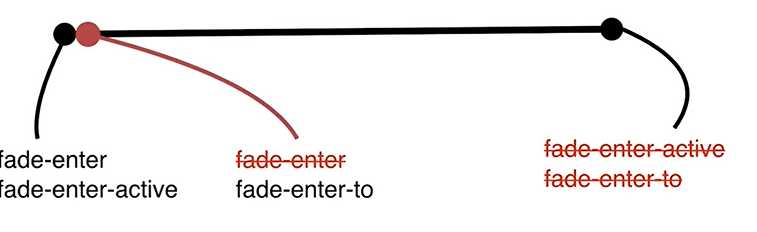
在动画要执行的一瞬间会往内部标签(这里时div),添加class 为fade-enter和fade-enter-active.当动画第一时间开始执行,transition会自己识别把class为fade-enter去掉,再增加class=fade-enter-to,当动画执行完毕会把fade-enter-active和fade-enter-to去除掉。
动画隐藏过程
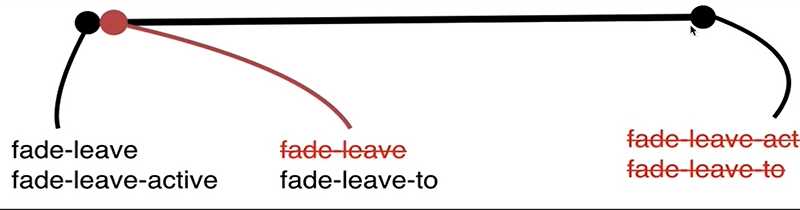
隐藏第一个瞬间时候,vue会往内部标签(这里时div)添加class为fade-leave和fade-leave-active,当动画第一时间开始执行,transition会自己识别把class为fade-leave去掉,同时增加fade-leave-to,当动画执行完毕会把fade-leave-active和fade-leave-to去除掉
- 一个简单动画显示
<!DOCTYPE html>
<html lang="en">
<head>
    <meta charset="UTF-8">
    <title>Title</title>
    <style>
        .fade-enter{
            opacity:0;
        }
        .fade-enter-active{
            transition: opacity 3s;
        }
        .fade-leave-to{
            opacity:0;
        }
        .fade-leave-active{
            transition: opacity 3s;
        }
    </style>
</head>
<script src="./vue.js"></script>
<body>
<div id="exp">
    <transition name="fade">
        <div v-if="show">hello world</div>
    </transition>
    <button @click="handleClick">切换</button>
</div>
</body>
<script>
    var vm = new Vue({
        // el限制一个vue实例的管理范围。
        el:"#exp",
        data:{
            show:true,
        },
        methods:{
            handleClick:function () {
                this.show = !this.show
            }
        }
    });
</script>
</html>
2.Vue中使用Animate.css库
那么我们可以自己定义CSS动画的class名字吗?可以的
<head> <!--通过@keyframs定制css样式--> <style> @keyframes bounce-in { 0% { transform: scale(0); } 50% { transform: scale(1.5); } 100% { transform: scale(1); } } /*指定active的动画效果*/ .active{ transform-origin: left center; animation: bounce-in 1s; } /*指定leave的动画效果*/ .leave{ transform-origin: left center; animation: bounce-in 1s reverse; } </style> </head> <body> <div id="exp"> <!--显示动画enter-active-class指定class名--> <!-- 隐藏动画leave-active-class指定class名--> <transition name="fade" enter-active-class="active" leave-active-class="leave" > <div v-if="show">hello world</div> </transition> <button @click="handleClick">切换</button> </div> </body>Animate.css有丰富的css动画效果,不用自己写css动画通过Animate.css引入动画。Animate.css官网地址
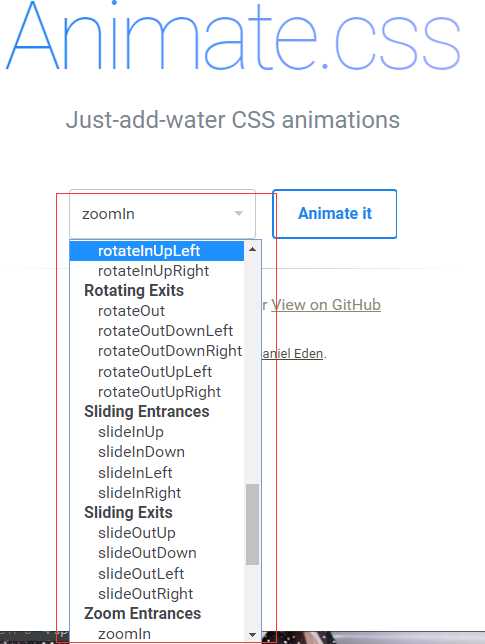
去官网下载Animate.css
引入css样式
<link rel="stylesheet" type="text/css" href="./animate.css">使用
在使用时候需要注意,在transiton标签中定义:enter-active-class为入场动画,leave-active-class为离场动画,只写animated是不行的,需要指定 Animate.css定义的样式名,也就是如下格式: animated [样式名字]
<transition name="fade"
        enter-active-class="animated swing"
        leave-active-class="animated shake"
        >
            <div v-if="show">hello world</div>
</transition>
3.Vue中同时使用过渡和动画
当你刷新页面,元素第一次显示时候,动画效果并没有添加上,那么如何做呢?在transition标签添加2个属性appear 和 appear-active-class 即可
<transition
            appear
            enter-active-class="animated swing"
            leave-active-class="animated shake"
            appear-active-class="animated swing"
    >
        <div v-if="show">hello world</div>
    </transition>
    <button @click="handleClick">切换</button>
当我们需要动画效果中,既有transition效果,又有Animate这样的css3效果。
<style>
    /*在style定义transition的效果*/
    .v-enter{
        opacity:0;
    }
    .v-enter-active{
        transition: opacity 3s;
    }
    .v-leave-to{
        opacity:0;
    }
    .v-leave-active{
        transition: opacity 3s;
    }
</style>
<!--只需要在后面添加class名v-enter-active,v-leave-active-->
<transition
            appear
            enter-active-class="animated swing v-enter-active"
            leave-active-class="animated shake v-leave-active"
            appear-active-class="animated swing"
>
    <div v-if="show">hello world</div>
</transition>
当两个动画效果结合会出现问题,两个动画执行的时长不一样,那么以哪个为准呢。
transition 标签添加type="transition" 表示以transition时间为准自定义动画时长
# 这里的10000 代表10秒
transition 标签添加  :duration="10000"

# 这里定义入场时间5s,离场时间10秒
:duration="{enter:5000,leave:10000}"
4.Vue中的Js动画与Velocity.js的结合
1.通过JS进行入场动画
通过js控制动画效果,需要介绍三个钩子,@before-enter在进行显示时候会执行它绑定函数,@enter在进行动画效果运行时会执行它绑定函数。@after-enter表示动画结束
<div id="exp">
    <transition
    name="fade"
    @before-enter="handleBeforeEnter"
    @enter="handleEnter"
    @after-enter="handleAfterEnter"
    >
        <div v-show="show">Hello world</div>
    </transition>
    <button @click="handleClick">toggle</button>
</div>
</body>
<script>
    var vm = new Vue({
        // el限制一个vue实例的管理范围。
        el:"#exp",
        data:{
            show:true
        },
        methods:{
            handleClick:function () {
                this.show = !this.show
            },
            //进行动画之前字体颜色为红色
            handleBeforeEnter:function (els) {
                els.style.color = 'red'
            },
            // 进行动画展示时为绿色
            // 执行完动画要执行done()
            handleEnter:function (els,done) {
                setTimeout(()=>{
                    els.style.color="green";
                },2000);
                setTimeout(() => {
                    // 必须调用done() 表示动画执行完毕
                    done()
                },4000)
            },
            // 入场动画执行完毕 字体颜色变回黑色
            handleAfterEnter:function (els) {
                els.style.color="black";
            }
        }
    });
</script>
2.JS进行出场动画
- @before-leave,@leave,@after-leave与进行动画用法是一样的。这里布局例子了。
<transition
    name="fade"
    @before-leave="handleBeforeLeave"
    @leave="handleLeave"
    @after-leave="handleAfterLeave"
    > ......  </transition>
3.JS常用的动画库Velocity.js
使用Velocity.js进行动画展示,Velocity.js的下载地址
引入
<script src="velcity.js"></script>简单使用Velocity.js的方法,还是上面那个例子
var vm = new Vue({
    // el限制一个vue实例的管理范围。
    el:"#exp",
    data:{
        show:true
    },
    methods:{
        handleClick:function () {
            this.show = !this.show
        },
        handleBeforeEnter:function (els) {
            //opacity设置元素不透明级别
            els.style.opacity = 0;
        },
        handleEnter:function (els,done) {
            //执行Velcity内函数
            //意思是透明级别从0-->1 用时1秒(1000等于1s),执行完成设置done
            Velocity(els,{opacity:1},{duration:1000,complete:done})
        },
        handleAfterEnter:function (els) {
            console.log("动画结束")
        }
    }
});
5.Vue中多个元素或组件的过渡
1.多个元素的过渡
通过transition自定义动画效果,进行多元素的过渡动画效果:
<!DOCTYPE html>
<html lang="en">
<head>
    <meta charset="UTF-8">
    <title>Title</title>
    <style>
        .v-enter, .v-leave-to {
            opacity: 0;
        }
        .v-enter-active, .v-leave-active {
            transition: opacity 1s;
        }
    </style>
</head>
<script src="./vue.js"></script>
<body>
<div id="exp">
    <transition>
        <div v-if="show" key="hello">Hello world</div>
        <div v-else="show" key="bye">bye world</div>
    </transition>
    <button @click="handleClick">toggle</button>
</div>
</body>
<script src="velcity.js"></script>
<script>
    var vm = new Vue({
        // el限制一个vue实例的管理范围。
        el:"#exp",
        data:{
            show:true
        },
        methods:{
            handleClick:function () {
                this.show = !this.show
            }
        }

    });

</script>
</html>
transition内的div 指定key是必要的,如果不指定key,Vue在元素切换时候回复用DOM,因为复用DOM导致动画效果没有出现。
mode设置
通过在transition设置mode进行动画效果切换
<!--显示元素先进入,要隐藏元素再隐藏-->
<transition mode="in-out"></transition>
<!--要隐藏元素先隐藏,显示元素再显示-->
<transition mode="out-in"></transition>
2.多个组件的过渡
通过动态组件实现组件显示过渡。通过component实现动态组件
<!DOCTYPE html>
<html lang="en">
<head>
    <meta charset="UTF-8">
    <title>Title</title>
    <style>
        /*transition方式定义css动画样式*/
        .v-enter, .v-leave-to {
            opacity: 0;
        }
        .v-enter-active, .v-leave-active {
            transition: opacity 1s;
        }
    </style>
</head>
<script src="./vue.js"></script>
<body>
<div id="exp">

    <transition mode="out-in">
        <!--通过:is绑定type的值,type再父组件定义-->
        <component :is="type"></component>
    </transition>
    <button @click="handleClick">toggle</button>
</div>
</body>
<script src="velcity.js"></script>
<script>
    // 定义组件1:child
    Vue.component("child",{
        template:`<div>child</div>`
    });
    // 定义组件2:child-one
    Vue.component("child-one",{
        template:`<div>child-one</div>`
    });
    var vm = new Vue({
        // el限制一个vue实例的管理范围。
        el:"#exp",
        data:{
            // 在父组件定义type默认值
            type:"child"
        },
        methods:{
            handleClick:function () {
                //执行点击事件方法,判断type
                this.type = this.type === "child" ? "child-one":"child"
            }
        }
    });
</script>
</html>
6.Vue中列表过渡
transition-group标签
<!DOCTYPE html>
<html lang="en">
<head>
    <meta charset="UTF-8">
    <title>Title</title>
    <style>
        /*transition方式定义css动画样式*/
        .v-enter, .v-leave-to {
            opacity: 0;
        }
        .v-enter-active, .v-leave-active {
            transition: opacity 1s;
        }
    </style>
</head>
<script src="./vue.js"></script>
<body>
<div id="exp">
    <!--transition-group作用是相当于把内部标签每一个都加了一个transition标签-->
    <transition-group>
        <div v-for="item of list" :key="item.id">{{item.title}}</div>
    </transition-group>
    <button @click="handleBtnClick">Add</button>
</div>
</body>
<script src="velcity.js"></script>
<script>
    var count = 0;
    var vm = new Vue({
        // el限制一个vue实例的管理范围。
        el:"#exp",
        data:{
            list:[]
        },
        methods:{
            handleBtnClick:function () {
                this.list.push({
                    id:count++,
                    title:"hello world!"
                })
            }
        }
    });
</script>
</html>
7.Vue中的动画封装
<!DOCTYPE html>
<html lang="en">
<head>
    <meta charset="UTF-8">
    <title>Title</title>
    <style>
        .v-enter,.v-leave-to{
            opacity:0;
        }
        .v-enter-active,.v-leave-active{
            transition: opacity 1s;
        }
    </style>
</head>
<script src="./vue.js"></script>
<body>
<div id="exp">
    <fade :show="show">
        <div>hello world</div>
    </fade>

    <fade :show="show">
        <h1>Hello world</h1>
    </fade>
    <button @click="handleClick">切换</button>
</div>
</body>
<script>

    // 创建一个组件封装动画效果,只要复用fade子组件就行了
    Vue.component("fade",{
        props:['show'],
        template:`
        <transition>
            <slot v-if="show"></slot>
        </transition>
        `
    });

    var vm = new Vue({
        // el限制一个vue实例的管理范围。
        el:"#exp",
        data:{
            show:true,
        },
        methods:{
            handleClick:function () {
                this.show = !this.show
            }
        }
    });
</script>
</html>- 但是这样封装的动画,没有将整个动画封装在组件中,还需要依赖全局CSS。那么通过JS方式将所有动画封装到组件中。
// 创建一个组件封装动画效果,只要复用fade子组件就行了
Vue.component("fade",{
    props:['show'],
    template:`
    <transition
    @before-enter="handleBeforeEnter"
    @enter="handleEnter"
    >
        <slot v-if="show"></slot>
    </transition>
    `,
    methods:{
        handleBeforeEnter:function (els) {
            els.style.color = "red";
0            },
        handleEnter:function (els,done) {
            setTimeout(() =>{
                els.style.color = "green";
                done()
            },2000)
        }
    }
});
8.动态过渡状态过渡
- 官网研究,平时用的不多。
原文:https://www.cnblogs.com/xujunkai/p/12231387.html