
jstree的checkbox默认选中和隐藏
时间:2019-12-26 21:50:07
收藏:0
阅读:118
jstree复选框自定义显示隐藏和初始化默认选中
首先需要配置 Checkbox plugin
"plugins" : [‘checkbox‘]
设置默认选中状态(checkbox 选中)
state: {checked: true}
示例:
$(‘#demo_tree‘).jstree({
    "core" : {
        ‘data‘: [
           { "id" : "ajson1", "parent" : "#", "text" : "Simple root node", state: {checked: true}},
           { "id" : "ajson2", "parent" : "#", "text" : "Root node 2" },
           { "id" : "ajson3", "parent" : "ajson2", "text" : "Child 1" },
           { "id" : "ajson4", "parent" : "ajson2", "text" : "Child 2" },
        ]
    },
    "plugins" : [‘checkbox‘],
});

jstree复选框自定义显示隐藏
jstree 本身不支持在节点中隐藏 checkbox,国外有个大佬给出一个利用 css 来隐藏的解决方案:
首先来一段 css
.no_checkbox>i.jstree-checkbox{display:none}
然后在 data 的 json 数据结构中
$(‘#demo_tree‘).jstree({
    "core" : {
        ‘data‘: [
           { "id" : "ajson1", "parent" : "#", "text" : "Simple root node", state: {checked: true}},
           { "id" : "ajson2", "parent" : "#", "text" : "Root node 2" },
           { "id" : "ajson3", "parent" : "ajson2", "text" : "Child 1" , a_attr: {class: "no_checkbox"}},
           { "id" : "ajson4", "parent" : "ajson2", "text" : "Child 2" },
        ]
    },
    "plugins" : [‘checkbox‘],
});
效果:
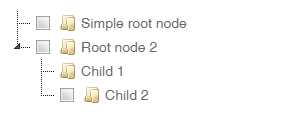
jstree version => 3.3.8
参考:
https://stackoverflow.com/questions/6112567/jstree-hide-checkbox
原文:https://www.cnblogs.com/sirdong/p/12097066.html
评论(0)