
[IO]System.IO.Pipelines
System.IO.Pipelines 是一个新库,旨在使在 .NET 中执行高性能 I/O 更加容易。 该库的目标为适用于所有 .NET 实现的 .NET Standard。
System.IO.Pipelines 解决什么问题
System.IO.Pipelines 已构建为:
- 具有高性能的流数据分析功能。
- 减少代码复杂性。
下面的代码是典型的 TCP 服务器,它从客户机接收行分隔的消息(由 ‘\n‘ 分隔):
async Task ProcessLinesAsync(NetworkStream stream)
{
    var buffer = new byte[1024];
    await stream.ReadAsync(buffer, 0, buffer.Length);

    // Process a single line from the buffer
    ProcessLine(buffer);
}
前面的代码有几个问题:
- 单次调用
ReadAsync可能无法接收整条消息(行尾)。 - 忽略了
stream.ReadAsync的结果。stream.ReadAsync返回读取的数据量。 - 它不能处理在单个
ReadAsync调用中读取多行的情况。 - 它为每次读取分配一个
byte数组。
要解决上述问题,需要进行以下更改:
-
缓冲传入的数据,直到找到新行。
-
分析缓冲区中返回的所有行。
-
该行可能大于 1KB(1024 字节)。 找到需要调整输入缓冲区大小的代码(一行完整的代码)。
- 如果调整缓冲区的大小,当输入中出现较长的行时,将生成更多缓冲区副本。
- 压缩用于读取行的缓冲区,以减少空余。
-
请考虑使用缓冲池来避免重复分配内存。
下面的代码解决了其中一些问题:


 1 async Task ProcessLinesAsync(NetworkStream stream)
 2 {
 3     byte[] buffer = ArrayPool<byte>.Shared.Rent(1024);
 4     var bytesBuffered = 0;
 5     var bytesConsumed = 0;
 6
 7     while (true)
 8     {
 9         // Calculate the amount of bytes remaining in the buffer.
10         var bytesRemaining = buffer.Length - bytesBuffered;
11
12         if (bytesRemaining == 0)
13         {
14             // Double the buffer size and copy the previously buffered data into the new buffer.
15             var newBuffer = ArrayPool<byte>.Shared.Rent(buffer.Length * 2);
16             Buffer.BlockCopy(buffer, 0, newBuffer, 0, buffer.Length);
17             // Return the old buffer to the pool.
18             ArrayPool<byte>.Shared.Return(buffer);
19             buffer = newBuffer;
20             bytesRemaining = buffer.Length - bytesBuffered;
21         }
22
23         var bytesRead = await stream.ReadAsync(buffer, bytesBuffered, bytesRemaining);
24         if (bytesRead == 0)
25         {
26             // EOF
27             break;
28         }
29
30         // Keep track of the amount of buffered bytes.
31         bytesBuffered += bytesRead;
32         var linePosition = -1;
33
34         do
35         {
36             // Look for a EOL in the buffered data.
37             linePosition = Array.IndexOf(buffer, (byte)‘\n‘, bytesConsumed,
38                                          bytesBuffered - bytesConsumed);
39
40             if (linePosition >= 0)
41             {
42                 // Calculate the length of the line based on the offset.
43                 var lineLength = linePosition - bytesConsumed;
44
45                 // Process the line.
46                 ProcessLine(buffer, bytesConsumed, lineLength);
47
48                 // Move the bytesConsumed to skip past the line consumed (including \n).
49                 bytesConsumed += lineLength + 1;
50             }
51         }
52         while (linePosition >= 0);
53     }
54 }
Pipe
Pipe 类可用于创建 PipeWriter/PipeReader 对。 写入 PipeWriter 的所有数据都可用于 PipeReader:
var pipe = new Pipe();
PipeReader reader = pipe.Reader;
PipeWriter writer = pipe.Writer;
Pipe基本用法
 1 async Task ProcessLinesAsync(Socket socket)
 2 {
 3     var pipe = new Pipe();
 4     Task writing = FillPipeAsync(socket, pipe.Writer);
 5     Task reading = ReadPipeAsync(pipe.Reader);
 6
 7     await Task.WhenAll(reading, writing);
 8 }
 9
10 async Task FillPipeAsync(Socket socket, PipeWriter writer)
11 {
12     const int minimumBufferSize = 512;
13
14     while (true)
15     {
16         // Allocate at least 512 bytes from the PipeWriter.
17         Memory<byte> memory = writer.GetMemory(minimumBufferSize);
18         try
19         {
20             int bytesRead = await socket.ReceiveAsync(memory, SocketFlags.None);
21             if (bytesRead == 0)
22             {
23                 break;
24             }
25             // Tell the PipeWriter how much was read from the Socket.
26             writer.Advance(bytesRead);
27         }
28         catch (Exception ex)
29         {
30             LogError(ex);
31             break;
32         }
33
34         // Make the data available to the PipeReader.
35         FlushResult result = await writer.FlushAsync();
36
37         if (result.IsCompleted)
38         {
39             break;
40         }
41     }
42
43      // By completing PipeWriter, tell the PipeReader that there‘s no more data coming.
44     await writer.CompleteAsync();
45 }
46
47 async Task ReadPipeAsync(PipeReader reader)
48 {
49     while (true)
50     {
51         ReadResult result = await reader.ReadAsync();
52         ReadOnlySequence<byte> buffer = result.Buffer;
53
54         while (TryReadLine(ref buffer, out ReadOnlySequence<byte> line))
55         {
56             // Process the line.
57             ProcessLine(line);
58         }
59
60         // Tell the PipeReader how much of the buffer has been consumed.
61         reader.AdvanceTo(buffer.Start, buffer.End);
62
63         // Stop reading if there‘s no more data coming.
64         if (result.IsCompleted)
65         {
66             break;
67         }
68     }
69
70     // Mark the PipeReader as complete.
71     await reader.CompleteAsync();
72 }
73
74 bool TryReadLine(ref ReadOnlySequence<byte> buffer, out ReadOnlySequence<byte> line)
75 {
76     // Look for a EOL in the buffer.
77     SequencePosition? position = buffer.PositionOf((byte)‘\n‘);
78
79     if (position == null)
80     {
81         line = default;
82         return false;
83     }
84
85     // Skip the line + the \n.
86     line = buffer.Slice(0, position.Value);
87     buffer = buffer.Slice(buffer.GetPosition(1, position.Value));
88     return true;
89 }
有两个循环:
FillPipeAsync从Socket读取并写入PipeWriter。ReadPipeAsync从PipeReader读取并分析传入的行。
没有分配显式缓冲区。 所有缓冲区管理都委托给 PipeReader 和 PipeWriter 实现。 委派缓冲区管理使使用代码更容易集中关注业务逻辑。
在第一个循环中:
- 调用 PipeWriter.GetMemory(Int32) 从基础编写器获取内存。
- 调用 PipeWriter.Advance(Int32) 以告知
PipeWriter有多少数据已写入缓冲区。 - 调用 PipeWriter.FlushAsync 以使数据可用于
PipeReader。
在第二个循环中,PipeReader 使用由 PipeWriter 写入的缓冲区。 缓冲区来自套接字。 对 PipeReader.ReadAsync 的调用:
-
返回包含两条重要信息的 ReadResult:
- 以
ReadOnlySequence<byte>形式读取的数据。 - 布尔值
IsCompleted,指示是否已到达数据结尾 (EOF)。
- 以
找到行尾 (EOL) 分隔符并分析该行后:
- 该逻辑处理缓冲区以跳过已处理的内容。
- 调用
PipeReader.AdvanceTo以告知PipeReader已消耗和检查了多少数据。
读取器和编写器循环通过调用 Complete 结束。 Complete 使基础管道释放其分配的内存。
反压和流量控制
理想情况下,读取和分析可协同工作:
- 写入线程使用来自网络的数据并将其放入缓冲区。
- 分析线程负责构造适当的数据结构。
通常,分析所花费的时间比仅从网络复制数据块所用时间更长:
- 读取线程领先于分析线程。
- 读取线程必须减缓或分配更多内存来存储用于分析线程的数据。
为了获得最佳性能,需要在频繁暂停和分配更多内存之间取得平衡。
为解决上述问题,Pipe 提供了两个设置来控制数据流:
- PauseWriterThreshold:确定在调用 FlushAsync 暂停之前应缓冲多少数据。
- ResumeWriterThreshold:确定在恢复对
PipeWriter.FlushAsync的调用之前,读取器必须观察多少数据。
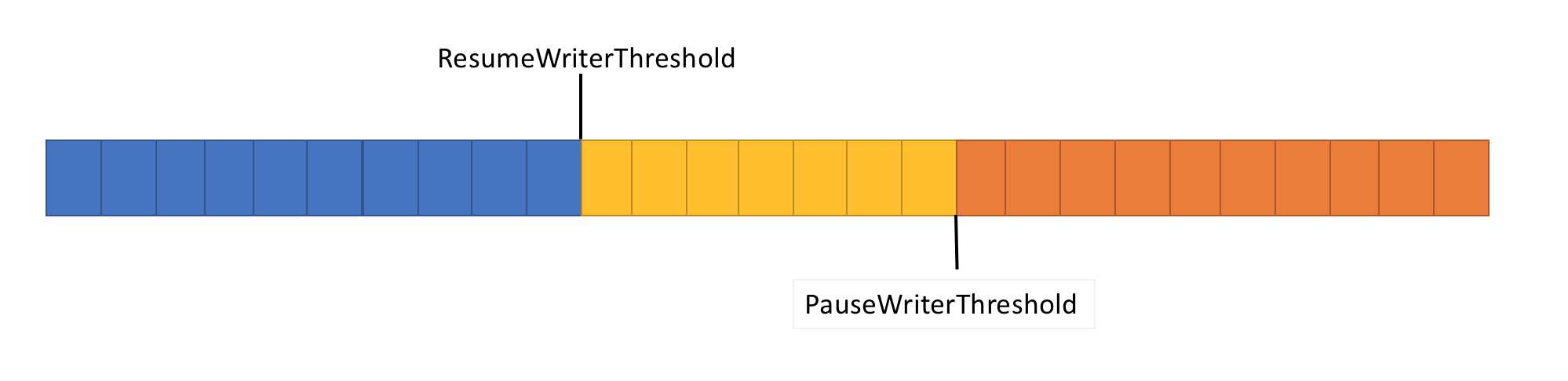
- 当
Pipe中的数据量超过PauseWriterThreshold时,返回不完整的ValueTask<FlushResult>。 - 低于
ResumeWriterThreshold时,返回完整的ValueTask<FlushResult>。
使用两个值可防止快速循环,如果只使用一个值,则可能发生这种循环。
原文:https://www.cnblogs.com/amytal/p/11723026.html