
CRM自定义页面
时间:2019-05-20 20:48:11
收藏:0
阅读:88
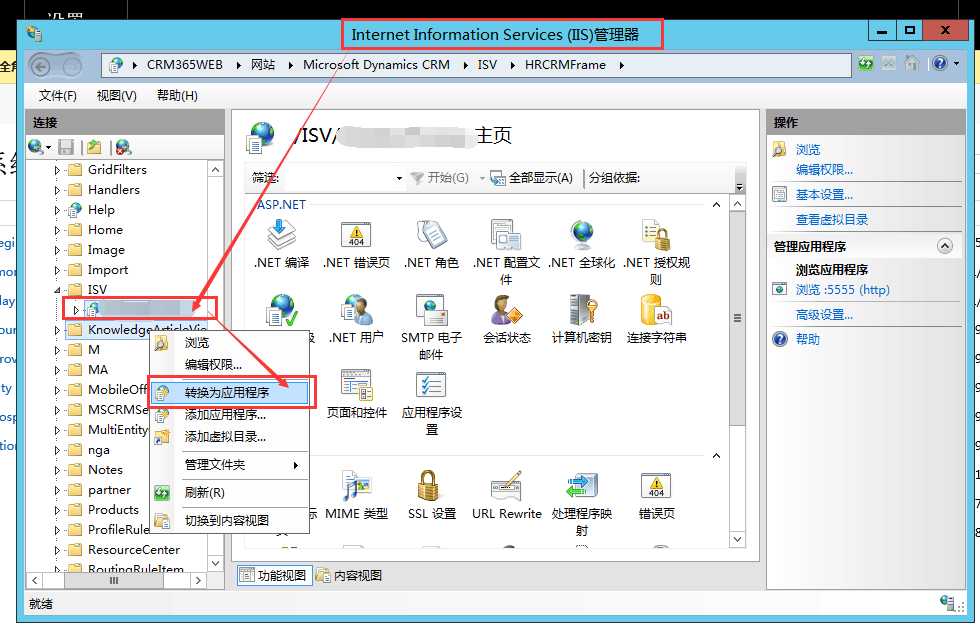
- 把自定义页面拷入CRMWeb 文件夹下.
- 打开IIS定位到此文件夹
- 右键
- 转换为应用程序
Below are the steps you can try to integrate with CRM:
- Create a Folder(Example: CustomImport) in CRMWeb Folder(Example: C:\Program Files\Microsoft Dynamics CRM\CRMWeb) and Copy/Paste all your files/website in it.
- Goto CRM Installation Path: CRMWeb\Help\bin (Example: C:\Program Files\Microsoft Dynamics CRM\CRMWeb\Help\bin) and copy all these files and paste it into the above website bin folder (where your Microsoft.Xrm.Sdk.dll located)
- Goto IIS drill down to the CRM Website and select the Folder which you have created in the Step 1.
- Right Click on the Folder and click Convert to Application
- Verify Windows Authentication is enabled.
This solution doesn‘t impact any of the CRM files or dll;However it is not a recommended solution that is provided by Dynamics CRM team.
原文:https://www.cnblogs.com/BinBinGo/p/10895999.html
评论(0)