
【PyQt5-Qt Designer】QComboBox-下拉列表框
时间:2018-12-05 11:12:34
收藏:0
阅读:1662
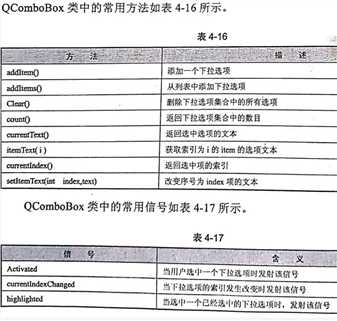
知识点:
1、QComboBox下拉列表框的一些常用方法
2、下拉列表框常用信号使用方法
案例:选中下拉框选项时触发信号
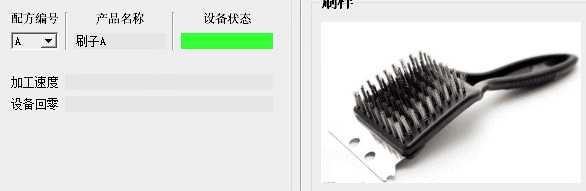
#[str] 表示comboBox中的选择框内容如A B C D 等
self.comboBox.activated[str].connect(self.BrushPhoto)
定义的BrushPhoto(self) 函数


def BrushPhoto(self, text):
        if text=="A":
            self.graphicsView_5.setStyleSheet("border-image: url(:/brush/photo/brush/A.png);")
            self.lineEdit_58.setText("刷子A")
        elif text=="B":
            self.graphicsView_5.setStyleSheet("border-image: url(:/brush/photo/brush/B.png);")
            self.lineEdit_58.setText("刷子B")
        elif text=="C":
            self.graphicsView_5.setStyleSheet("border-image: url(:/brush/photo/brush/C.png);")
            self.lineEdit_58.setText("刷子C")
        elif text=="D":
            self.graphicsView_5.setStyleSheet("border-image: url(:/brush/photo/brush/D.png);")
            self.lineEdit_58.setText("刷子D")
        elif text=="E":
            self.graphicsView_5.setStyleSheet("border-image: url(:/brush/photo/brush/E.png);")
            self.lineEdit_58.setText("刷子E")
        elif text=="F":
            self.graphicsView_5.setStyleSheet("border-image: url(:/brush/photo/brush/F.png);")
            self.lineEdit_58.setText("刷子F")
原文:https://www.cnblogs.com/XJT2018/p/10069425.html
评论(0)