
RabbitMQ Windows下安装问题解决
时间:2017-08-14 17:55:48
收藏:0
阅读:1037
一、问题描述
安装后出现如下问题描述
C:\Program Files\RabbitMQ Server\rabbitmq_server-3.4.3\sbin>rabbitmqctl status Status of node rabbit@TPAJ05421843 ...
 Error: unable to connect to node rabbit@TPAJ05421843: nodedown

DIAGNOSTICS

attempted to contact: [rabbit@TPAJ05421843]

rabbit@TPAJ05421843:
 * connected to epmd (port 4369) on TPAJ05421843
 * epmd reports: node ‘rabbit‘ not running at all
 other nodes on TPAJ05421843: [‘RabbitMQ‘]
 * suggestion: start the node

current node details:
 - node name: ‘rabbitmqctl-19884@TPAJ05421843‘
 - home dir: H: - cookie hash: PD4QQCYrf0TME9vIko3Xuw==
二、解决方案
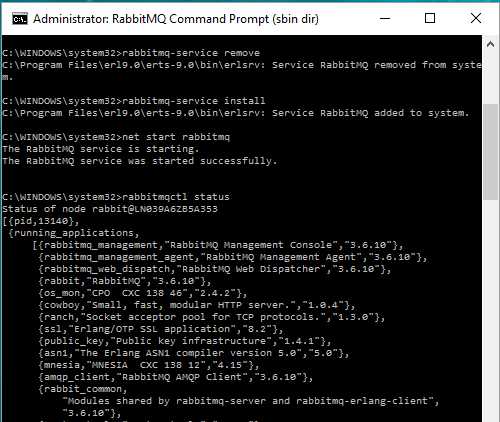
Run RabbitMQ sbin command prompt as administrator.
- Run "rabbitmq-service remove"
- Run "rabbitmq-service install"
Then
run "net start rabbitmq" to start the service after removing and reinstalling it.
三、效果截图
原文:http://www.cnblogs.com/windy2008/p/7359123.html
评论(0)