
Android:控件布局(线性布局)
时间:2014-06-12 15:26:26
收藏:0
阅读:376
android:orientation指定LinearLayout布局方向,值:vertical (垂直方向) 、horizontal(水平方向)
实例一:
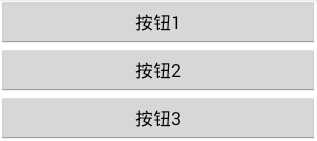

<?xml version="1.0" encoding="utf-8"?>
<LinearLayout xmlns:android="http://schemas.android.com/apk/res/android"
    android:layout_width="match_parent"
    android:layout_height="match_parent"
    android:orientation="vertical" >

<Button
    android:layout_width="match_parent"
    android:layout_height="wrap_content"
    android:text="按钮1"
    />

<Button
    android:layout_width="match_parent"
    android:layout_height="wrap_content"
    android:text="按钮2"
    />
<Button
    android:layout_width="match_parent"
    android:layout_height="wrap_content"
    android:text="按钮3"
    />
<Button
    android:layout_width="match_parent"
    android:layout_height="wrap_content"
    android:text="按钮4"
    />
</LinearLayout>
实例二:

<?xml version="1.0" encoding="utf-8"?>
<LinearLayout xmlns:android="http://schemas.android.com/apk/res/android"
    android:layout_width="match_parent"
    android:layout_height="match_parent"
    android:orientation="horizontal" >

<Button
    android:layout_width="wrap_content"
    android:layout_height="wrap_content"
    android:text="按钮1"
    />

<Button
    android:layout_width="wrap_content"
    android:layout_height="wrap_content"
    android:text="按钮2"
    />
<Button
    android:layout_width="wrap_content"
    android:layout_height="wrap_content"
    android:text="按钮3"
    />
<Button
    android:layout_width="wrap_content"
    android:layout_height="wrap_content"
    android:text="按钮4"
    />
</LinearLayout>
Android:控件布局(线性布局),布布扣,bubuko.com
原文:http://www.cnblogs.com/tinyphp/p/3781665.html
评论(0)