
sql prompt 不能用
时间:2017-06-21 10:52:15
收藏:0
阅读:529
问题描述:
安装成功后,打开sql server 工具栏不显示菜单,并弹出提示错误信息:
SQL Prompt has been disabled due to an error with the registration of a required DLL - TextMgrP.dll.
To resolve the error, repair SQL Server Management Studio or Visual Studio from the Windows Control Panel.
解决办法
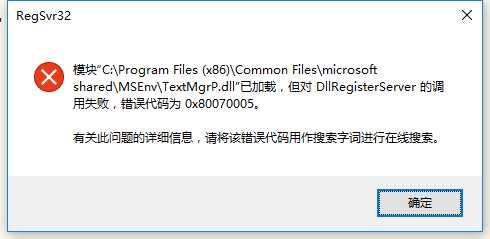
开始》运行》cmd 输入regsvr32 "C:\Program Files (x86)\Common Files\microsoft shared\MSEnv\TextMgrP.dll"
如果上面运行报错(如下图),需要用管理员身份运行命令提示符
原文:http://www.cnblogs.com/Zing/p/7058068.html
评论(0)