
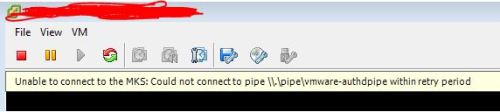
Unable to connect to the MKS: Could not connect to pipe
"Unable to connect to MKS" error in vSphere Web Client (2115126)
Symptoms
Launching a virtual machine console from the vSphere Web Client or vSphere Client fails with one of these errors.
Unable to connect to the MKS: Could not connect to pipe \\.\pipe\vmware-authdpipe within retry period.
Unable to connect to MKS: internal error
Note: For additional symptoms and log entries, see the Additional Information section
Purpose
To work around the issue when Unable to connect to MKS error is reported in vSphere Web Client / vSphere Client, refresh the VMX/MKS SSL cache in the virtual machine.
Cause
This issue occurs because an ESXi host is not placed in maintenance mode before migrating to a different vCenter Server.
Resolution
To avoid this issue, place the host in the maintenance mode before migrating to a different vCenter Server.
To work around this issue, refresh the VMX/MKS SSL cache on the virtual machine by migrating the virtual machine to another ESXi host.
If migrating the virtual machine does not resolve the issue, reboot the ESXi host.
To reboot the ESXi host:
Power off the affected virtual machine.
Place the ESXi host into maintenance mode.
Restart the ESXi host.
原文:http://549687.blog.51cto.com/539687/1893174