
Jmeter之Bean shell使用(一)
时间:2017-01-13 15:44:43
收藏:0
阅读:509
一、什么是Bean Shell
- BeanShell是一种完全符合Java语法规范的脚本语言,并且又拥有自己的一些语法和方法;
- BeanShell是一种松散类型的脚本语言(这点和JS类似);
- BeanShell是用Java写成的,一个小型的、免费的、可以下载的、嵌入式的Java源代码解释器,具有对象脚本语言特性,非常精简的解释器jar文件大小为175k。
- BeanShell执行标准Java语句和表达式,另外包括一些脚本命令和语法。
二、Jmeter有哪些Bean Shell
-
定时器: BeanShell Timer
-
前置处理器:BeanShell PreProcessor
-
采样器: BeanShell Sampler
-
后置处理器:BeanShell PostProcessor
-
断言: BeanShell断言
-
监听器: BeanShell Listener
三、BeanShell的用法
在此介绍下BeanShell PreProcessor的用法,其它的beahshell可以类推。在此我们使用beahshell调用自己写的工具类,工具类实现了密码的加、解密功能:
1、在eclipse写好代码,然后把该类打成jar包(在类上点击右键->Export->jar file)
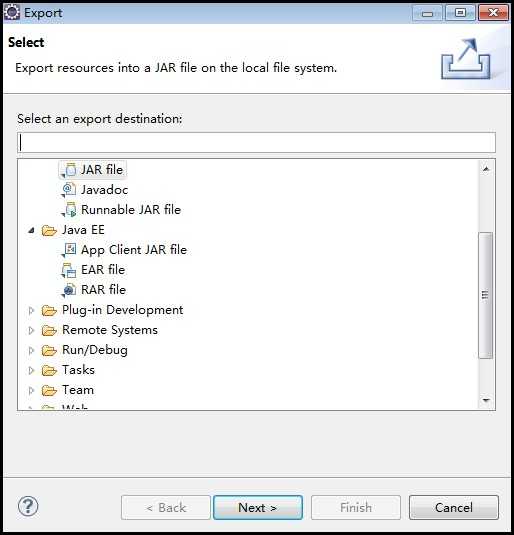
2、把jar包放到jmeter目录\apache-jmeter-2.13\lib\ext下
3、打开jmeter,添加一个http sampler(调用登录接口),在sampler下添加一个BeanShell PreProcessor
4、在beanshell PreProcessor中导入我们的jar包,调用里面的加、解密码方法,把结果保存在jmeter变量中,下面两个方法是beanshell中我们最常用到的:
- vars.get(String paramStr):获得变量值
- vars.put(String key,String value):,将数据存到jmeter变量中
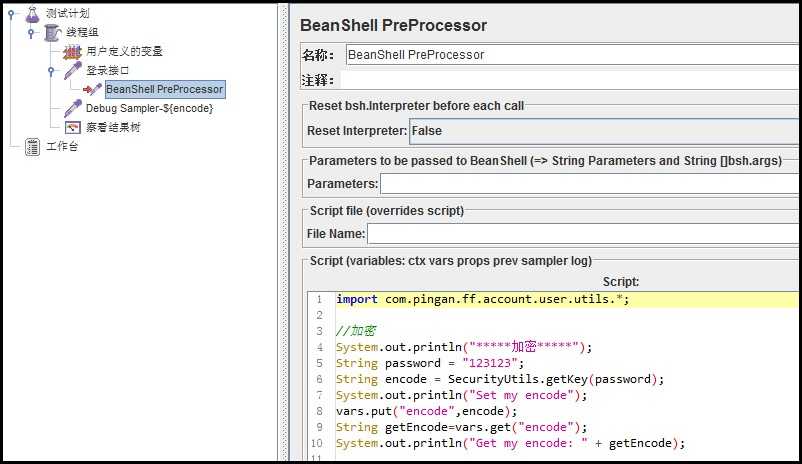

import com.pingan.ff.account.user.utils.*;

//加密
System.out.println("*****加密*****");
String password = "123123";
String encode = SecurityUtils.getKey(password);//调用工具类中的方法进行加密
System.out.println("Set my encode");
vars.put("encode",encode);//把值保存到jmeter变量encode中
String getEncode=vars.get("encode");
System.out.println("Get my encode: " + getEncode);
原文:http://www.cnblogs.com/alisapan/p/6282868.html
评论(0)