
iMPACT学习记录
iMPACT 概述
主要用于器件编程和文件生成,使用赛灵思通信线(MutiPRO Desktop Tool, Parallel Cable IV,或者Platform Cable USB)直接对FPGA、CPLD或PROM进行多种模式的配置;边界扫描模式可进行所有元件配置,从串和SelectMAP模式则仅可配置FPGA,在Desktop配置模式CPLD和PROM可配置,在直接SPI模式可编程select SPI serial flash(STMicro: M25P, M25PE, M45PE 或 Atmel: AT45DB)。
可生成System ACE CF, PROM, SVF, STAPL, 和 XSVF等类型的文件。
其它任务:回读和验证设计配置数据;调试配置问题;执行SVF和XSVF文件。
功能实现相关资源
- 输入文件:CPLD(JEDEC or ISC);FPGA(BMM, ELF, BIT, or ISC);PROM(MCS, EXO, TEK, or ISC);SPI/BPI PROM(MCS, EXO, TEK, or HEX)
- 边界扫描文件(BSDL):仅用于边界扫描编程,用VHDL描述其结构和功能特征,在iMPACT安装时加载并自动识别使用,可通过新建配置手动加载非赛灵思器件.bsd文件
- 配置格式文件(CFI):由PROMGen创建.cfi 并用于赛灵思PROM(XCF08P, XCF16P, and XCF32P)
- 输出文件:MCS, EXO, TEK, HEX, BIN, or ISC files for PROM file generation, ACE files for System ACE CF file generation, and SVF, STAPL, or XSVF files for SVF- STAPL-XSVF file generation and IPF files for project management.
- PROM文件:iMPACT生成的PROM编程文件
- 支持的通信线:
Name
Platforms
Voltages
Modes
Default Speeds
Parallel Cable IV (Model DLC7)
PC
1.5, 1.8, 2.5, 3.3, 5V
Boundary-Scan Slave Serial SPI Direct Configuration
5 MHz
Platform Cable USB
PC
1.5, 1.8, 2.5, 3.3, 5V
Boundary-Scan Slave Serial SPI Direct Configuration
6 MHz
MultiPRO
PC
1.5 - 5V
Desktop Configuration Boundary-Scan Slave Serial SelectMAP SPI Direct Configuration
2.5 MHz
- 工具图标:
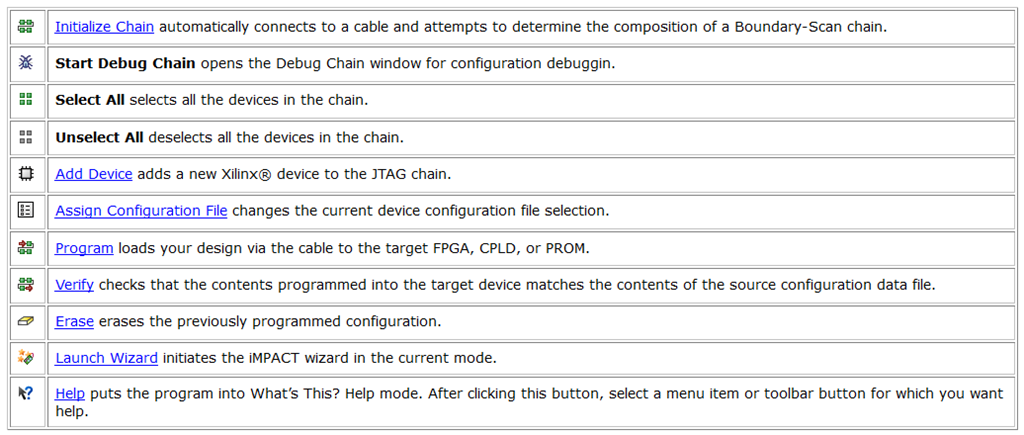
- 配置标签:源窗口中包含7个可选配置模式标签,双击其一可激活(Boundary-Scan, Slave Serial, SelectMAP, Desktop Configuration, Direct SPI Configuration, System ACE, and PROM File Formatter);进程窗口显示相应模式下的配置操作标签(Program, Verify, and Get Device ID等)
- 键盘快捷方式
|
Key |
Function |
Key |
Function |
|
F1 |
Help |
Ctrl+D |
Add Xilinx® Device |
|
Ctrl+N |
New |
Ctrl+I |
Initialize Chain |
|
Ctrl+G |
Assign Configuration File |
Ctrl+O |
Open |
|
Ctrl+H |
Open Configuration Archive |
ALT+F |
File Menu |
|
Ctrl+K |
Add Non-Xilinx Device |
ALT+E |
Edit Menu |
|
Ctrl+S |
Save |
ALT+V |
View Menu |
|
Ctrl+J |
Save As |
ALT+P |
Operations Menu |
|
Ctrl+X |
Cut |
ALT+T |
Options Menu |
|
Ctrl+C |
Copy |
ALT+O |
Output Menu |
|
Ctrl+V |
Paste |
ALT+G |
Debug Menu |
|
Ctrl+A |
Select All |
ALT+W |
Window Menu |
|
Ctrl+U |
Unselect All |
ALT+H |
Help Menu |
边界扫描配置(JTAG)
- 操作任何支持JTAG模式的器件,对非赛灵思器件采用BYPASS和HIGHZ模式。串行传输,包括TDI, TCK, TMS和TDO四个引脚
- 启动边界扫描:双击Boundary-Scan图标,add devices, initialize the Boundary-Scan chain, establish cable connections
- 手动创建链接:双击Boundary-Scan图标、右键Add Xilinx Device or Add Non-Xilinx Device、在原链选中某连线右键可添加器件
- 可选操作:由于不同器件和配置文件对应不同的操作,具体情况应通过右键器件查看
- SPI(Serial Peripheral Interface):4线同步串行主/从接口,可通过它实现对SPI配置闪存<Atmel AT45DB family, ST Micro MP25P, M25PE and MP45PE families> 的直接<将配置线连到配置存储器的SCLK, SS_n, MOSI, MISO口>/FPGA间接配置信息存储<将配置信息发送给FPGA,再在FPGA中实现数据转换和存储器传送;支持该功能的器件有Spartan-3A, Spartan-3E, and Virtex-5;更多信息参考XAPP445文档>
- 通过FPGA配置SPI/BPI存储器件:iMPACT配置FPGA为Boundary-Scan-to-SPI or BPI转换模式,配置时要进行Add Xilinx Device、Add New Configuration File、Enable Programming of SPI Flash Device Attached to this FPGA or Enable Programming of BPI Flash Device Attached to this FPGA、选一个SPI/BPI器件
其它配置方法
- 从串模式:所有赛灵思FPGA支持的串行线编程,同时需要额外的时钟源,一次一位。
- SelectMAP模式:允许通过字节宽的端口进行最多3个赛灵思器件的并行编程,一次8位。仅MultiPRO线可实现,支持所有Virtex和部分Spartan器件。
- Desktop模式:用Desktop工具配置线配置单个非易失赛灵思器件(CPLD/PROM);配置前必须进行配置设定(编程、擦除、回读、编程XPLA USE等选项)
- 直接SPI模式:

生成PROM文件
- 双击PROM File Formatter进行文件格式选择并生成相应文件
- PROM文件生成器功能:将BIT文件转换为赛灵思和第三方PROM编程器兼容的PROM文件格式;将多个BIT文件合并成单个PROM文件用于菊花链式的应用;(利用赛灵思FPGA可重配置功能)进行单个PROM的多应用配置存储
- 四种类型的PROMs:赛灵思串并双功能PROM;第三方/通用并行PROM;第三方串行SPI接口PROM;多设计版本的PROM
- 赛灵思PROM:用于对赛灵思FPGA进行主串菊花链式配置
- 通用并行PROM:常用于首个器件处于从并模式下,用CPLD或微处理器下进行FPGA的菊花链式编程,多数据流仅被允许在并行PROM中存储和配置
- SPI接口PROM:可同时实现该类PROM的读/写功能
- 多设计版本PROM:内部存有多个不同电路的配置信息
- 输入文件:一个或多个BIT文件
- 输出文件:PROM文件(TEK, MCS, EXO, HEX, UFP, or BIN);PRM文件(多配置芯片的统筹响应文件)
- BIT转换PROM:将bit文件中每个字节的位进行反转(可关闭该功能),bit文件越靠左越低位,ROM中每个字节内越靠右位越低
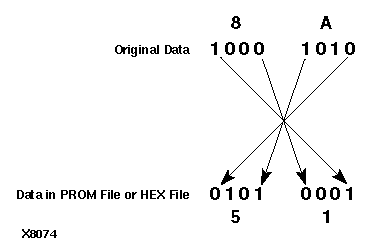
- 数据流的组合
|
Number of Applications |
Number of FPGA Devices to Configure |
Number of Data Streams and BIT Files |
|
Single Application |
Single Device |
One data stream with a single BIT file. |
|
Daisy chain of devices |
One data stream with multiple BIT files. |
|
|
Multiple daisy chains of devices |
Multiple data streams with multiple BIT files in each data stream. Each data stream includes configuration data for a different daisy chain of devices. |
|
|
Multiple Applications (Reprogramming) |
Single device |
Multiple data streams with a single BIT file in each data stream. |
|
Daisy chain of devices |
Multiple data streams with multiple BIT files in each data stream. Each data stream programs the group of devices for a different application. |
生成和使用配置文件
- 边界扫描文件:SVF(串行向量格式,包含配置模式和数据);STAPL(标准测试和编程语言,用于描述系统可编程操作的标准文件格式);XSVF(赛灵思串行向量格式,通过二进制格式和压缩算法实现数据的压缩存储);不同的器件命令集不尽相同且有冲突,应针对进行修改,不可混合加载。
- View > View SVF/STAPL File可查看相应文件信息;Operations > Execute XSVF/SVF选择执行相应文件
- System ACE CF:一个双芯片配置方案,需要System ACE CF Controller,以及一个CompactFlash card/one-inch Microdrive disk;可实现单源多芯片配置、多配置位流控制、基于网络(IRL)的配置更新、hot-swapping、进程内核初始化和软件存储;操作模式分两种(Novice:默认模式,每个配置地址有等量器件;Expert:不同的配置地址可有不同量器件)。 可进行的设置(尺寸:选定存储容量;预定空间:用于存储处理器代码或通用数据;配置名称:最多8个字母;位置:文件保存位置;指定配置地址和设计名称)
配置调试
- 初始化链未能全部显示BSCAN链上的所有器件:主要是由于部分器件连接到了其它JTAG线上。解决方案=>运行链路完整性测试(Debug > Chain Integrity Test);降低传输速度(Output > Cable Setup);向FPGA的PROG端口发送脉冲(可清除所有上电斜率所引起的错误);复查器件勘误表;进行硬件调试(逐个JTAG链中的每个器件检测和调试);检查供电源
- iMPACT不能成功编程FPGA:可能是文件生成问题或系统级问题。解决方案=>读取状态寄存器值分析(Debug > Read Status Register);核实DCM/DCI等待在BitGen >Start Up options中进行了设置(允许在DCM被锁定/DCI匹配后再开始配置,其设定在ISE中的Generate Programming File > Properties > Start Up Option: Wait for DCM / DCI);降低下载速度(减小噪声对配置识别的影响);检查供电源/系统级推断
- iMPACT未能成功识别FPGA:可能是文件生成问题或系统级问题。解决方案=>核对多次尝试的错误码是否一致(变化说明设计的运行会影响识别操作);核对器件功能正确性(如果Done且CRC无错则说明配置是成功下到器件了的);核对一个简单设计是否可成功识别;核对设计中是否有SRL16/Distributed RAM元件
- iMPACT未能成功擦除器件:软件会进行擦除和复检,然后再进行其它操作=>降低下载速度;复查器件勘误表;向供电引脚发送脉冲;检查供电源
- iMPACT不能成功进行空白核对:器件编程前必须通过空白核对以保证器件被完全擦除,否则无法进行后续的配置下载。解决方案=>降低下载速度;复查器件勘误表;进行硬件调试
- iMPACT不能成功编程PROM/CPLD器件:不能成功核实用于核对正确寄存器设置的嵌入器件内部的编程算法,解决方案=>降低下载速度;复查器件勘误表;使用默认用户设置;进行硬件调试
- iMPACT不能成功检测PROM/CPLD器件:可能由文件错误/硬件和板级问题导致,解决方案=>降低下载速度;确保正确的文件被用于检测器件;复查器件勘误表;进行硬件调试
- 边界扫描状态机调试:由测试连接口控制器TAP的状态机结构实现配置序列的传送。通过Debug->Enable/Disable Debug Chain命令实现配置序列的控制传送和分析
- Debug > Chain Integrity Test用于检测器件到器件的端口连接问题,识别断线等情况
- Debug > IDCODE Test发送命令并回读器件的32位识别序列,用于识别器件
- Debug > Read Device Status
- 从串配置失败常见问题及原因:
DONE pin did not go low. Please check cable connection. Programming terminated due to error.(PROG/DONE引脚信号没有拉低)
DONE pin did not go high. Programming terminated due to error.(器件模式引脚未设成从串模式/DIN,INIT,CCLK引脚未连接上/噪声影响/硬件未调节好/配置文件有误)
- SelectMAP配置失败常见问题及原因:
DONE pin did not go high. Programming terminated due to error. Programming failed.(器件模式引脚未设置成SelectMAP模式/有引脚未连接恰当/CS引脚错误的连向了器件/噪声影响/硬件未调节好/配置文件有误)
配置下载线
- iMPACT支持多种下载线,具体性能特点由列表给出
|
Name |
Platforms |
Voltages |
Modes |
Default Cable Speeds |
|
Parallel Cable IV (Model DLC7) |
PC |
1.5, 1.8, 2.5, 3.3, 5V |
Boundary-Scan Slave Serial SPI Direct Configuration |
5 MHz |
|
Platform Cable USB |
PC |
1.5, 1.8, 2.5, 3.3, 5V |
Boundary-Scan Slave Serial SPI Direct Configuration |
6 MHz |
|
MultiPRO |
PC |
1.5 - 5V |
Desktop Configuration Boundary-Scan Slave Serial SelectMAP SPI Direct Configuration |
2.5 MHz |
并行IV线是高速并行接口配置下载线,支持所有赛灵思器件。平台USB接口线利用USB串口实现配置,支持所有赛灵思器件。MultiPRO桌面工具自动识别和调整IO电压标准,同时进行并行的配置下载实现。
- Linux下载线驱动:不同版本的Linux都有对应的驱动,没有通用的版本从而不具备可移植性。
- 连接下载线:Cable Auto Connect/Cable Setup、失败时先检查电源和地的连接、Output > Cable Disconnect
批处理模式
直接进行器件相关操作,GUI不会出现,可在开启iMPACT时指定使用该模式(命令行输入命令-> iMPACT -batch)。
按命令名称和功能都有分类,且有详细的命令格式和功能介绍,这里从略。。。。。。
命令行模式
器件操作不可以直接通过命令行进行,而是命令行调用GUI来实现。但如果-batch命令开启,则所有命令构成批处理,实现直接器件操作。
|
Switch |
Parameters |
Notes |
|
-batch |
<file> |
If the -batch command line switch is used, then all other command line switches are ignored, and iMPACT goes into interactive batch mode (if a file is passed as part of -batch, then it runs the file). |
|
-j or -jedec |
jedec file name (.jed extension) |
If a fully specified pathname is not provided then the specified file is assumed to be in the current working directory. |
|
-b or -bitstream |
bitstream file name (.bit extension) |
If a fully specified pathname is not provided then the specified file is assumed to be in the current working directory. |
|
-i or -isc |
isc file name (.isc extension) |
If a fully specified pathname is not provided then the specified file is assumed to be in the current working directory. |
|
-c or -cdf |
cdf file name (.cdf extension) |
If a fully specified pathname is not provided then the specified file is assumed to be in the current working directory. |
|
-p or -prom |
mcs, exo or hex file name (.exo, .mcs, .hex extensions respectively) |
If a fully specified pathname is not provided then the specified file is assumed to be in the current working directory. |
|
-port |
PC: auto,lpt1,lpt2,lpt3,com1, com2,com3,usb0,usb1, usb2 UNIX: auto,/dev/ttya,/dev/ttyb /dev/tty00 dev/tty01 |
auto means automatically detect cable available and connect to it. If the -port switch is not specified, the application does not attempt cable connection at start-up. |
|
-mode |
bscan,sserial,smap, cf, mpm, bsfile, dtconfig, pff, prom, file, config, file |
Indicates the configuration mode in which to start the application. The default configuration mode is Boundary-Scan (bscan). Indicates the configuration files. |
|
-baud |
auto,9600,19200,38400,57600 {-pref <name:value>} |
When the -port switch selects a serial port connection (com1,com2,com3,/dev/ttya,/dev/ttyb) this switch indicates the connection speed (baud rate). auto indicates that the speed selection should automatically choose the fastest possible. The default -baud value is auto. Sets the preferences and values of the preferences that are allowable in the Preferences dialog box. |
边界扫描简介
边界扫描也称为IEEE Standard 1149.1标准的通信协议、JTAG。其正常工作需要TAP控制器、指令寄存器和数据寄存器三个主要功能部件。TAP包括4个接口线,分别是TCK、TMS、TDI和TDO,实现数据和指令的发出和回读,具体功能有:
- TCK:用于控制数据和指令传输识别的时钟信号
- TMS:向TAP控制器传送模式的端口,TAP控制器是个16状态的有限状态机
- TDI:串行数据输入端口
- TDO:串行数据输出端口
TAP控制器包含的16个状态:
- Test-Logic-Reset:TMS保持5个时钟以上的高电平,控制器处于复位状态
- Run-Test-Idle:运行就绪,准备好进行相关配置和回读等操作
- Select-DR-Scan:扫描操作数据寄存器前的一个暂态
- Select-IR-Scan:扫描操作指令寄存器前的一个暂态
- Capture-DR:允许时钟上升沿的时候把数据写到指定的数据寄存器中
- Shift-DR:每个时钟上升沿向寄存器移入一位数据
- Exit1-DR:过渡到Pause-DR/Update-DR的暂态
- Pause-DR:实现数据传输的暂停功能
- Exit2-DR:过渡到Shift-DR/Update-DR的暂态
- Update-DR:时钟下降沿时将DR数据传送到并行锁存输出中
- Capture-IR:允许时钟上升沿的时候把数据写到指定的指令寄存器中
- Shift-IR:每个时钟上升沿向寄存器移入一位数据
- Exit1-IR:过渡到Pause-IR/Update-IR的暂态
- Pause-IR:实现数据传输的暂停功能
- Exit2-IR:过渡到Shift-IR/Update-IR的暂态
- Update-IR:时钟下降沿时将IR数据传送到并行锁存输出中
边界扫描常用指令用于实现具体扫描功能:
- BYPASS:用于实现其它元件间数据的快速传输
- SAMPLE/PRELOAD:测试器件常规操作的表现
- EXTEST:进行脱板电路和板级互联测试
- INTEST:使能在线测试,尽管元件早已设置在板子上了
- HIGHZ:强制将所有驱动置为高阻态
- IDCODE:将编码植入芯片,以此来确定产品包含哪些元件
- USERCODE:提供用户可编程32位识别码以用于测试
推荐学习
文档程序:Xilinx ISE Help/Software Help/iMPACT Help
原文:http://www.cnblogs.com/leyou2016/p/iMPACT.html