
Eclipse输入智能提示设置
时间:2014-04-15 15:28:43
收藏:0
阅读:836
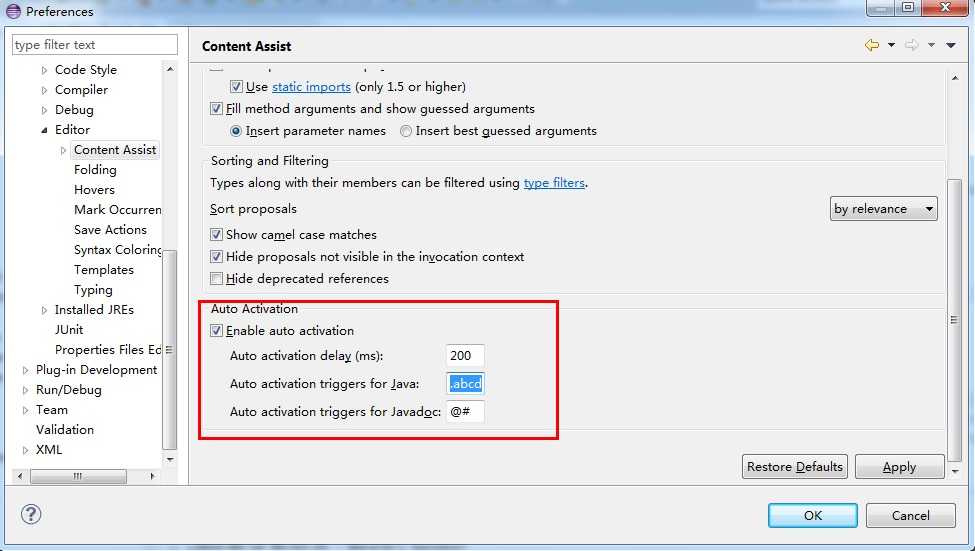 JAVA智能提示
展开菜单 Window -> preferences -> Java -> Editor -> Content assist 找到右边的Auto-Activation项, Auto activation delay ---提示延迟时间,默认是200毫秒 Auto activation triggers for Java ---提示触发,默认就一个“.”,在这里点的后面输入26个大小写字母,即:“.abcdefghijklmnopqrstuvwxyzABCDEFGHIJKLMNOPQRSTUVWXYZ",点击Apply ->OK
XML智能提示
展开菜单 Window -> preferences -> Java -> Editor -> Content assist 找到右边的Auto-Activation项, 默认:<=: 改为 <=:.abcdefghijklmnopqrstuvwxyz(,
Eclipse输入智能提示设置,布布扣,bubuko.com
原文:http://www.cnblogs.com/profession/p/3663333.html
评论(0)