
cognos10.2.2使用ODBC连接oracle92数据库(BMT-IMP-0016)
对于Cognos Server 64位Windows系统,注意!请下载32位程序。即:
因为Cognos只认32位ODBC程序。这里千万要注意。对于64位的Windows系统的ODBC有两个程序,即:
Odbcad32.exe 文件的 32 位版本位于 %systemdrive%\Windows\SysWoW64 文件夹中。
Odbcad32.exe 文件的 64 位版本位于 %systemdrive%\Windows\System32 文件夹中。
我们安装后,要打开%systemdrive%\Windows\SysWoW64中的ODBC程序进行配置。千万不要到控制面板中计算机管理中的ODBC中配置,因为这个是64位的ODBC。

ODBC配置后如下图(详细参数,非常简单,这里不给出了,注意db的编码要在Detail中设置一下。)
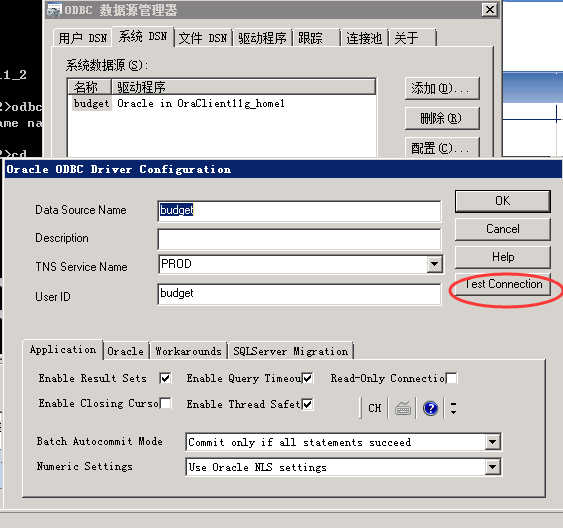
Cognos的ODBC配置页面
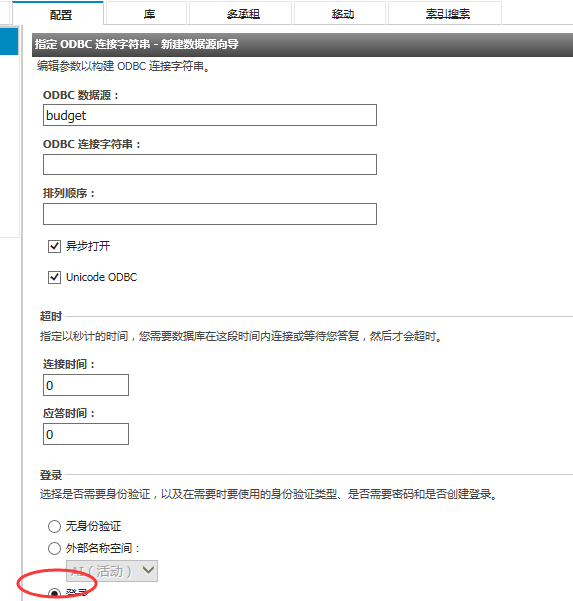
BMT-MD-6001 or BMT-IMP-0016 error when running Metadata Wizard in Framework Manager
Technote (troubleshooting)
Problem(Abstract)
When creating a new project using the Metadata Wizard, modelers are presented with the following error message after selecting a Data Source:
BMT-MD-6001 Connection to the data source ‘great_outdoors_sales‘ failed because a valid connection string was not specified.
ODBC data source connections will return the following error:
BMT-IMP-0016 The provider type OD is not supported in this mode.
Cause
The Framework Manager project is configured to use Dynamic Query Mode but no JDBC connection details have been entered in the Data Source connection in Cognos Administration. For more details regarding configuring connectivity for Dynamic Query Mode, please refer to the "Data Sources and Connections" section of the Administration and Security Guide.
Dynamic Query Mode does not support ODBC connections.
Resolving the problem
To resolve this issue, there are two possible steps:
- If creating a new model, uncheck the "Use Dynamic Query Mode" option in the New Project window.
- If updating an existing model, select the Project item (the highest level item in the Project viewer panel) and in the Properties pane set the Query Mode property to Compatible.
- Using a web browser, navigate to the Cognos Connection URL.
- Log in as a user with Administrative privileges.
- Click Launch -> Cognos Administration.
- Click the Configuration tab.
- Click the name of the data source to be modeled.
- In the Actions column, click the Set Properties icon next to the appropriate Data Source connection.
- Click the Connection tab.
- Click the pencil icon next to the Connection String entry.
- Click the JDBC tab.
- Ensure "Enable JDBC connection" is checked and fill in the details for the data source connection.
- Click OK.
- Open Framework Manager and run the Metadata Wizard.
Switch to Classic Query Mode
Configure JDBC Connection Details in Cognos Administration
Related information
Data Sources and Connections - Administration and Secur
原文:http://www.cnblogs.com/benton/p/4798552.html